User Manual CXE85X
59300464 Rev.005
9.12.2013 26(44)
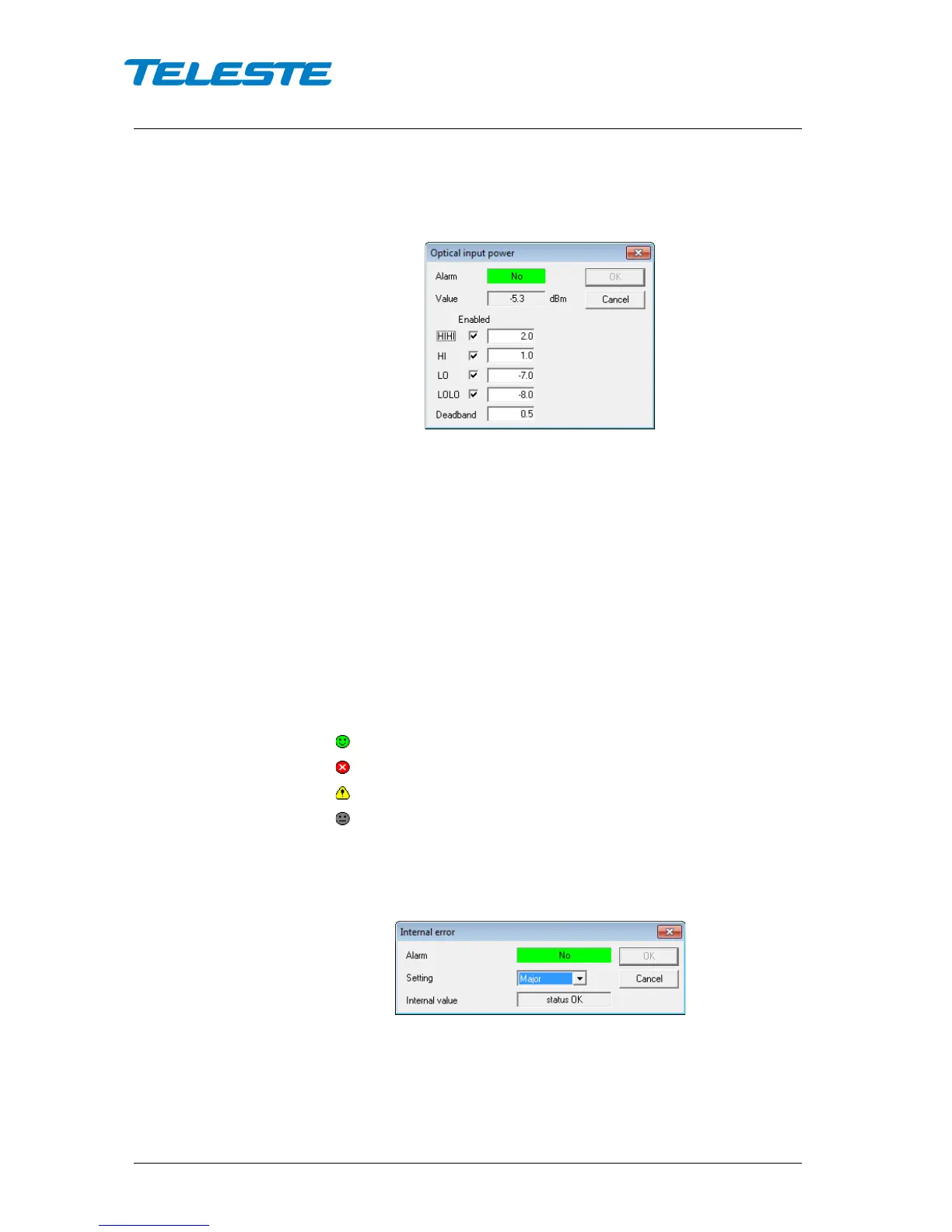
The alarm settings are user configurable by double-clicking an analog
parameter. This will open a dialog box with parameter's alarm limits and
deadband that can be edited by users with at least "Service" level user rights.
For others this is read-only information.
Figure 12. CXE85x Monitoring analog alarm configuration dialog
Each alarm limit can be individually enabled/disabled and configured. The alarm
limits should be in decreasing order for correct alarm processing, preferably
with more than "Deadband" units between each limit.
Discrete parameters
Each monitored discrete parameter of the unit is displayed in the lower half of
the frame with following information in the list:
Discrete parameter: Name of the monitored parameter.
Alarm: Alarm status of the parameter: No / Minor / Major. If the alarm is
disabled, but parameter is in alarming state, "Yes" is shown.
Setting: Alarm severity can be configured to Major, Minor or Disabled.
The colour of each list entry and the icon indicates alarm status:
- green for nominal value
- red for major alarm
- yellow for minor alarm
- grey for disabled alarm
The alarm severity setting is user configurable by double-clicking a discrete
parameter. This will open a dialog box which can be edited by users with at
least "Service" level user rights. For others this is read-only information.
Figure 13. CXE85x Monitoring discrete alarm configuration dialog


 To Next Page