User Manual CXE85X
59300464 Rev.005
9.12.2013 30(44)
viewer page” chapters for details. Because CXE851 is equipped with one
optical receiver compared with CXE852 with two optical receivers this page is
slightly different but contains the same functionality.
After editing new settings must be taken into use by clicking "Apply" button.
The “Settings” frame displays a dialog box for configuring the midstage
attenuator, slope and OLC controls. After editing the setting it must be taken
into use by clicking "Apply" button.
Notes
The “Notes” field allows storing up to 100 character message into CXE85x non-
volatile memory. It can be used for example as a reminder for the next service
technician.
Monitoring WebUI page
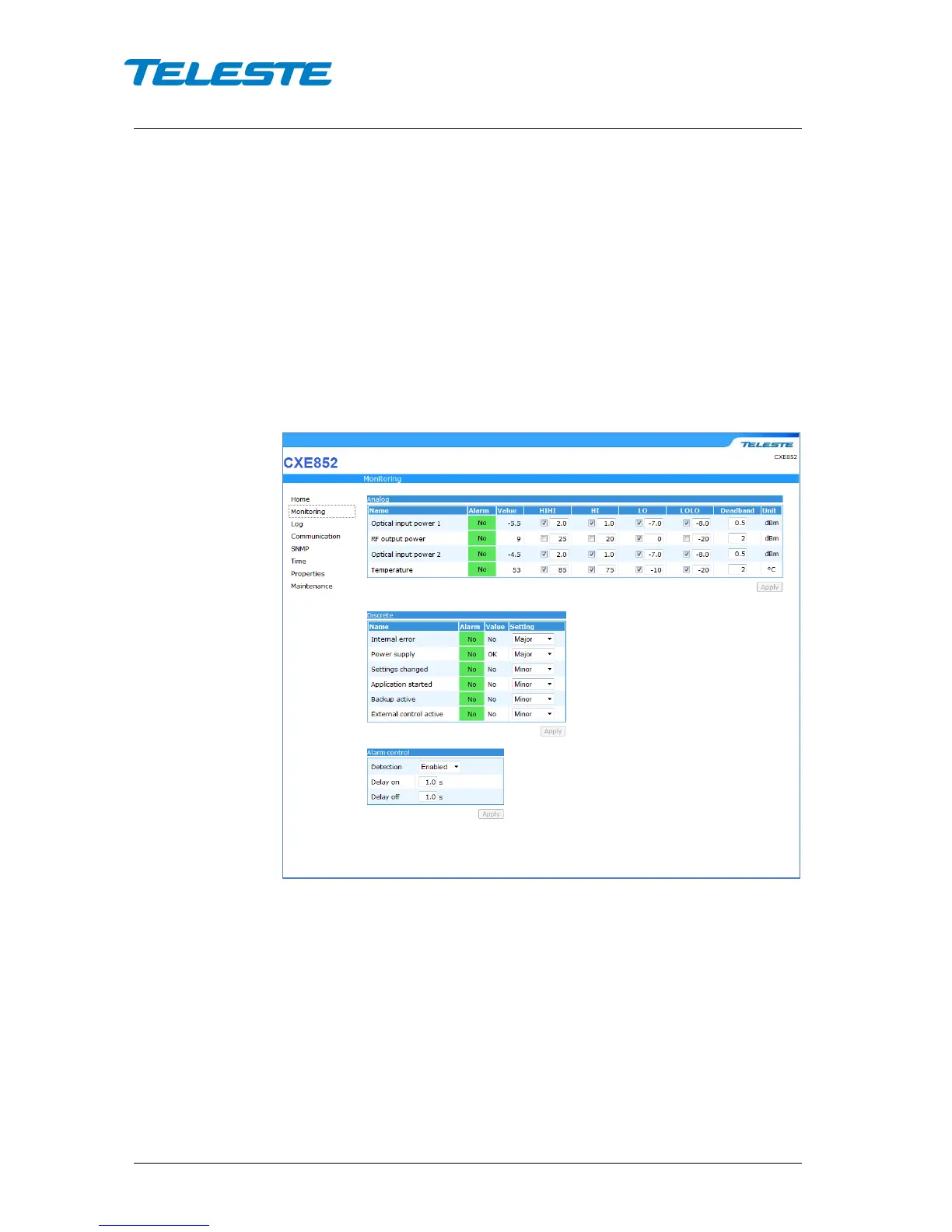
Figure 16. Monitoring page
The "Monitoring" page displays all monitored parameters and their values as
well as alarm limits, statuses and severity settings. Alarms which are not used
or need to be hidden can be masked. Alarm settings are user configurable via
CATVisor Commander/ Monitoring viewer page.
Analog
Each monitored analog parameter of the unit is displayed in the upper half of
the page with following information in the list:
Name: Name of the monitored parameter.
Alarm: Alarm status of the parameter: Nominal / HIHI / HI / LO / LOLO
Value: Current measured value.


 To Next Page