User Manual CXE85X
59300464 Rev.005
9.12.2013 38(44)
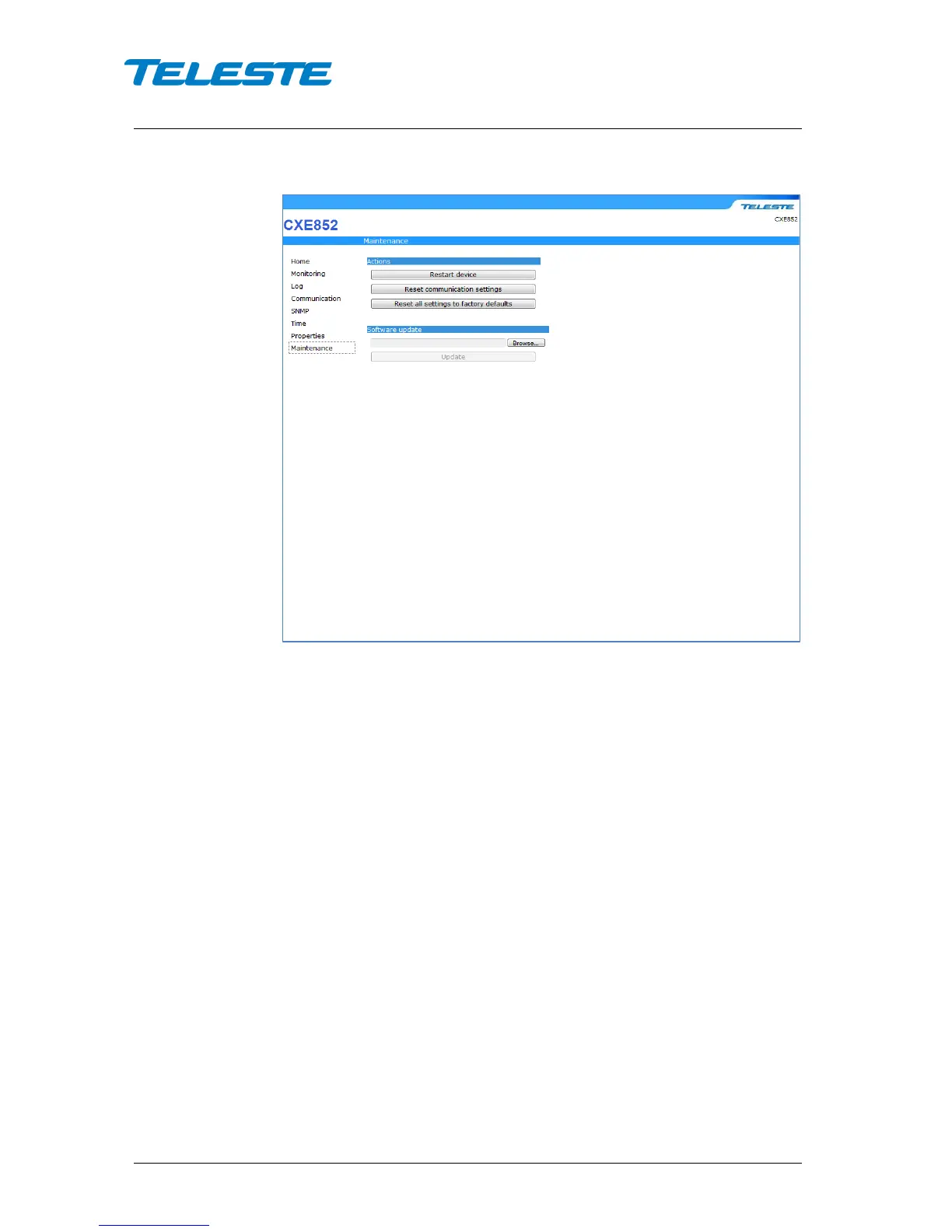
Maintenace WebUI page
Figure 22. Maintenance page
Restart device
The button can be used to perform a software reset of CXE85x optical receiver.
This process will take ~30 s.
Reset communication settings
This action can be used to reset the communication settings to their factory
default values. Note that this action may result in loss of communication and the
viewer needs to be closed and reopened with the new IP address.
Reset all settings to factory defaults
This action restores the factory defaults and clears all of the CXE85x’s settings.
The reset can also be done via the front panel reset button. Note that this action
may result in loss of communication and the viewer needs to be closed and
reopened with the new IP address.
Software upgrade
The embedded software of CXE85x optical receiver can be updated via this
page. Specify the file to upload by entering the full path of the file in the text box
of the control, or select the file by clicking the Browse button. Click the “Update”
button to proceed with the firmware update. Once the process is complete, the
device will reboot. This process will take a few minutes. After the reset the
device is fully functional and running the new software. If the download fails,
CXE85x optical receiver continues to use its previous software.


 To Next Page