User Manual CXE85X
59300464 Rev.005
9.12.2013 24(44)
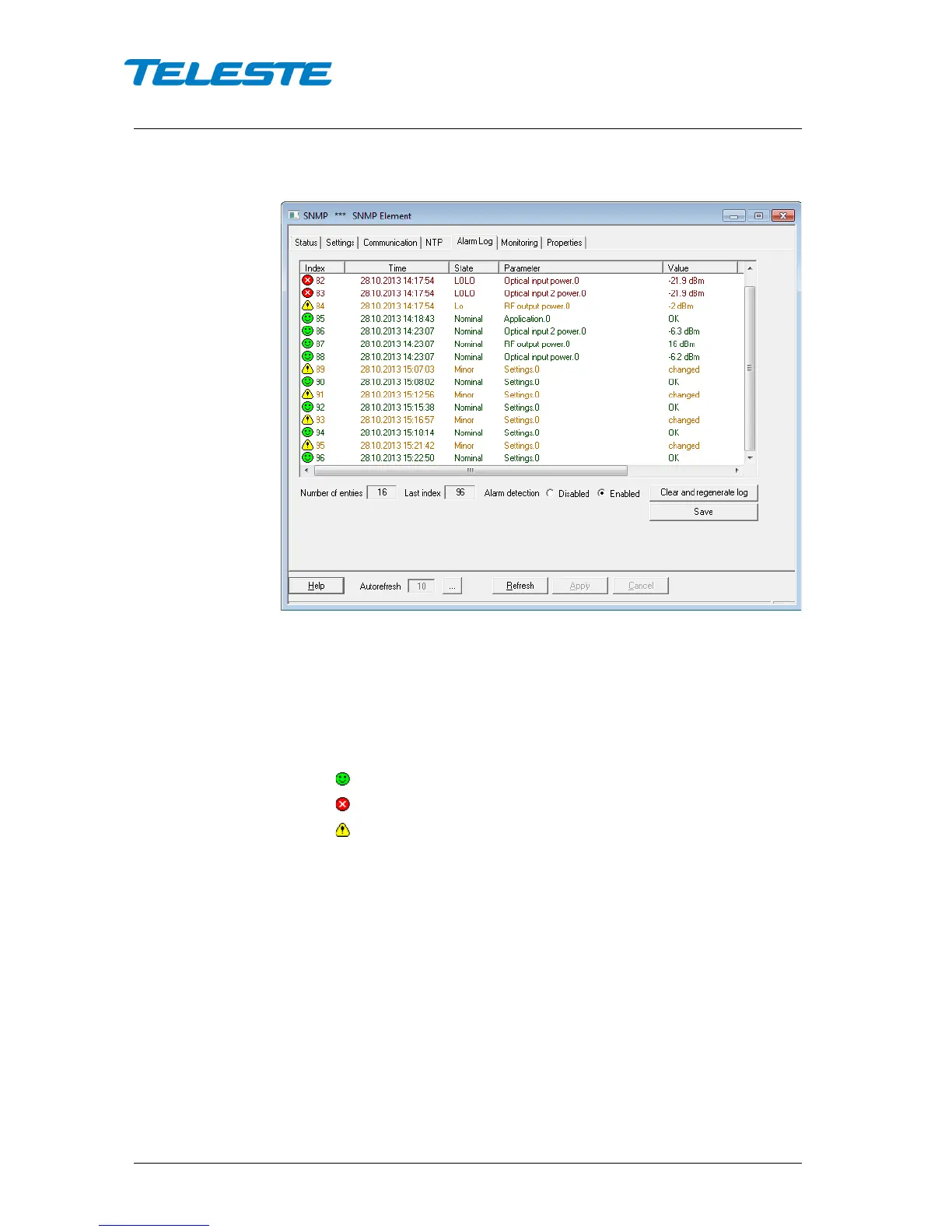
Alarm log viewer page
Figure 10. CXE85x Alarm Log page
The “Alarm log” dialog box displays the alarm history for latest 16 events. All
entries are date and time stamped with the most current entry at the bottom.
Note that date/time information may not be correct if CXE85x hasn't received
correct time.
The icon and colour of each list entry indicate alarm status:
- green for nominal value
- red for major alarm
- yellow for minor alarm
The total number of entries in the alarm log list is shown in the “Number of
entries” field. The index number of the last entry is displayed in the
accompanying field. Total number of entries is limited to available memory. The
oldest entry is overwritten when the log becomes full.
“Alarm detection” control the unit’s SNMP alarm log handling. When the control
is disabled, new alarms will not be recognised and the alarm log will keep the
old alarm information. When the control is “enabled”, new alarms will be logged.
“Clear and regenerate log” button clears alarm log and restarts alarm detection.


 To Next Page