User Manual CXE85X
59300464 Rev.005
9.12.2013 19(44)
Settings viewer page
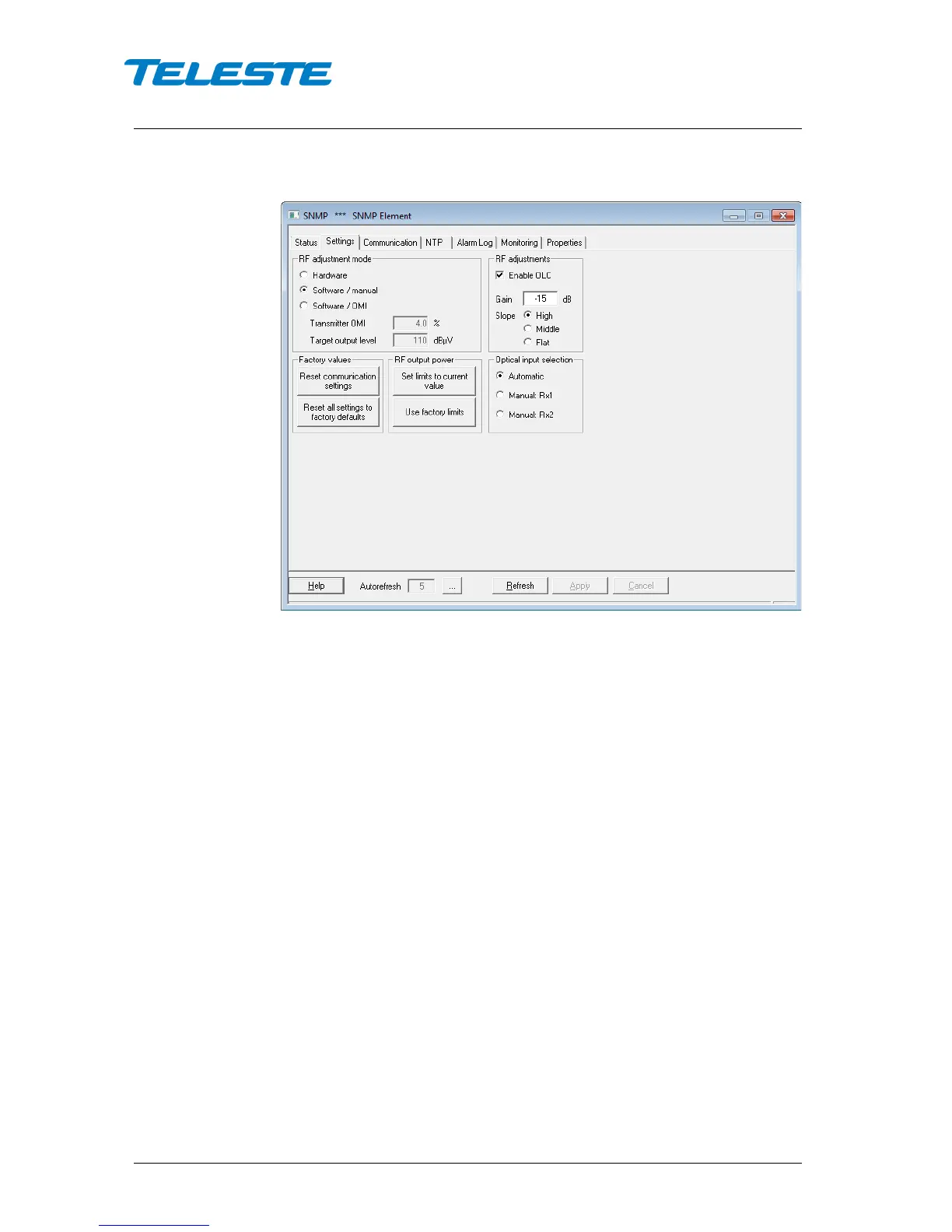
Figure 7. CXE852 Settings page
RF adjustment mode
These selections control how the midstage attenuator, slope and OLC controls
are adjusted:
Hardware: All controls are in hardware control, settings are displayed as read-
only in "RF adjustments" frame.
Software/manual: Hardware controls are overridden with the values in the "RF
adjustments" frame.
Software/OMI: Hardware controls are overridden with the values in the "RF
adjustments" frame. The gain is calculated by CXE85x based on the
“Transmitter OMI” (0…20%) and “Target output level” (80…120 dBµV) values
given by the user.
RF adjustments
In "Hardware" RF adjustment mode these values are read from the hardware, in
software modes the hardware settings are overridden with these values.
The gain is editable between 0...-15/20 dB (1
st
generation devices) / 0…-31 dB
(2
nd
generation devices) in "Software / manual" mode. In "Software / OMI"
mode the calculated gain is displayed with green background if the target output
level can be reached and in yellow if the target is out of range. The desired
slope setting can be selected with the radio buttons
Factory values
The “Reset communication settings” can be used to reset the communication
settings to their default values. The “Reset all settings to factory settings” button
can be used to return all CXE85x settings to factory default values. These can


 To Next Page