User Manual CXE85X
59300464 Rev.005
9.12.2013 34(44)
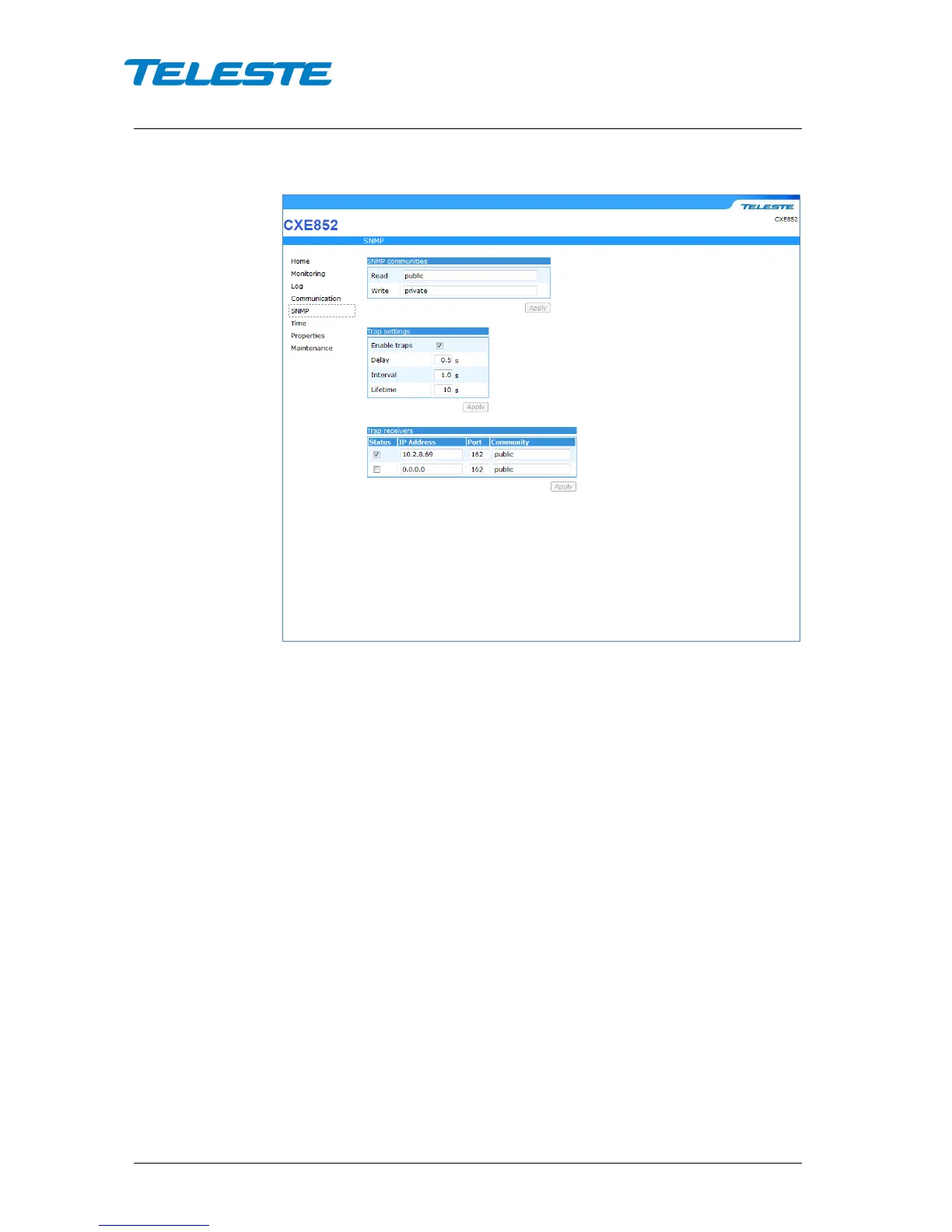
SNMP WebUI page
Figure 19. SNMP page
This page is used to configure SNMP access of the device by using a SNMP
manager.
SNMP communities
Community names are the weak security method of SNMPv1 to limit access to
the manageable objects. These should be matched with the community names
used by the SNMP manager and should therefore be based on a network plan.
Trap settings
CXE85x can send SNMP traps up to two IP addresses, with separate port
settings and trap community settings. The trap sending behaviour can be fine-
tuned with delay, interval and lifetime parameters.
Enable traps: Enables/disables sending of SNMP traps. By default, this option
is enabled.
Delay: The time to wait before sending an alarm trap, once an alarm is
detected. This parameter can be used to control trap storms in amplifier
cascades. By setting a longer delay deeper in the cascade, traps can be set to
arrive on due order. By default, this option is 0.5 s.
Interval: The minimum time between successive traps. This parameter applies
only if several alarms are detected simultaneously. By default, this option is
1.0 s.
Lifetime: The time the transponder keeps an alarm trap in the transmit queue, if
it cannot be sent for some reason. By default, this option is 10.0 s.


 To Next Page