EasyManua.ls Logo

TELEVAC CC-10 - Changing Modes; Analog Output

TELEVAC CC-10
40 pages
Print Icon
To Next Page IconTo Next Page
To Previous Page IconTo Previous Page
Loading...
CC-10
INSTRUMENT MANUAL
Phone:(215) 947-2500 fax:(215) 947-7464 e-mail:sales@televac.com web site:www.televac.com
CC-10 MANUAL REV D
Page 9 of 40
Y
TELEVA
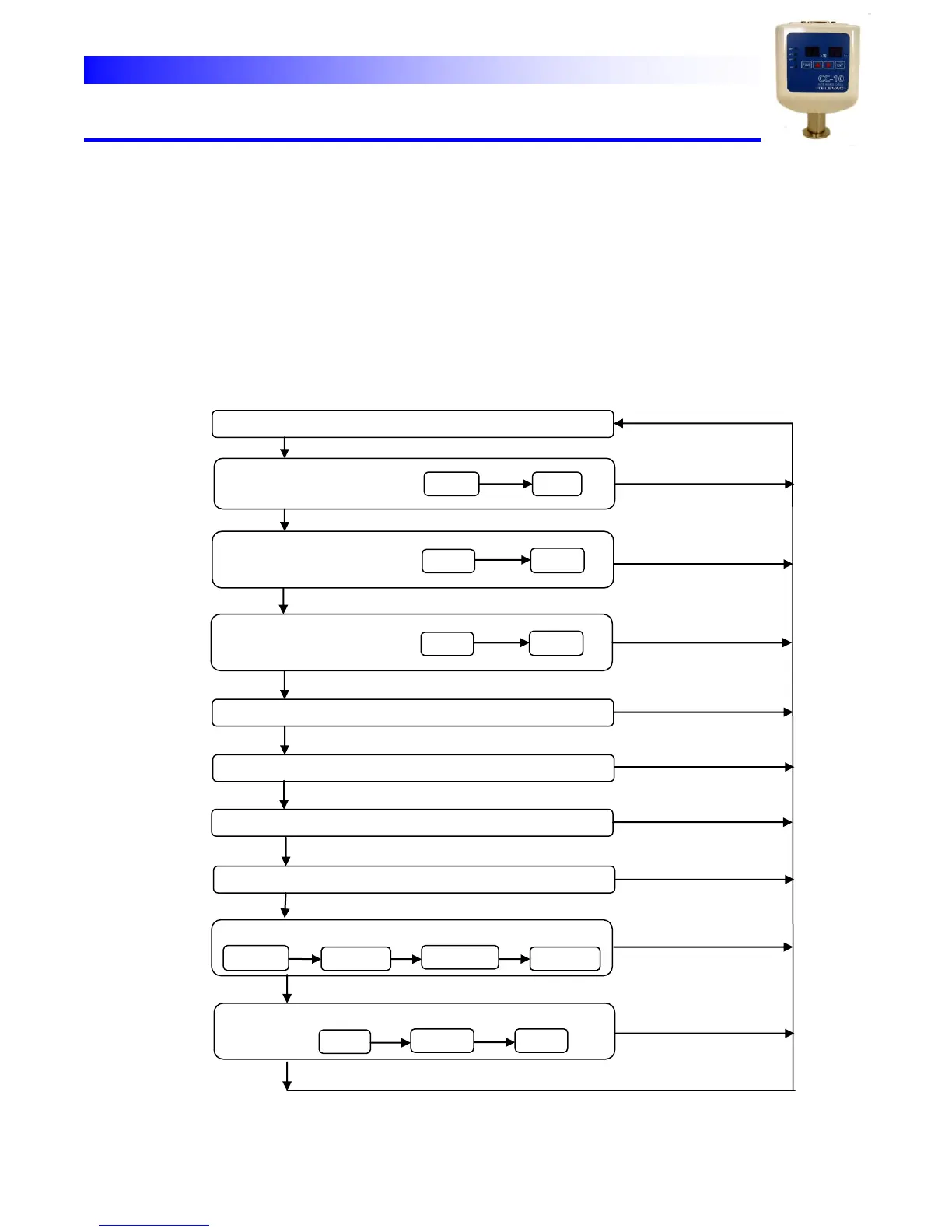
Changing
modes
(1)
By
pushing
[FUNC]
key
the
mode
moves
cyclically
as;
1
2
3
4
5
6→7
8
→9→1
(2)
When
the
mode
moves
to
SPx(x
is
1,2
or
3)
set
mode,
SPxL
set
is
selected
first.
Pushing
[ENT]
key
stores
the
value
and
moves
to
SPxH
set
mode.
In
SPxH
mode
by
pushing
[ENT]
key the
value
is
stored
then
it
returns
to
measure
mode.
*If
[FUNC]
key
is
pushed
instead
of
[ENT]
button
in
either
SPxL
or
SPxH
mode
the
value
is
not stored
and
the
mode
moves
to
the
next
one.
(3)
In
any
other
mode
than
SPx
set
modes,
by
pushing
[ENT]
key
the
value
is
stored
and
the mode
returns
to
the
measure
mode.
(If
[FUNC]
key
is
pushed
instead,
the
value
is
not
stored and
the
mode
moves
to
the
next
mode.
(4)
If,
in
any
program
mode,
there
are
no
operation
for
30
seconds
it
automatically
moves
back to
measure
mode. (There are some exceptions)
MEASURE MODE
SP1 SET MODE
SP1L
SP1H
ENT
SP2 SET MODE
SP2L
SP2H
FUNC
SP3 SET MODE
SP3L
SP3H
ATM ADJUST MODE
XTAL ZERO ADJUST MODE
ANALOG OUTPUT SET MODE
PRESSURE UNIT SELECT MODE
COMMUNICATION SET MODE
ADDRESS
BAUD RATE
ENT
PARITY RATE
STOP BIT
ENT
ENT
CRYSTAL SENSOR PROPERTY SET MODE
O6on
ENT
XXXX*
YYYY*
ENT
FUNC
FUNC
FUNC
FUNC
FUNC
FUNC
FUNC
FUNC
*4 digit numbers specific to the sensor
FUNC
ENT
ENT
ENT
ENT
ENT
ENT
ENT
ENT
ENT
1
2
3
4
5
6
7
8
9
10