CC-10
INSTRUMENT MANUAL
Phone:(215) 947-2500 fax:(215) 947-7464 e-mail:sales@televac.com web site:www.televac.com
CC-10 MANUAL REV D
Page 20 of 40
Crystal sensor property set mode
When sensor (or electronics unit ) is replaced in the field, property
numbers, which represent sensor temperature dependency, must be
written manually. It is performed by entering two set of numbers into the
electronics unit of CC-10. The numbers are printed on the label affixed to
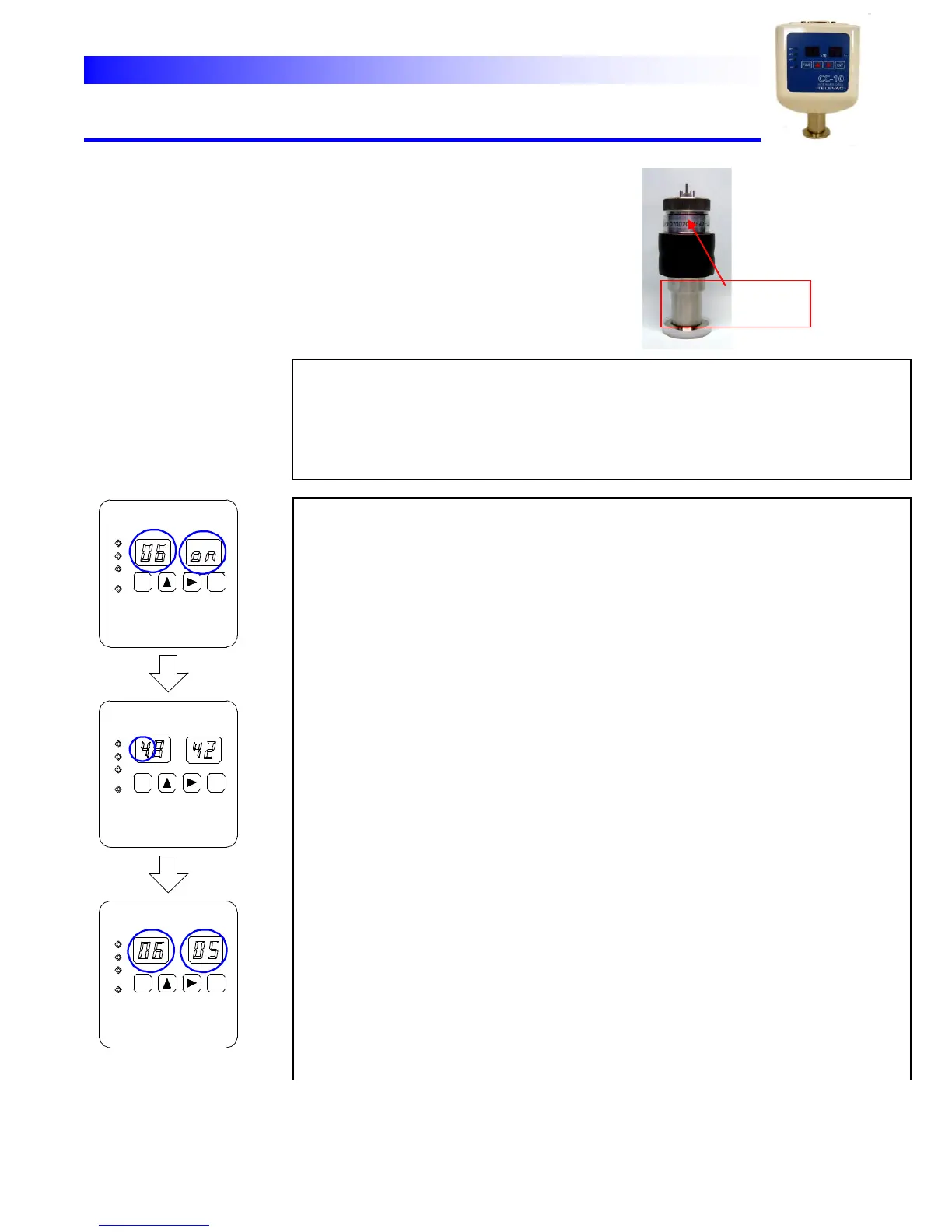
the sensor body. See the picture here.
Note: This procedure is only necessary when sensor/ electronics
combination is changed. All newly shipped units are pre-set at the factory
Crystal sensor property set mode :
When “parameter lock” is enabled this adjustment is not possible. Make sure if lock is
disabled before the programming. (Refer to 4.2)
The specific numbers are printed on the sensor body in the parenthesis followed by
the serial number.
Ex. If indicated as S/N070020(4842-05), the property numbers are 4842 and 05.
“06” display appears on the left two digits that means the gauge is in crystal sensor
property set mode.
To enter the property numbers into the unit, follow the procedures below.
(1) Push horizontal arrow key [→] to indicate the first property number. (Ex. 4842)
The current number XXXX is displayed. The first digit will blink indicating the digit
is ready to change.
(2) Change the digit by vertical arrow key [↑] then push horizontal arrow key [→]
moving to the next digit.
(3) After changing all four digits, push [ENT] key. The number will be stored and the
second property number will be displayed on the exponent LED. ( Left 2 digits
are fixed to “06”. The property number YY is displayed on the right 2 digits. Ex.
05)
(4) Change the number by vertical arrow key [↑] then push [ENT] key to register the
data. The unit returns to measure mode.
Crystal sensor
Property mode



 To Next Page