EasyManua.ls Logo

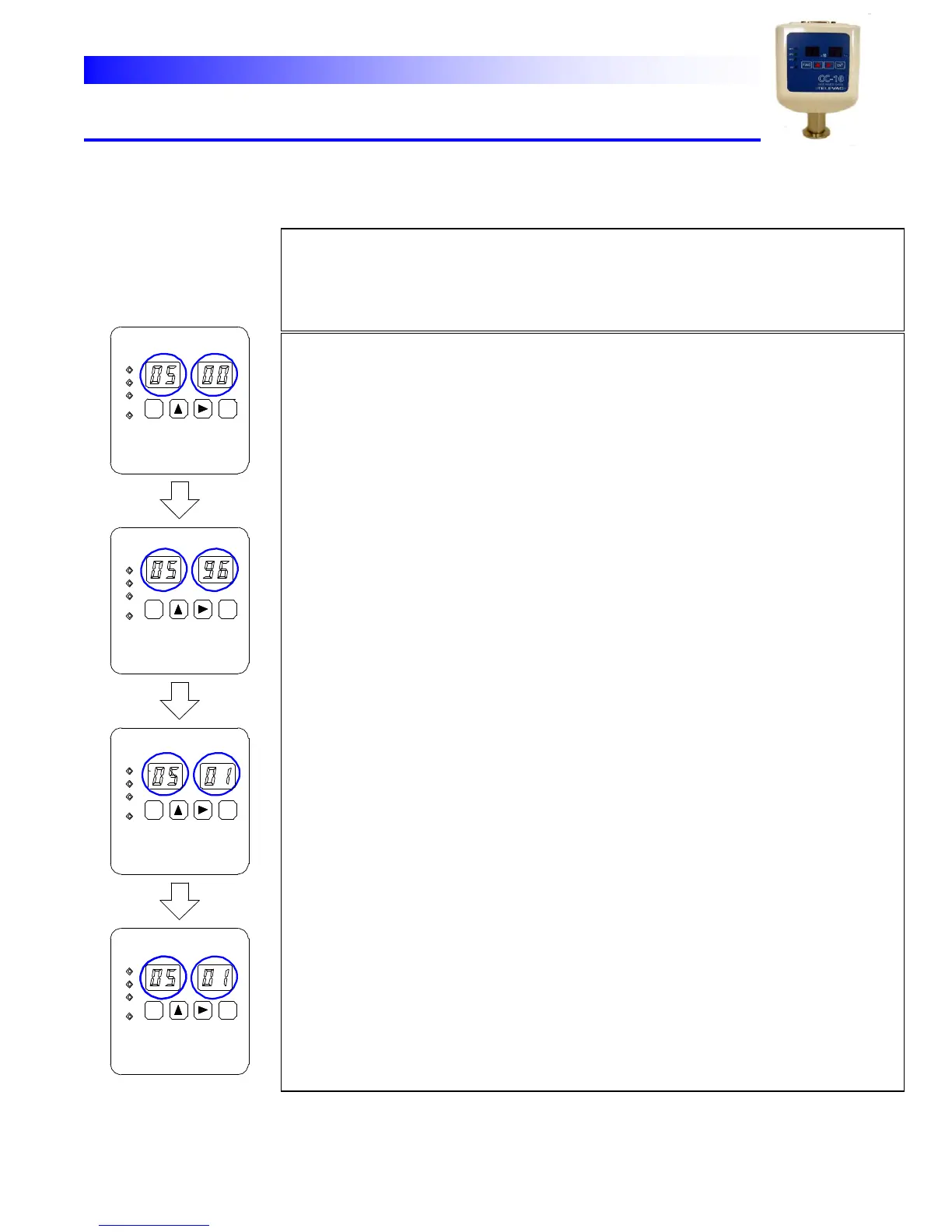
TELEVAC CC-10 - Communication setting mode

TELEVAC CC-10
40 pages
Print Icon
To Next Page IconTo Next Page
To Previous Page IconTo Previous Page
Loading...
CC-10
INSTRUMENT MANUAL
Phone:(215) 947-2500 fax:(215) 947-7464 e-mail:sales@televac.com web site:www.televac.com
CC-10 MANUAL REV D
Page 19 of 40
Y
TELEVA
C
o
mm
un
i
c
a
t
i
on
s
e
tt
i
ng
m
od
e To
communicate
with
the
host
computers,
address,
boud
rate,
parity
bit
and
stop
bit
are
to
be programmed.
Follow
the
procedures
below. Note:
As
to
the
communication
functions
refer
to
the
section
5.
SP1
SP2
SP3
HV
SP2
SP1
SP3
HV
HV
SP2
SP1
SP3
SP3
SP2
SP1
HV
X10
Pa
Pa
Pa
Pa
X10
X10
X10
FUNC
FUNC
FUNC
FUNC
ENT
ENT
ENT
ENT
Display stop
bit
Display
parity bit
Display rate
Display
address
Lit Blink
Lit Blink
Lit Blink
Lit Blink
Communication
setting
mode
: When
parameter
lock”
is
enabled
any
parameter
change
can
not
be
done
and only
displaying
the
current
parameters
is
possible. In
this
case
by
pushing
ENT
key,
the
display
in
the
right
two
digits
will
be
changed
in
the
following
order;
address,
data
rate,
parity
bit
then
stop
bit. Make
sure
that
the
lock
is
disabled
if
you
need
the
programming.
05
display
appears
on
the
left
two
digits
that
means
the
gauge
is
in communication
setting
mode.
The
right
two
digits
(blinking)
show
the
address value
(00
0F)
.
To
change
the
parameter
settings,
follow
the
procedures
below.
(1)
Address Changing
the
number
in
the
blinking
digits
by
the
vertical
arrow
key
[↑]
then push
ENT
key.
The
address
setting
is
stored
and
the
unit
moves
to
the
data
rate
select
mode.
(2)
Data
Rate Select
the
data
rate
in
the
blinking
digits
by
the
vertical
arrow
key
[↑]
then push
ENT
key.
The
data
rate
setting
is
stored
and
the
unit
moves
to
the
parity bit
select
mode.
Note:
Selectable
data
rates
are
12(1200bps),
48(4800bps),
96(9600bps),
19(19200bps)
and
38(38400bps).
(3)
Parity
bit Select
the
parity
bit
in
the
blinking
digits
by
the
vertical
arrow
key
[↑]
then
push ENT
key.
The
parity
bit
setting
is
stored
and
the
unit
moves
to
the
stop
bit
select mode.
Note:
Selectable
parity
bit
settings
are
00(none),
01(odd)
and
02(even).
(4)
Stop
bit Select
the
stop
bit
in
the
blinking
digits
by
the
vertical
arrow
key
[↑]
then
push ENT
key.
The
stop
bit
setting
is
stored
and
the
unit
moves
to
the
measure
mode. Note:
Selectable
stop bit
settings
are
01(1
bit)
and
02(2
bits).
*
If
FUNC
key
is
pushed
instead
of
ENT
key,
the
unit
skips
the
rest
of
the
communication
setting
and
return
to
measure
mode.
Note
that
the
settings
are not
stored.