EasyManua.ls Logo

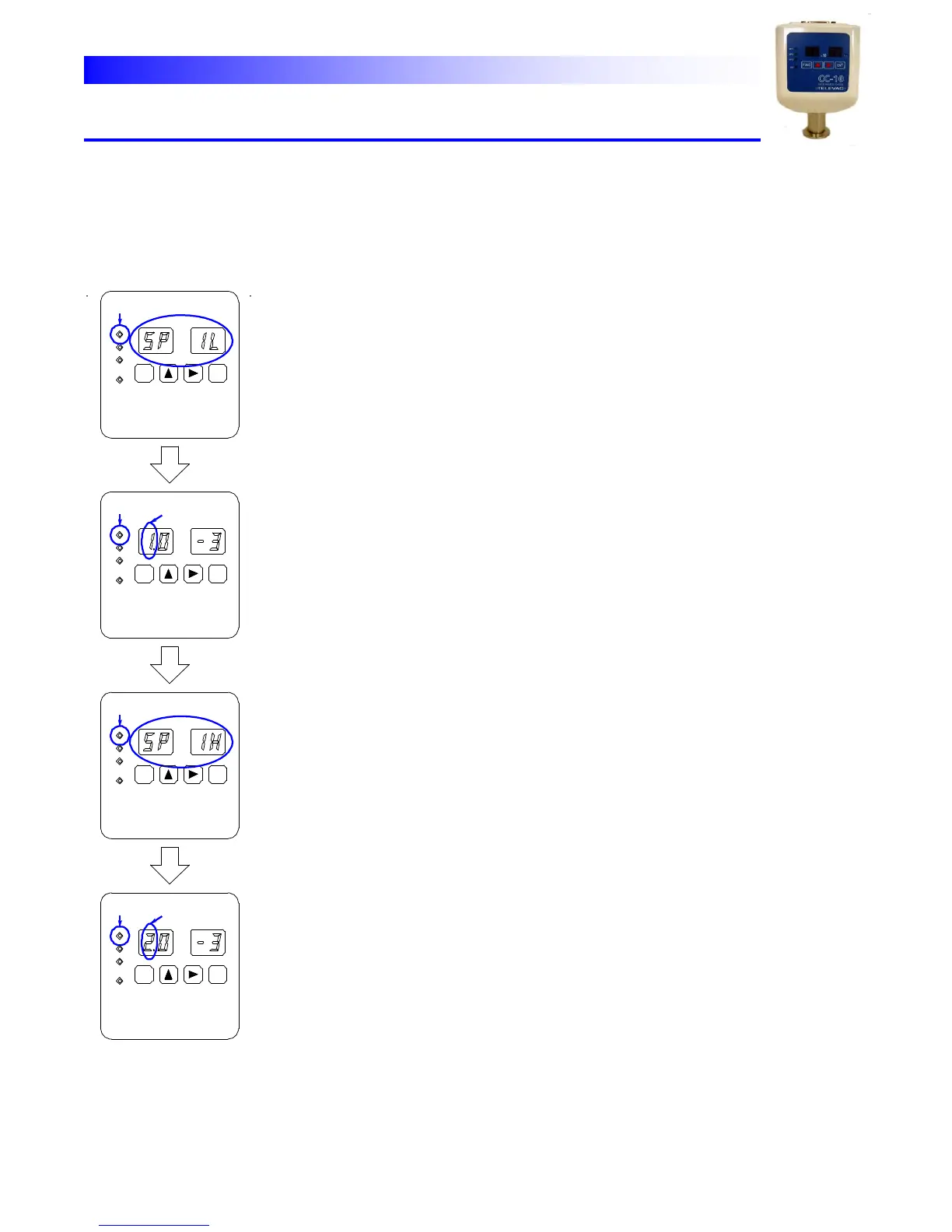
TELEVAC CC-10 - SP1 Set Mode

TELEVAC CC-10
40 pages
Print Icon
To Next Page IconTo Next Page
To Previous Page IconTo Previous Page
Loading...
CC-10
INSTRUMENT MANUAL
Phone:(215) 947-2500 fax:(215) 947-7464 e-mail:sales@televac.com web site:www.televac.com
CC-10 MANUAL REV D
Page 12 of 40
Y
TELEVA
SP1
Set
Mode
In
this
mode
value
of
SP1L
and
SP1H
can
be
set.
SP1
SP2
SP3
HV
SP2
SP1
SP3
HV
HV
SP2
SP1
SP3
SP3
SP2
SP1
HV
X10
Torr
Torr
Torr
Torr
X10
X10
X10
FUNC
FUNC
FUNC
FUNC
ENT
ENT
ENT
ENT
Select SP1H
Select SP1H
Select SP1L
Select SP1L
SP1
mode
:
When
parameter
lock”
is
enabled
any
parameter
change
can
not be
done
and
only
displaying
the
current
parameters
is
possible.
Make
sure
if lock
is
disabled
before
the
programming.
(Refer
to
4.2)
SP1
lamp
blinks
when
SP1
setting
mode
is
selected.
Characters
of
SP
1L appear
in
the
main
display
then
the
pre
set
value
appears.
The
first
digit
of
the mantissa
blinks.
To
change
the
set
value,
follow
the
procedures
below.
(1)
Select
the
digit
to
be
changed
by
horizontal
arrow
key
[→].
(2)
Change
the
value
by
vertical
arrow
key
[].
(3)
By
pushing
[ENT]
key
the
unit
moves
to
SP1H
set
mode.
*
If,
instead,
[FUNC]
key
is
pushed
the
unit
skips
SP1H
then
moves
to SP2L
mode.
Note
that
the
new
set
value
of
SP1L
is
not
stored
in
this operation.
When
SP1L
is
determined
the
unit
moves
to
SP1H
set
mode. The
character
of
SP
1H”
is
shown
in
the
display
then
the
pre-set
value
is appears.
The
first
digit
will
blinks
prompting
the
entry
of
the
new
value.
To
change
the
set
value,
follow
the
procedures
below.
(1)
Select
the
digit
to
be
changed
by
horizontal
arrow
key
[→].
(2)
Change
the
value
by
vertical
arrow key ↑
(3)
By
pushing
[ENT]
key
the
values
of
both
SP1L
and
SP1H
are
registered
and
the
unit
returns
to
measure
mode.
*
If,
instead,
[FUNC]
key
is
pushed
the
values
are
not
registered
and
the
unit moves
to
SP2L
mode.
Lit
Blink
Blink
Blink
Blink
Lit
Blink
Blink