EasyManua.ls Logo

TELEVAC CC-10 - 4.0 Operation; 4.1 Starting the measurement; 4.2 Locking parameters; 4.3 Display modes and mode changing

TELEVAC CC-10
40 pages
Print Icon
To Next Page IconTo Next Page
To Previous Page IconTo Previous Page
Loading...
CC-10
INSTRUMENT MANUAL
Phone:(215) 947-2500 fax:(215) 947-7464 e-mail:sales@televac.com web site:www.televac.com
CC-10 MANUAL REV D
Page 8 of 40
Y
TELEVA
4.0
O
p
e
r
a
t
i
on
4.1
Starting
the
measurement
Connect
D
sub-connector
to
the
instrument
and
supply
power
after
installing
CC-10
to
the vacuum
system
and
properly
connecting
necessary
wires. When
the
power
is
supplied
the
unit
runs
an
internal
check
program
for
several
seconds
then goes
to
measurement
mode.
Pressure
display
will
appear
on
the
display.
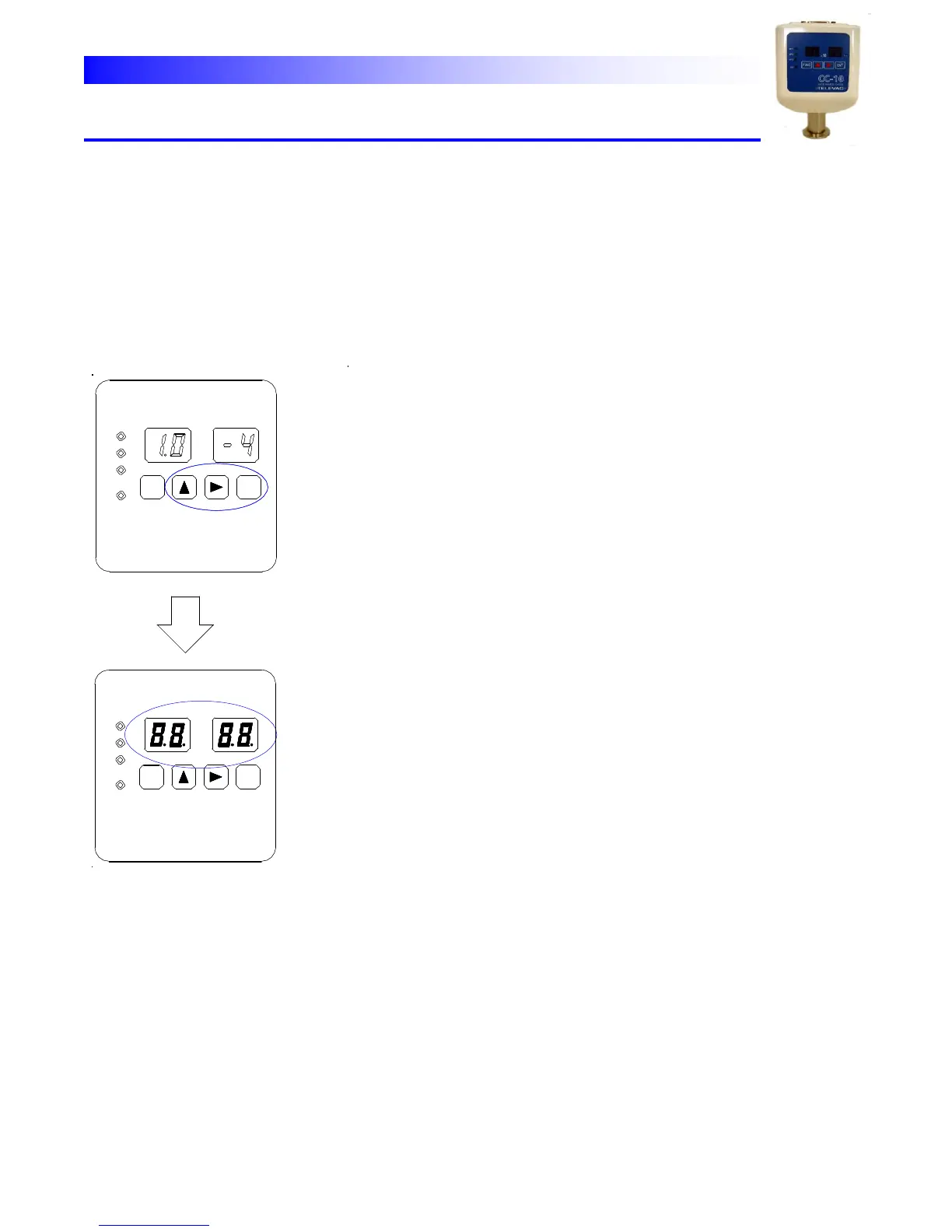
4.2
Locking
parameters In
order
to
prevent
unintended
parameter
changing
the
parameter
lock”
function
is
provided.
To switch
this
function
between
enabled
and
disabled
follow
the
procedure
below.
When
shipped,
it
is
set
to
disabled.
4.3
Display
modes
and
mode
changing
There
are
nine
modes
that
are
changed
by
pushing
[FUNC]
key
and
[ENT]
key.
Those
are;
1.
Measurement
mode
2.
SP1
setting
mode
(SP1L
setting,
SP1H
setting)
3.
SP2
setting
mode
(SP2L
setting,
SP2H
setting)
4.
SP3
setting
mode
(SP3L
setting,
SP3H
setting)
5.
Crystal
gauge
ATM
(atmospheric
pressure)
adjustment
mode
(Manual
operation)
6.
Crystal
gauge
Zero
adjustment
mode
(Manual
operation)
7.
Analog
output
setting
mode
8.
Pressure
unit
selection
mode
9. Communications
set
mode
10.
Crystal sensor property mode
When in the measure mode, push “  “ key, and “→” key,
“ENT” key simultaneously.
SP1
SP2
SP3
HV
FUNC
X 10
Torr
ENT
All LEDs are lit for a moment, then established status
will alter.
PUSH
SIMULTANEOUSLY
SP3
SP2
SP1
X 10
Torr
ENT
FUNC
Lit
HV