EasyManua.ls Logo

TELEVAC CC-10 - Crystal gauge atmospheric pressure adjust mode

TELEVAC CC-10
40 pages
Print Icon
To Next Page IconTo Next Page
To Previous Page IconTo Previous Page
Loading...
CC-10
INSTRUMENT MANUAL
Phone:(215) 947-2500 fax:(215) 947-7464 e-mail:sales@televac.com web site:www.televac.com
CC-10 MANUAL REV D
Page 13 of 40
Y
TELEVA
SP2
,SP3
Setting
Mode The
settings
of
SP2L,
SP2H,
SP3L
and
SP3H
are
possible.
Follow
the
same
procedure
as SP1L/SP1H
setting.
The
crystal
gauge
atmospheric
pressure
adjust
mode The
crystal
sensor
which
covers
pressures
from
Atmosphere
to
about
10
millitorr
need
to
be calibrated
at
atmosphere
when
the
instrument
is
first
installed. Because
the
gauge
is
factory
calibrated
before
shipment,
the
calibration
at
user
site
is
not
usually necessary
unless
the
physical
elevation
of
the
users
location
is
substantially
above
sea
level. When
the
crystal
sensor
is
replaced
for
maintenance
or
if
the
displayed
value
at
atmosphere
is shifted,
perform
the
calibration
as
follows.
T
h
e
c
r
ys
t
a
l
g
a
ug
e
a
t
m
osph
e
r
i
c
p
r
e
ssu
r
e
a
d
j
us
t
m
e
n
t
m
od
e
:
when
“parameter
lock”
is enabled
this
adjustment
is
not
possible.
Make
sure
if
lock
is
disabled
before
the programming.
(Refer
to
4.2)
Note: The same adjustment can be triggered from I/O pin #14. See section 8.
HV
SP2
SP1
SP3
SP3
SP2
SP1
HV
Torr
Torr
X10
X10
FUNC
FUNC
ENT
ENT
Blink
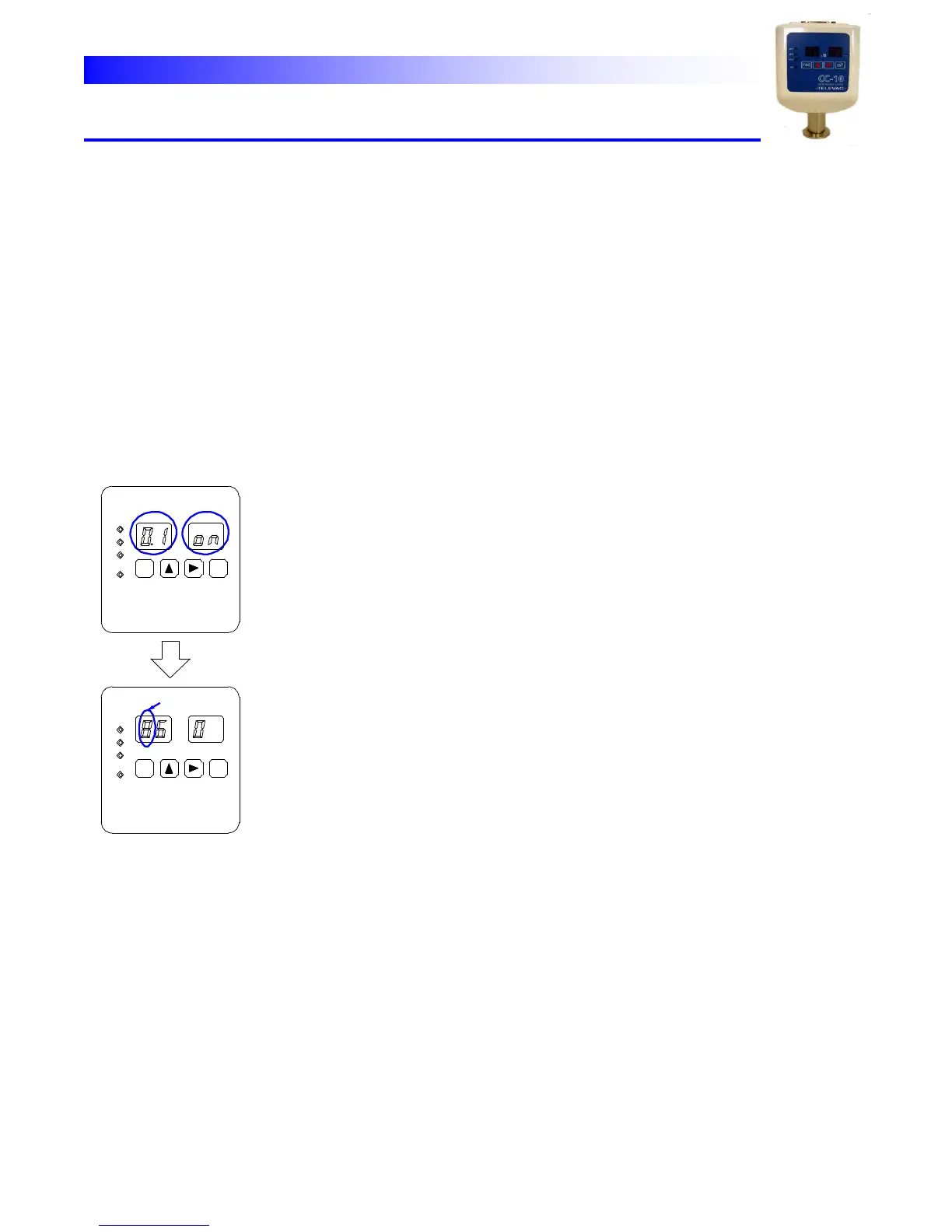
Crystal Gauge
ATM Adjust Mode
Crystal Gauge
ATM Adjust Mode
Lit Blink
The
character
01
on
on
the
display
shows
the
unit
is
in
this
mode
Make
sure
the
system
is
vented
to
atmosphere
then
push
[ENT] key.
It
triggers
the
adjustment,
instructing
the
sensor
to
fit
the measurement
to
the
pre-set
atmosphere
value
at
the
event.
*As
to
the
pre-set
atmosphere
value
see
below.
Note:
If,
by
some
mis-operation,
the
adjustment
is
triggered
when the
system
is
in
vacuum
ErrA
is
displayed
and
the
adjustment
will not
be
completed.
The
unit
regards
the
crystal
sensor
signal
as
the
pre-set atmosphere
pressure
and
adjusts
the
measurement
to
fit
the
value. The
default
atmospheric
pressure
value
is
760
Torr.
If
actual atmospheric
pressure
is
considerably
different
from
760Torr
(for instance
a
high
altitude
locale)
changing
the
atmosphere
value
is
necessary. To
change
the
Atmosphere
value
setting,
follow
the
procedure below.
(1) Push horizontal arrow key [→] to indicate the current set value.
(The
set
value
is
displayed
in
Torr
unit.)
The
first
digit
will
blink.
(2)
Select
the
digit
to
be
changed
with
[→]
key.
Then
select
the
value
by
vertical
arrow
key[↑].
(3)
Push
[ENT]
key
to
register
the
new
set
value.
The
unit
returns to
measure
mode.
*
These
procedures
only
change
the
Atmosphere
pressure
value. To
perform
the
Atmospheric
pressure
adjustment,
enter
this
mode again
and
press
[ENT]
key.
*
When
the
unit
shipped
the
value
is
set
at
760
Torr.
This procedure
is
not
necessary
unless
the
customer
site
is
high
above sea
level
and
the
Atmosphere
pressure
is
much
lower
than
760
Torr.
8-5