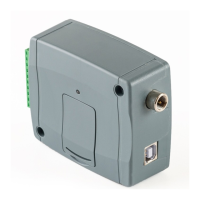
If you are using the device in in a private network, where there is no option to enable access to
the cloud server, in the “Server register” menu you can add an IP address and port number
available in the given private network, which you can then select as the default cloud server in
the device settings, in the “General” menu. Thus, it is not necessary to enable access to the
cloud server in the private network, just configure port forwarding from the chosen IP address
and port number to the cloud IP address and port number (54.75.242.103:2016)
Function buttons available in the “Server register” menu:
• Update the records from database:
To update the listed records from database, click on the “Update list” button.
• Adding new server contact details:
Click on the “Add new” button to add new server contact details.
• Creating a copy of existing contact details of a server:
To create a copy of the contact details of the selected server, click on the “Clone”
button. Please note that the new copy should have a different unique name.
• Editing existing server contact details:
To edit the contact details of the selected server, click on the “Edit” button.
• Deleting the contact details of a server:
To delete the contact details of the selected server, click on the “Delete” button.
Data stored by the server register:
Server name: custom server name.
Server address: the IP address or domain name of the server.
Port: the communication port number of the server.
Comment: in this field you can enter custom comments related to the given server.


 To Next Page