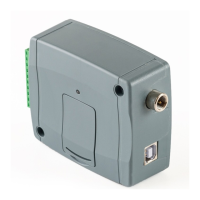
3.5 Preparing and installing the SIM card
• The device requires a Mini (2FF) size SIM card.
• The SIM card holder can be accessed by removing the cover of
the aperture found on the device enclosure. The cover can be
removed by pressing it with your fingernail towards the status
LED at the edge where the gap is, and then pulling it outwards.
Insert the SIM card into the holder. The services to be activated
on the SIM card installed into the Gate Control BASE device
should be chosen according to which services of the device you
want to use. For accessing the device remotely (remote
programming) over the Internet, mobile Internet service is
necessary. The functions that use SMS sending need SMS
service and the ones that use calls require voice call service.
For accessing the Internet, the SIM card may use either a
public or a private APN, but in case of using a SIM card that works in a private APN,
accessing the cloud server IP address in the given APN must be specifically enabled at the
mobile service provider.
• Disable voicemail and notification in SMS about missed calls on the SIM card
installed in the device.
• The device can manage the SIM card’s PIN code. If you enable PIN code request on
the SIM card, configure the SIM card’s PIN code in the programming software in the
“General” device settings menu. Otherwise disable PIN code request on the SIM card.
• Enable caller identification service on the SIM card at the mobile service provider
(this service might not be enabled by default, please check). To enable this service, install
the SIM card into a mobile phone and call the customer service of the card’s mobile service
provider and enable the service in the menu, or visit one of the service provider’s personal
customer services and ask them to enable this service on the SIM card.
• Set the APN for the given SIM card in the “General” device settings menu in the
programming software.
• Installing the SIM card:
1. Pull the metal security lock of the SIM
holder towards the LED until you hear a
click.
2. Reach under the metallic security lock
with your fingernail and pull it outwards to
open the holder.
3. Slide the SIM card into the opened part
with the contacts facing down, as shown in
the figure.
4. Close back the opened part together
with the SIM card.
5. Press down the metallic security lock
carefully and pull it towards the side of the
enclosure until you hear a click.


 To Next Page
 Loading...