Please note that after you make changes, you must write the settings into the device
to be applied. For this, click on the “Write settings” button.
SMS / call notification recipients:
You can configure up to 4 phone numbers (TEL1…TEL4) which the system can notify by SMS
or call, when contact inputs are activated.
Attention! If you are using the device model equipped with a 2G modem, or the device is
connected to the 2G network, when using functions that make an outgoing call, the Internet
connection will be interrupted for the duration of the call, because the 2G network does not
support voice calls and mobile Internet usage at the same time. In such a case, an outgoing call
will block the Internet connection, i.e., a possible remote connection in progress will be
suspended for the duration of the call.
Name: the name of the phone number’s owner. The program will use the name entered in this
section for listing the available notification channels when configuring events.
Phone number: the phone number to be notified.
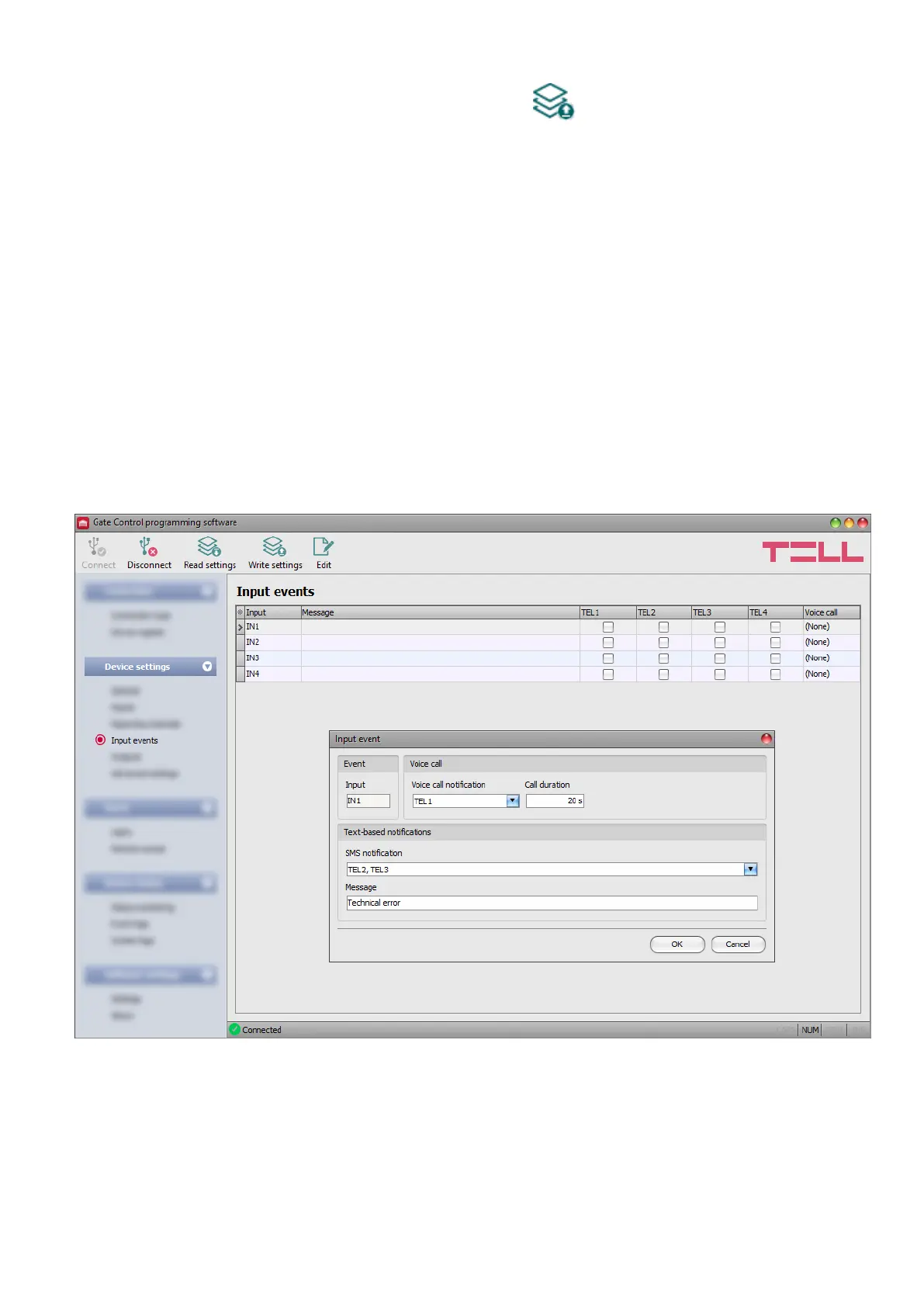
5.2.4 Input events
In this menu you can configure SMS and voice call notifications to be sent upon activating the
contact inputs IN1…IN4.



 To Next Page