Control mode 2
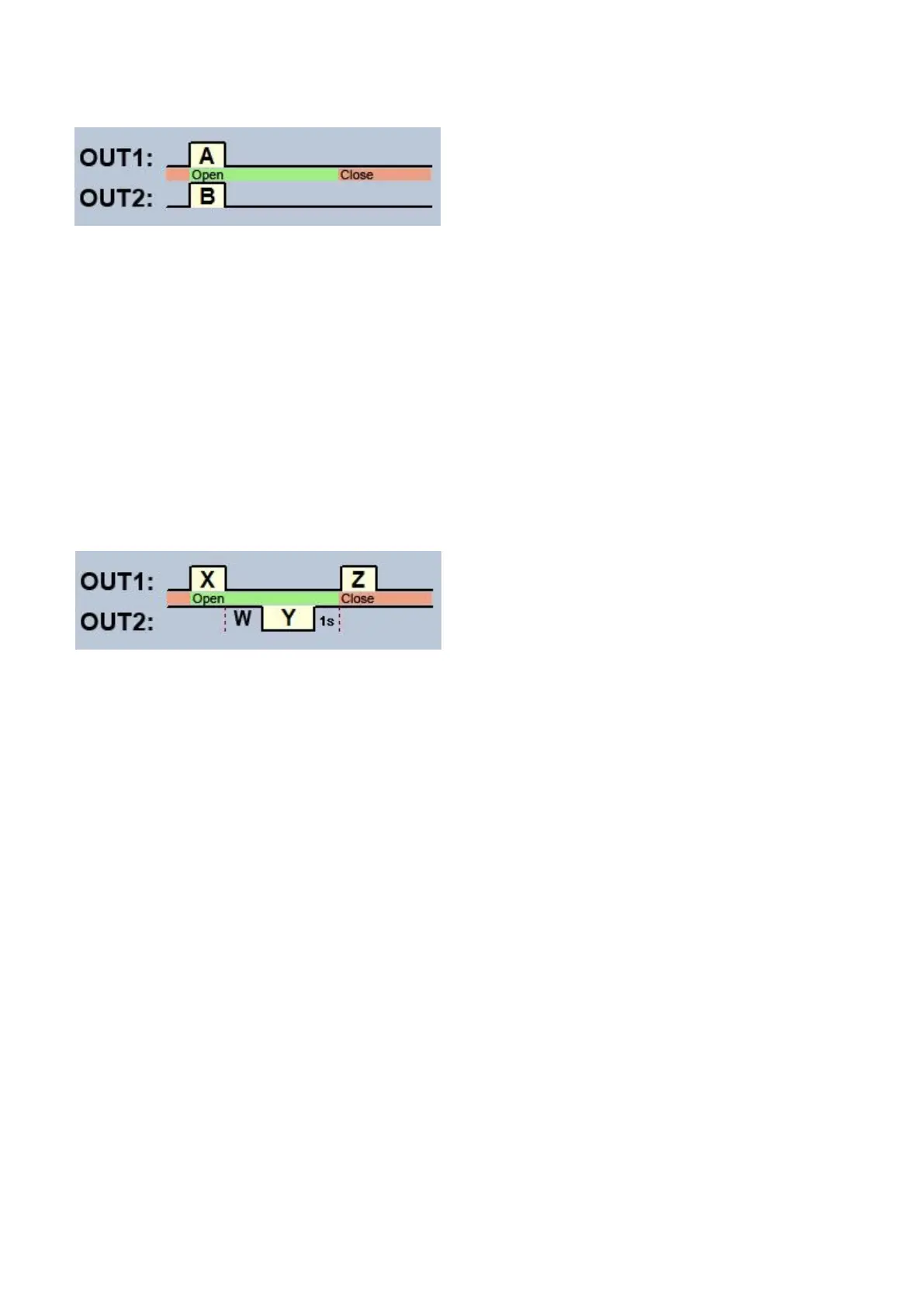
For one or two gates or one gate with two opening options (partial/total opening).
OUT1=N.O. (normally open)
OUT2=N.O. (normally open)
A = OUT1 pulse length (seconds) => for opening gate A
B = OUT2 pulse length (seconds) => for opening gate B
Selective or simultaneous control of outputs OUT1 and OUT2 using caller identification, based
on configured user permissions. Permissions can be configured for each user separately,
to activate output OUT1 only, output OUT2 only, or both outputs at the same time upon control.
Thereby, this control mode enables you to control two different gates. The outputs provide an
open contact by default, and they become closed upon control. The trigger pulse length of output
OUT1 can be configured by parameter ”A”, while the trigger pulse length of output OUT2 can be
configured by parameter ”B”. The values are considered in seconds.
The gate’s control board must close the gate automatically.
Control mode 3
For single-gate automations that require triggers for opening and closing on the same input.
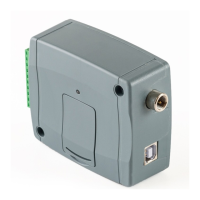
OUT1=N.O. (normally open)
OUT2=N.C. (normally closed)
X = OUT1 pulse length (seconds) => for gate opening
W = delay before interrupting the infrared photocell loop (seconds)
Y = OUT2 pulse length (seconds) => for holding the gate locked in open state
Z = OUT1 pulse length (seconds) => for gate closing
Starting a process of opening and closing by a single call/control command, using caller
identification. In idle state, output OUT1 provides an open contact, while output OUT2 provides a
closed contact. Upon controlling the device, output OUT1 gives a closed contact for
X seconds, then after W seconds output OUT2 gives an open contact for Y seconds, then after
1 second output OUT1 gives again a closed contact for Z seconds. You can use this control
mode if the gate automation control board requires the triggers for opening and closing on the
same input (the first trigger pulse opens the gate, the second one closes it). The opening and
closing trigger pulses are provided by OUT1, while inserting the OUT2 contact in the loop of the
infrared photocell, it holds the gate locked in open state for Y seconds (interrupts the photocell
loop, just like when an obstacle shows up in the photocell’s ray, thus the gate will not close).
If the gate’s control board closes the gate automatically, there is no need for the Z trigger pulse.
In this case you should set parameter Z to 0 seconds, thus there will not be a gate closing trigger
pulse. For certain gate automations, the gate stops immediately if the photocell loop is
interrupted during gate opening. To avoid this, a delay can be configured by parameter W, which
can be used to delay the interruption of the photocell loop. In such case, configure for parameter
W the maximum duration of a gate opening plus 3 to 5 seconds (e.g., if it takes 12 seconds for
the gate to open, configure 15 to 17 seconds for parameter W).



 To Next Page