Teo IP Phone 4101 Installation Instructions
Page 10 13-280135 Rev. K
R
R
o
o
u
u
t
t
i
i
n
n
g
g
t
t
h
h
e
e
C
C
o
o
r
r
d
d
s
s
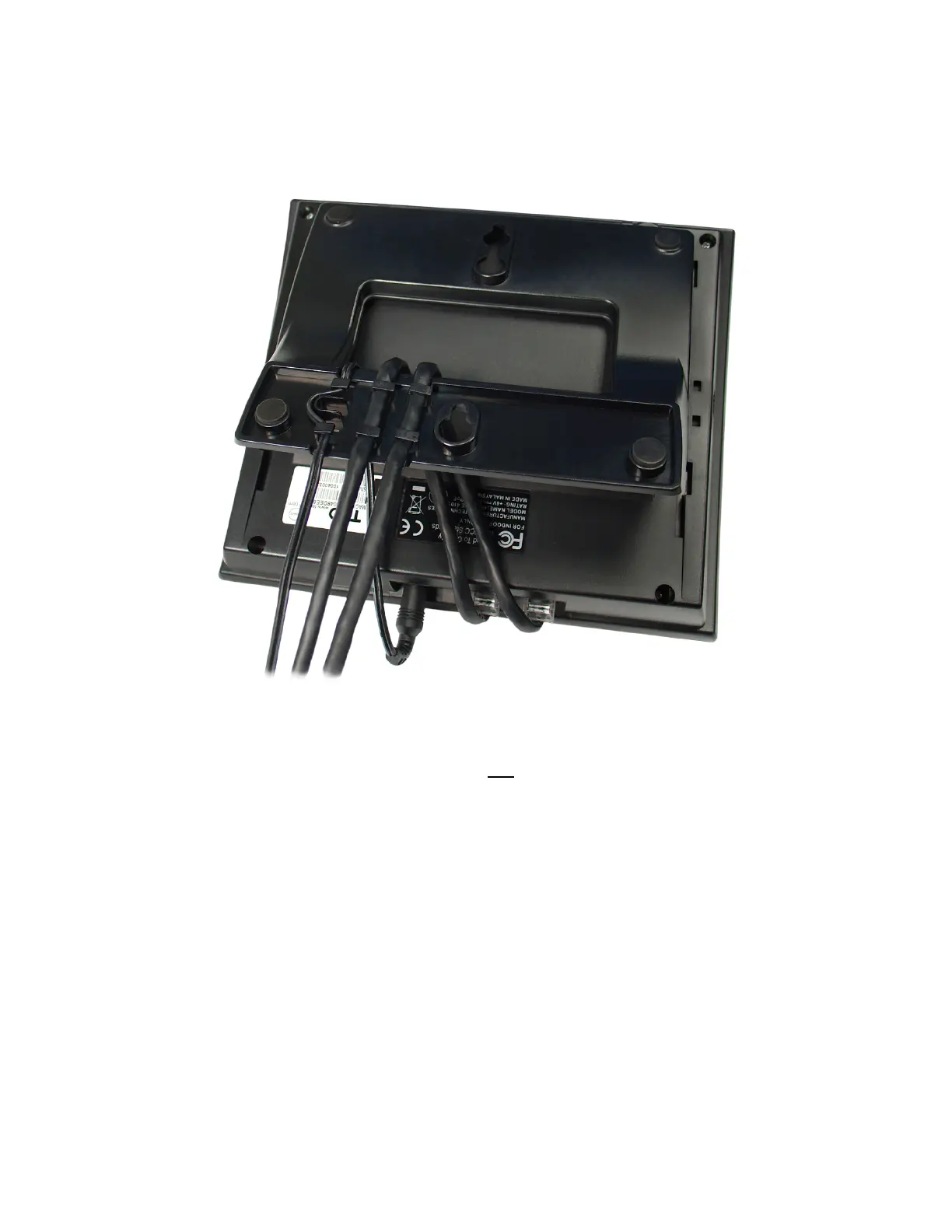
If you want to secure the Ethernet and power cords to the base, route the cords through
the base and under the retaining tabs as shown before connecting them.
N
N
e
e
t
t
w
w
o
o
r
r
k
k
C
C
o
o
n
n
n
n
e
e
c
c
t
t
i
i
o
o
n
n
Connect the LAN switch to the phone’s WAN jack (not the LAN jack) using a Category 5 or
better cable. If the network switch provides 802.3af Power over Ethernet (PoE), a local
power supply connection is not needed.
P
P
C
C
C
C
o
o
n
n
n
n
e
e
c
c
t
t
i
i
o
o
n
n
If you want to use a PC on the same network connection, connect the PC network interface
card to the phone's LAN
jack using a Category 5 or better cable.
H
H
a
a
n
n
d
d
s
s
e
e
t
t
/
/
H
H
e
e
a
a
d
d
s
s
e
e
t
t
Plug the supplied handset into the Handset jack on the left side of the phone. Plug a
compatible headset into the Headset jack on the right side of the phone.



 To Next Page