Teo IP Phone 4101 Installation Instructions
Page 6 13-280135 Rev. K
C
C
o
o
n
n
t
t
r
r
o
o
l
l
s
s
a
a
n
n
d
d
I
I
n
n
d
d
i
i
c
c
a
a
t
t
o
o
r
r
s
s
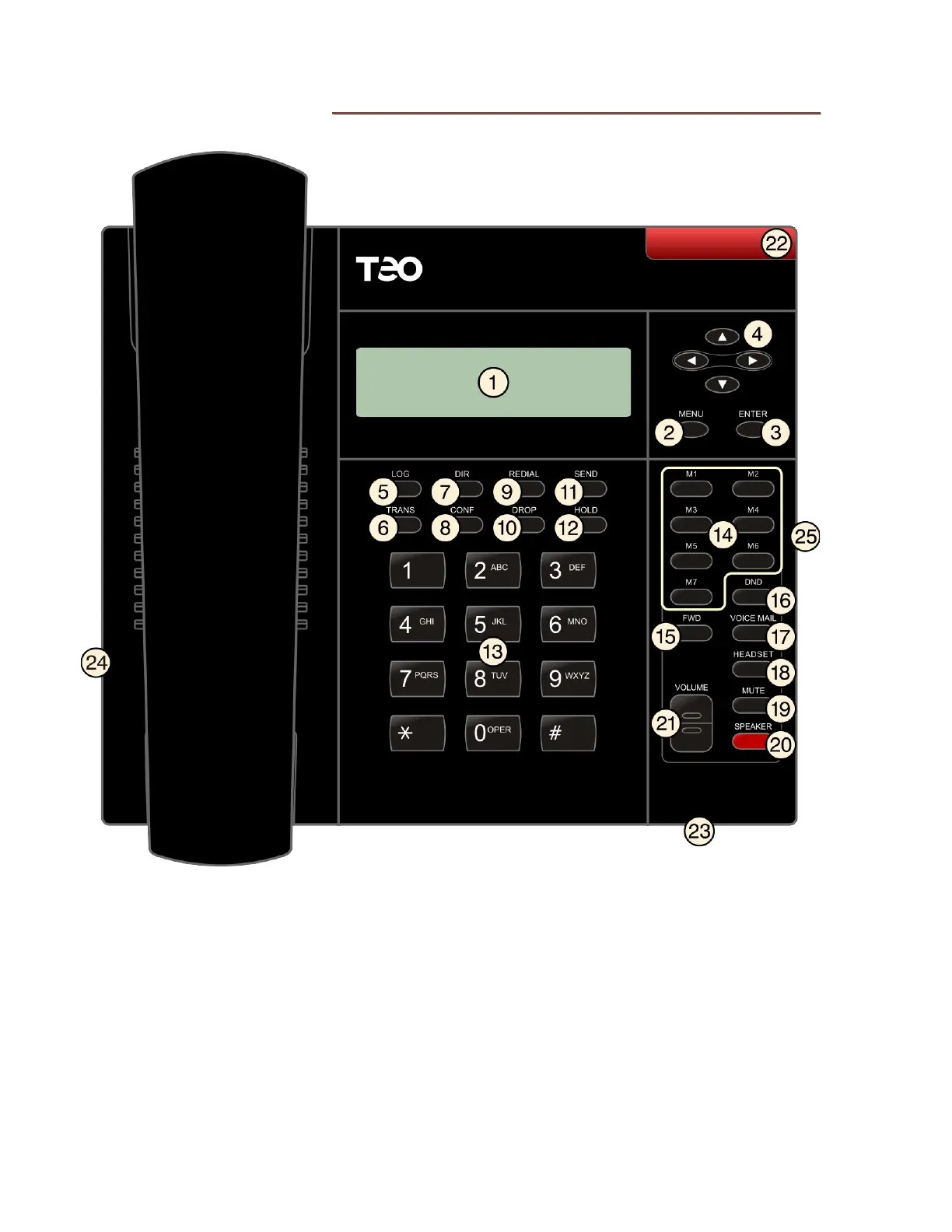
1) Display – shows the call state, caller ID, dialed digits, network call control messages,
elapsed time during calls, the date and time of day, and setup options.
2) MENU Key – enters and exits Setup Mode.
3) ENTER Key – select menu options, and can be used to initiate dialing.
4) Navigation (Arrow) Keys –
and
keys navigate within menus. In editing modes,
the
key moves the cursor one position to the right and the
key moves the cursor one
position to the left.
5) LOG Key – displays Call Log options.
6) TRANS Key – transfers a call.



 To Next Page