Controls and Operating
3-15
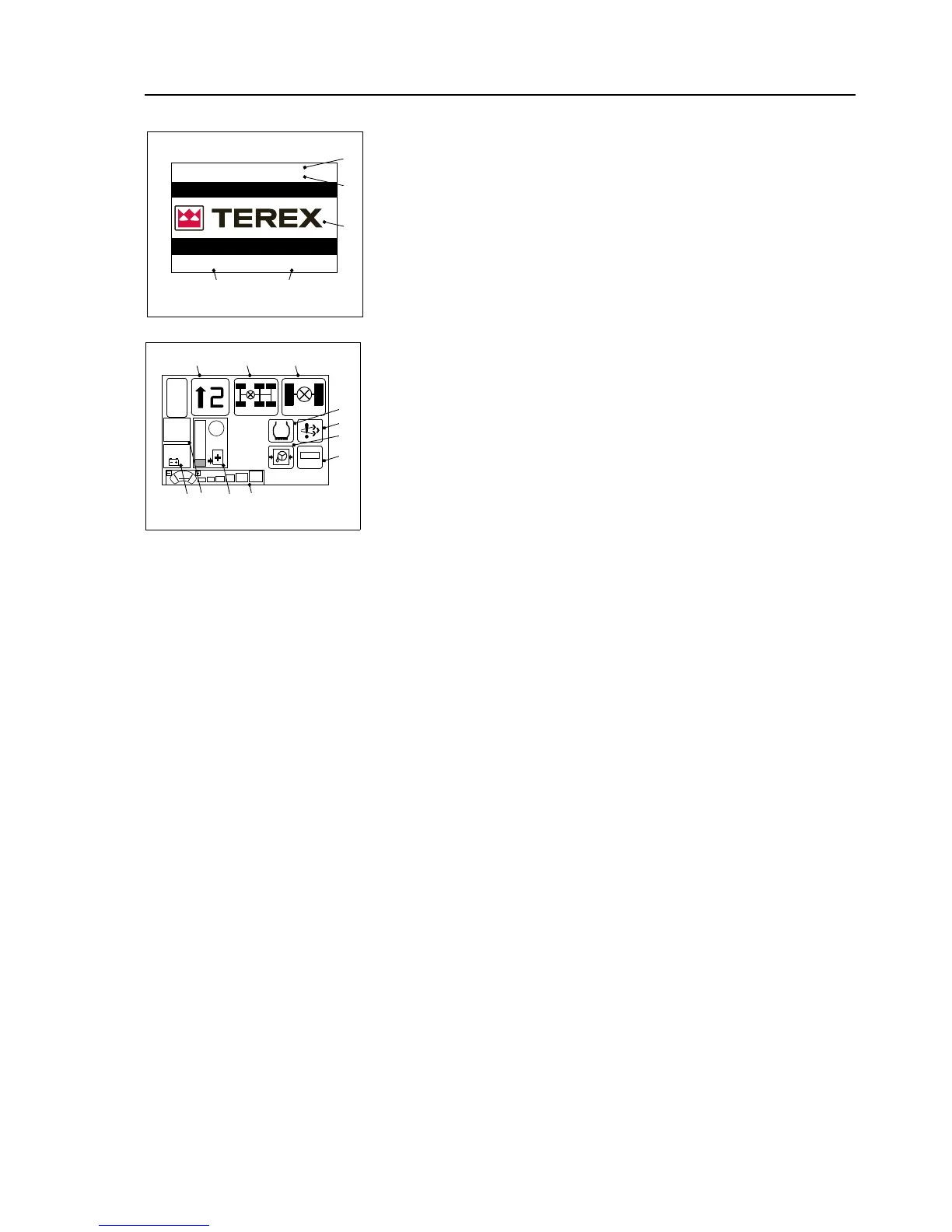
Screen - 1:
PowerUp Screen - Displays the Terex logo(1).
The Date (2) and Time (3) are displayed at the bottom of the screen.
Dashboard display software version (4) and MCU software version (5) are
displayed at the top of the screen.
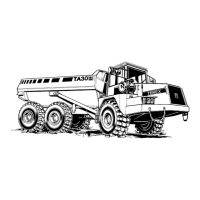
Screen - 2:
Main Screen - Displays several indicators, as shown.
1. Gear Indicator - The GEAR INDICATOR displays information
relating to the transmission status. The indicator displays the gear
selected and drive direction. Drive direction is indicated by a col-
ored arrow: Green = Forward, Red = Reverse. The Transmission
drive mode: Automatic / Manual and Torque convertor status: Lock
- up / Converter is also shown.
2. Transmission Differential Lock Engaged - Displays if the trans-
mission differential Lock is engaged.
NOTICE: On trucks using Ergotraction software, this lamp will illumi-
nate briefly when accelerating quickly from rest and when the engine
brake is activated. In both cases this identifies that the differential lock
is engaging due to the level of torque/brake torque, and is normal.
Ergotraction software, where fitted, monitors the torque/speed output
to front and rear drives, and if the difference exceeds design parame-
ters the TCU sends a signal to apply the differential lock automatically,
locking the front and rear outputs and resulting in 1:1 drive.
3. Cross Axle Differential Lock Engaged - Displays if the cross
axle differential lock is engaged.
NOTICE: Cross Axle Differential Lock activates only when transmis-
sion differential lock is switched on and the vehicle speed is less than
15km/h.
4. Steering Oil Pressure Low - Illuminates to warn of a fault in the
steering system supply pressure. Illuminates when the ignition is
turned on and pressure is low. If the light illuminates, stop the
machine and investigate the cause.
5. Traction Control Active - Displays if the traction control is active.
6. Diesel Exhaust Fluid Tank Indicator - The ADD BLUE TANK
INDICATOR shows the current fluid level in the add blue tank in
graphical form (bargraph) as well as a numerical value 0…100%.
The red warning indicator illuminates if the fluid level is at 20% or
below.
NOTICE: The engine power derates gradually as the DEF level
reduces.
7. Front Windscreen Wiper Intermediate Status Bar - Displays the
speed stage at which the wiper is operating.The front windscreen


 To Next Page