TIME key display current data and time.
16. Keys : Setting current date and time, or recall manual data
memory to read memory data in cycles control keys.
17. START key : Start auto datalogging function.
18. STOP key : Stop auto datalogging function. Press START key to resume
recording in current data sets.
19. MEMORY key : Manual data memory control key. Press MEMORY key each
time to store one set current display reading into the
memory, the M annunciator and the memory address
number is displayed, total memory size is 99 sets.
20. READ key : Read manual memory data control key.
21. POWER Key : Display measured power value control key, the Pt123,
Qt123 and St123 annunciators will be displayed in cycles.
22. ENERGY key : Display total integrated power energy value control key, the
three h annunciators will be displayed.
23. KEY Lock key : Lock all the functions key, except
and keys, the
LOCK annunciator is displayed.
24.
key : Power on-off control key.
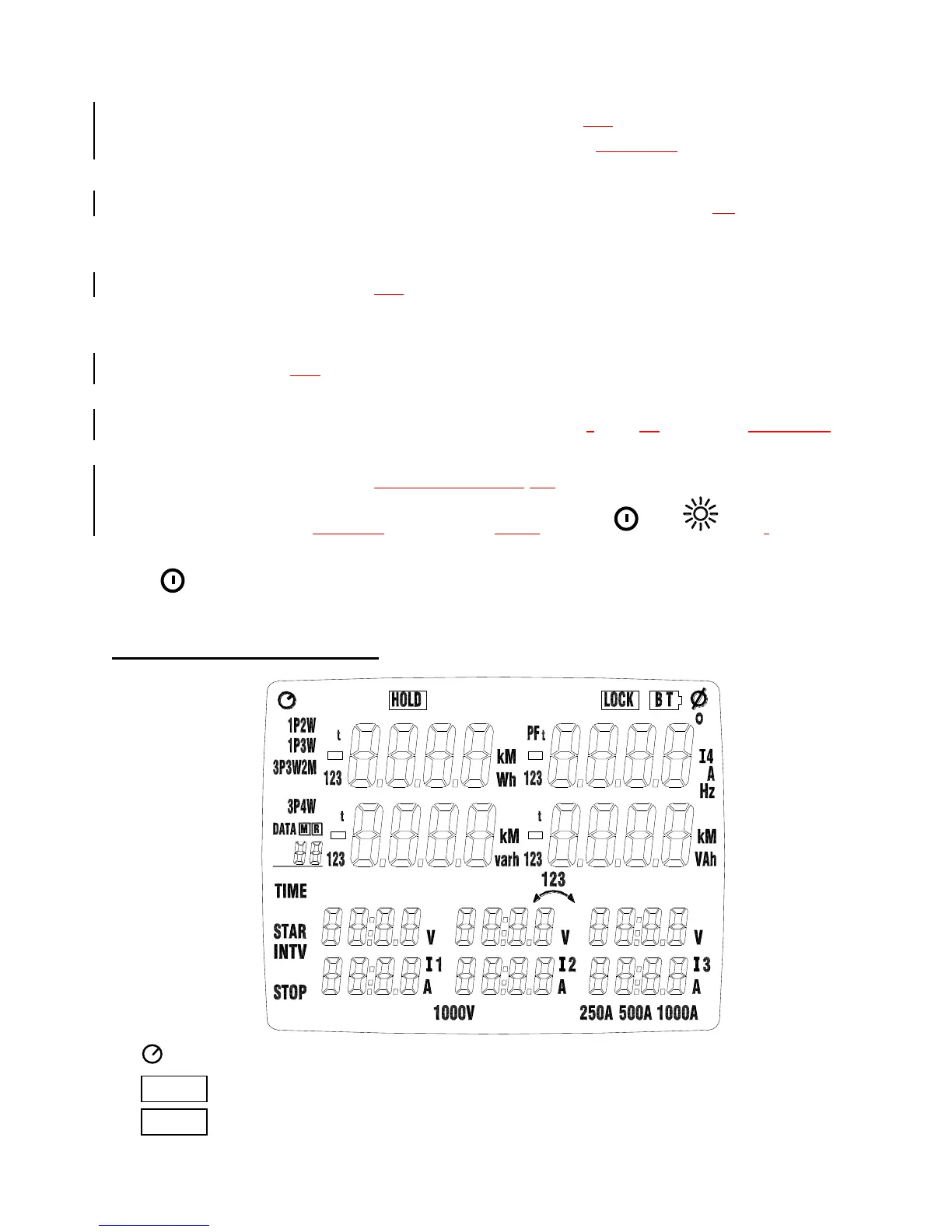
4-2 Description of Display
: Auto power off indication.
HOLD : Display hold mode.
LOCK : Set key lock mode.
Shop for Data Logging products online at: www.DataLoggerStore.ca 1.877.766.5412



 To Next Page