STEP 4 - MOUNT POWERWALL
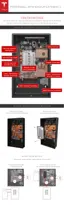
1. With Powerwall still in its box, keeping it as level as possible, lift it so that the mounting cleat
is just above the lip on the wall mount bracket. Use the tape or pencil marks on the wall as
visual guides.
2. Lower Powerwall so that the cleat on the back of Powerwall fits securely over the lip on the
bracket.
3. Ensure that Powerwall is centered on the bracket. When properly centered, Powerwall sits
between the two protruding tabs on the bottom part of the bracket.
Step-by-Step Installation Instructions
14



 To Next Page