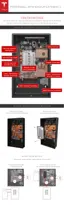
STEP 6 - REMOVE THE BOTTOM COVER
Warning: Before beginning the wiring portion of the installation, verify that the inverter is
powered o.
1. Use a 10 mm hex socket to remove a 10 mm external hex M6 screw on each side of the bottom
cover.
2. Carefully slide o the bottom cover, ensuring that nothing is caught or bent.
3. Set the bottom cover and the 2 screws aside for reassembly after the wiring is complete.
Step-by-Step Installation Instructions
16



 To Next Page