STEP 11 - FEED WIRES THROUGH THE CONDUIT PLATE OR CABLE GLAND
Depending on regional requirements, Powerwall can be installed either through conduit or
through a cable gland. Follow local codes to determine which is appropriate.
The conduit plate hole has a 28.2 mm (1.11 in) diameter. It supports ¾” trade fittings, and PG-21 and
M25 glands. The conduit plate has passed water ingress testing with individual cables squeezed
together in a single gland. All fittings other than the conduit plate itself are provided by the
installer.
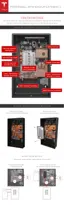
The access point on Powerwall is centered on the bottom of the device.
1. (Optional) Use a a T30 Torx driver to remove the conduit plate.
2. For conduit configurations, feed the wires through the conduit and conduit opening. Make
sure that wires are not frayed.
3. For cable gland
configurations, push out the protective coverings and feed the wires through
the gland. Make sure that wires are not frayed.
4. Tighten the gland or conduit opening to the housing plate.
5. If the conduit plate was removed, reattach it to Powerwall and torque to 7 Nm (62 in-lbs).
6. Route the cables along the same path as the internal wiring harness (toward the front of
Powerwall), then down to reach their destinations as shown in the circuit board image. The
plastic cover over the board has raised printing on it that names each terminal.
Step-by-Step Installation Instructions
22



 To Next Page