Installation
16
Internal design Testomat
®
808
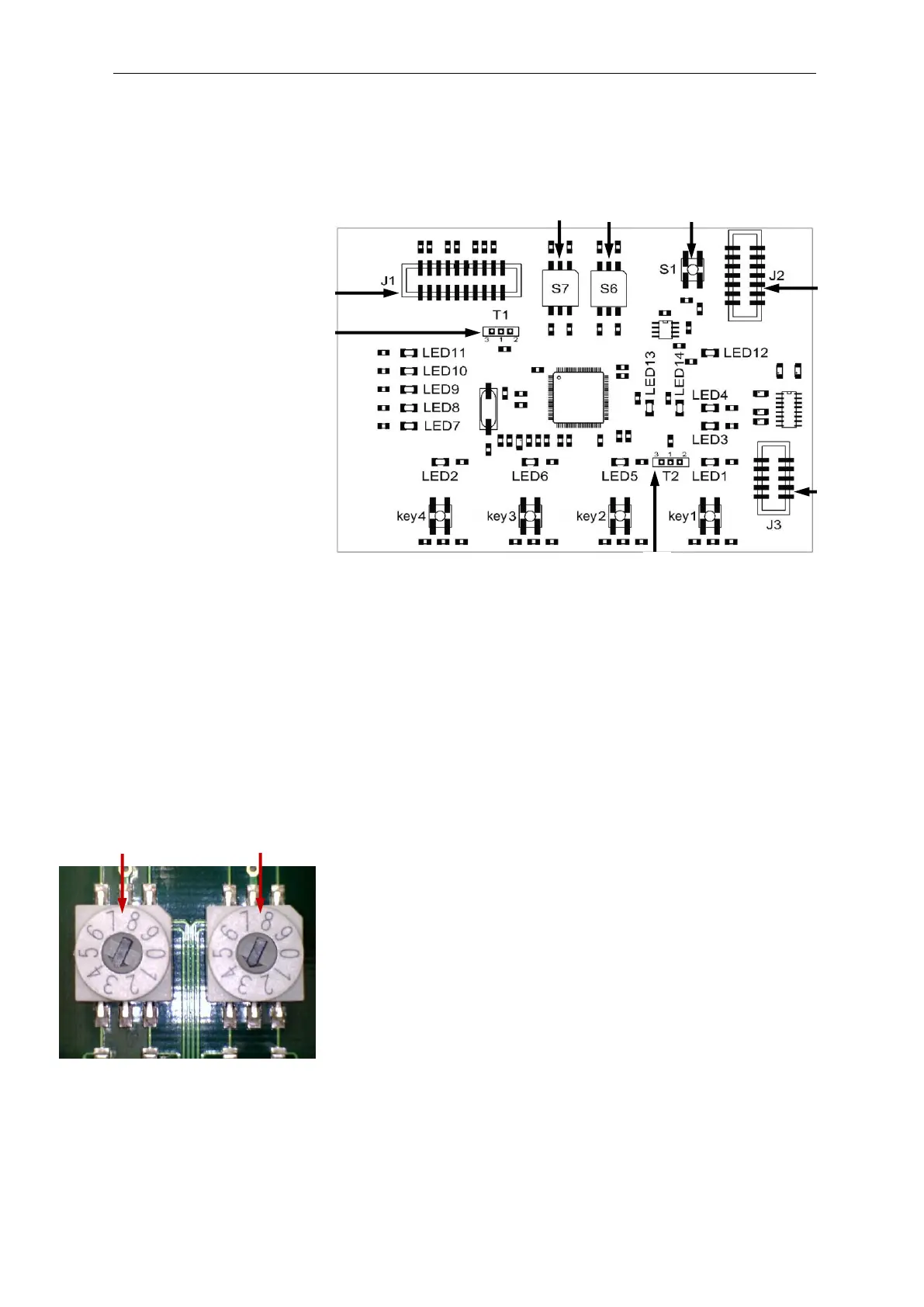
Rear of the controller board
Keys 1 to 4 are located at the front of the board. Please refer to the
section entitled “Functions of the operating and display elements” on
page 9 for a detailed description of its operating system and the dis-
play elements.
The following function keys and slide switches as well as plug con-
nectors are also provided:
Reset key S1
Use reset key S1 to execute a reset, i.e. to reset the firmware of
Testomat
®
808 after an update.
Function key S6
Use function key S6 to set the interval pause between measure-
ments. Please refer to the section entitled “Interval pause” on page
31 for an overview of possible switching positions and interval paus-
es. (The standard setting is 3.)
Function key S7
Use function key S7 to set the switching behaviour of the relays
K1 and K2. Please refer to the section entitled “Switching functions of
the relays K1 and K2” on page 24 for an overview of possible switch-
ing positions. (The standard setting is 3.)


 To Next Page