Helpline No. UK/ North Ireland 0871 37 61 020 Rep. Ireland 1-800-992 508
Web Support www.medion.co.uk
Model Number: 82663
24
Switching off the VOL/MUTE universal function for a
specific device
You can program the universal remote control in such a way that it will use only that
particular device’s own VOL/MUTE functions. The "Punch Through" function for this
device is therefore switched off.
The universal function cannot be switched off for the TV mode. As described in the
previous section, if you have selected a different mode for the VOL/MUTE universal
function, you will not be able to switch off the universal
function for this mode either.
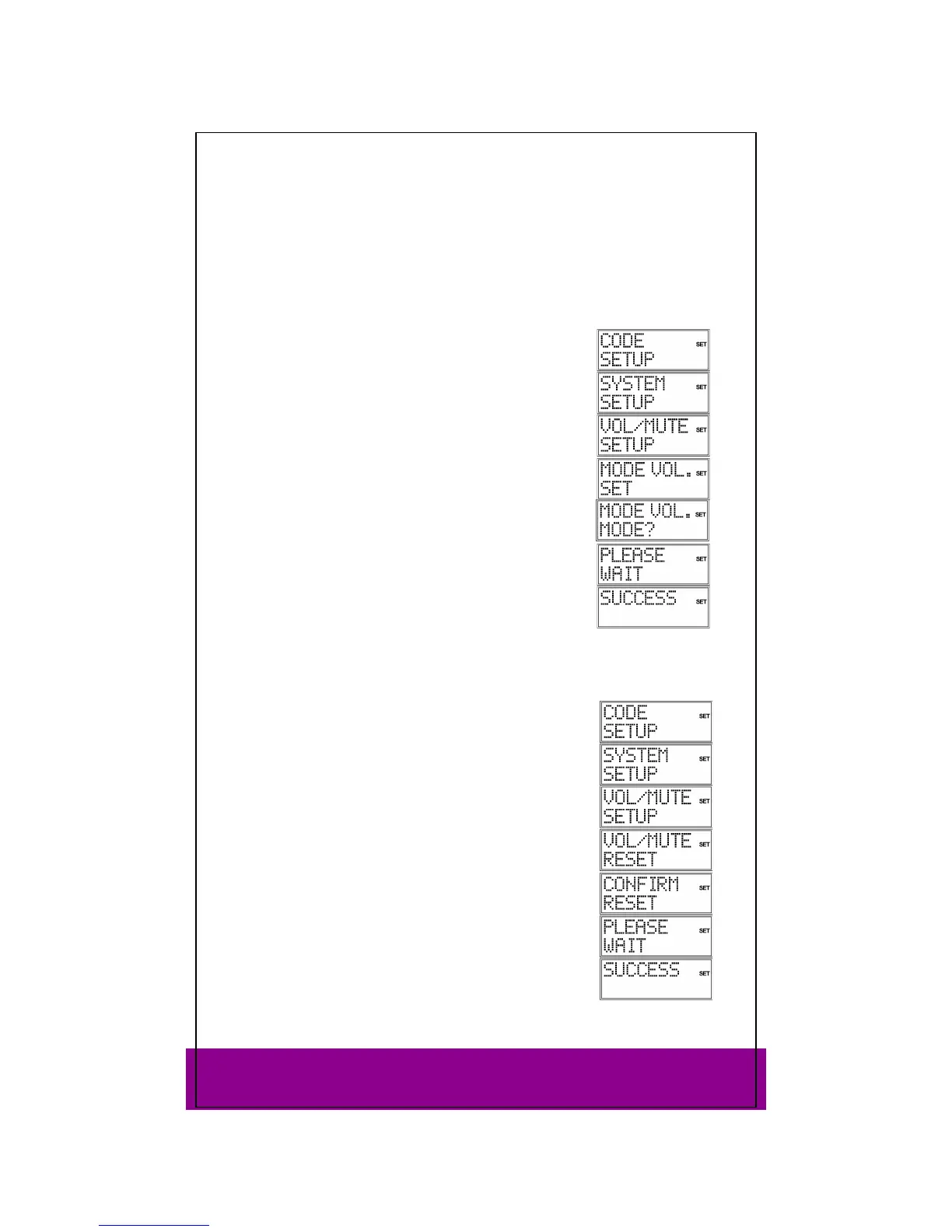
Keep the SETUP key pressed down for approx. 3 seconds,
until
CODE SETUP appears.
Press SETUP again briefly to open
SYSTEM SETUP.
Press OK. The VOL/MUTE SETUP is displayed.
Press OK again. The ALL VOL SET menu is displayed.
Use the arrows to select the
MODE VOL. SET menu. Use this
menu to switch off the VOL/MUTE universal function for an
individual device that you can select in the next step.
Press OK. The
MODE VOL MODE? query appears.
Use a mode key to select the device type which should have
its own VOL/MUTE control (not: TV).
PLEASE WAIT appears in the display, followed by the
confirmation message SUCCESS.
Restoring the VOL/MUTE universal function factory settings
If you have changed the universal VOL/MUTE functions as described in the previous
two sections, you can reset the functions to the factory settings.
Keep the SETUP key pressed down for approx. 3 seconds,
until
CODE SETUP appears.
Press SETUP again briefly to open
SYSTEM SETUP.
Press OK. The
VOL/MUTE SETUP is displayed.
Press OK again. The
VOL/MUTE ALL menu is displayed.
Use the arrows (press twice) to select the
VOL/MUTE RESET
menu.
Press OK. The
CONFIRM RESET message is displayed.
Confirm with OK to reset the settings.
PLEASE WAIT appears again in the display, followed by the
confirmation message
SUCCESS.



 To Next Page