Helpline No. UK/ North Ireland 0871 37 61 020 Rep. Ireland 1-800-992 508
Web Support www.medion.co.uk
Model Number: 82663
6
Overview 6
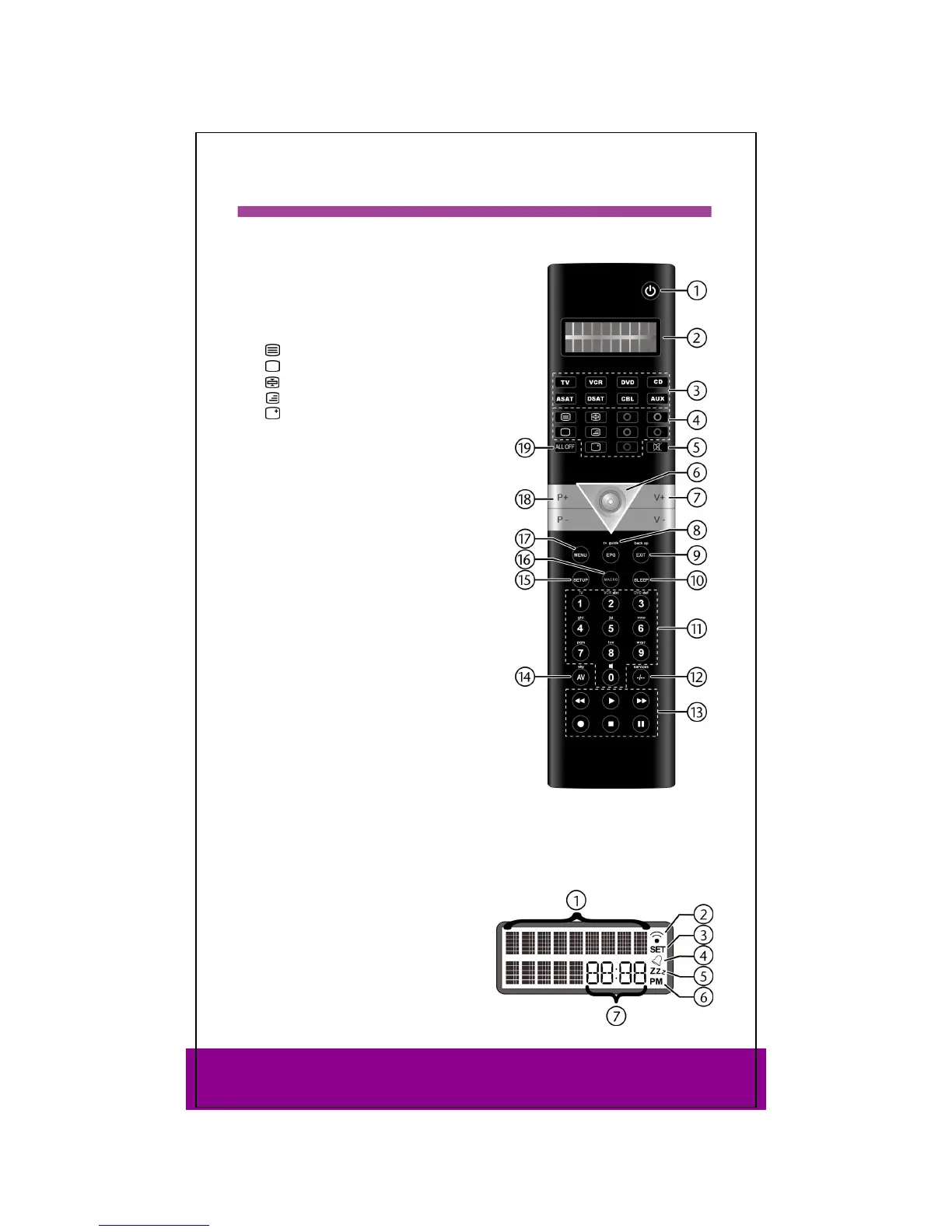
Device
1 Switch source on/off
2 Double spaced LCD display with
background
3 Mode keys for selecting the device
4 Video text keys:
: Video text on
: Video text off
: Video text hold
: Video text / TV mix
: Screen displays
5 Mute
6 Joystick: navigate up, down, left, right.
Select approprivate arrow direction; press
joystick: OK
7 Set volume
8 Electronic Program Guide: Electronic TV
programming; ShowView function
9 Exit menu
10 Automatic shutdown
11 Number keys for entering codes and
programme selection; keys 1-3: save
macros
12 Enter double-spaced numbers
13 Playback control:
: Start playback
/: Playback fast backward/forward
: Recording
: Playback stop
: Playback pause
14 AV mode
15 press and hold: opens programming mode
(e.g. for entering a device code) press
briefly: Display date (instead of time)
16 Programming macros
17 Open menu
18 Programmme selection
19 press once to switch one device to and from standby mode; press twice to switch
all devices to and from standby mode
Display
1 Alternating text displays
2 IR signal is being transmitted
3 Setup mode is active
4 Timer is active
5 TV sleep timeer is active
6 Time format: AM/PM
7 Date, time or device code



 To Next Page