34
SLOU489–August 2017
Submit Documentation Feedback
Copyright © 2017, Texas Instruments Incorporated
Overview of the AFE5832 EVM GUI Features
Appendix B
SLOU489–August 2017
Overview of the AFE5832 EVM GUI Features
This section provides a quick overview of the features and functions of the AFE5832 EVM GUI. The GUI
allows the user to easily configure the various functions of the AFE such as receiver gain, bandwidth
settings, and timing or clocking control settings.
Operations in the GUI should only be performed after the status at the bottom left-hand corner of the GUI
reads Idle.
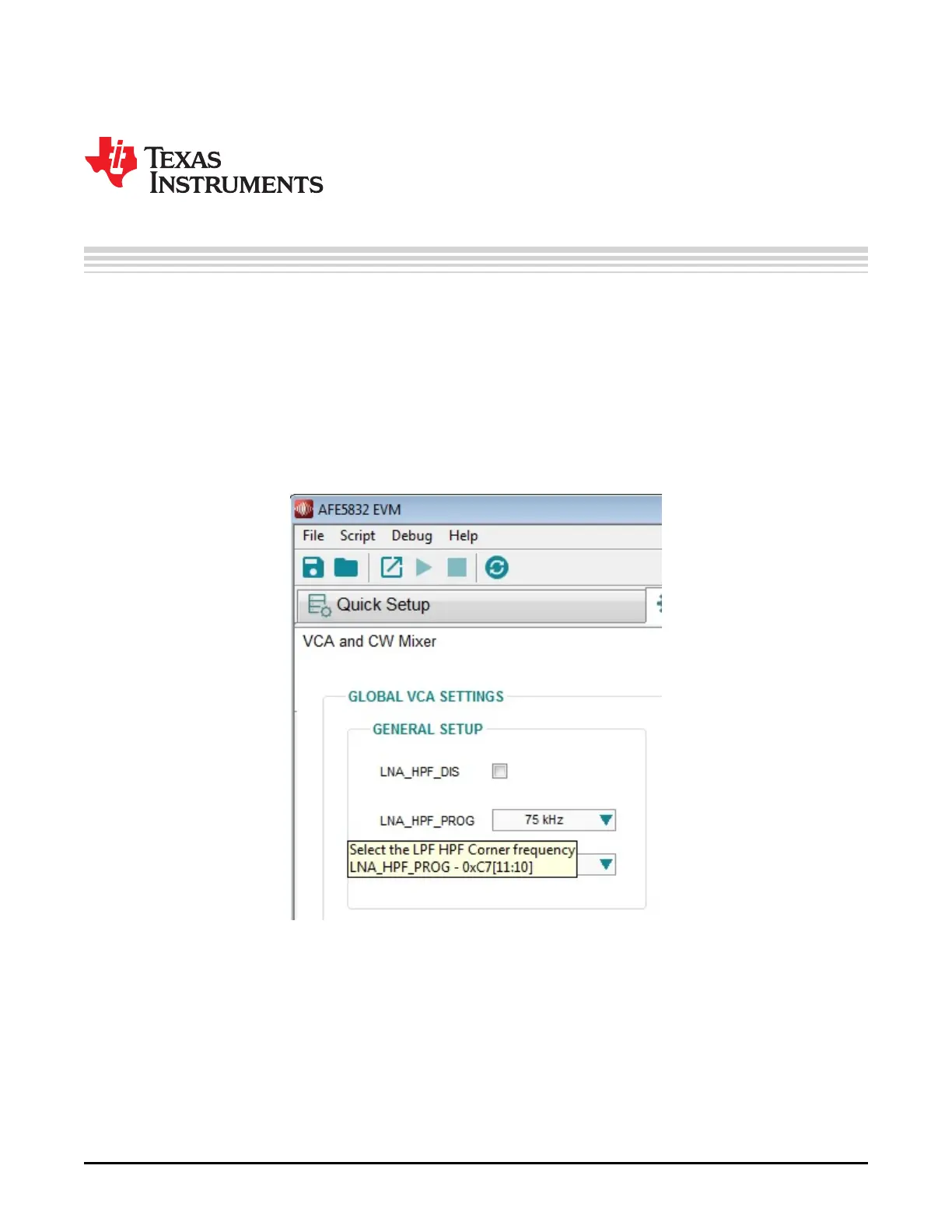
Furthermore, hovering over a control within any of the GUI subtabs provides a description of what the
specific control does and shows what register fields would be updated using this control. For example, in
Figure 46, hovering over ‘LNA_HPF_PROG’ or its corresponding drop-down menu brings up a light yellow
box describing what this control is responsible for and what register it corresponds to.
Figure 46. AFE5832: Hovering Over Controls
The 5 main tabs and their subtabs are as follows:
• Quick Setup
– HSDC Pro Related Parameters
• fsamp
• ADC Input Target Frequency
– DUT Reset and Initialize Device
– Data Format
• Output Format







 To Next Page