www.ti.com
Testing the EVM in Digital Time Gain Compensation (DTGC) Mode
15
SLOU489–August 2017
Submit Documentation Feedback
Copyright © 2017, Texas Instruments Incorporated
AFE5832 32-Channel Analog Front-End Evaluation Module (EVM Rev. A)
5 Testing the EVM in Digital Time Gain Compensation (DTGC) Mode
Use the following steps to test the EVM in DTGC mode:
a. Input a 5-MHz, –20-dBm signal to any SMA input on the AFE EVM. Connect a 5-MHz filter to the input
signal. Connect a single SMA-SMA cable from J11 (TSW EVM) to J37 (AFE EVM).
b. Change the jumper configurations as outlined in Section C.1.3 and apply a 160-MHz, 10-dBm external
LMK input clock to J56 or clock at 4× the desired ADC sample rate.
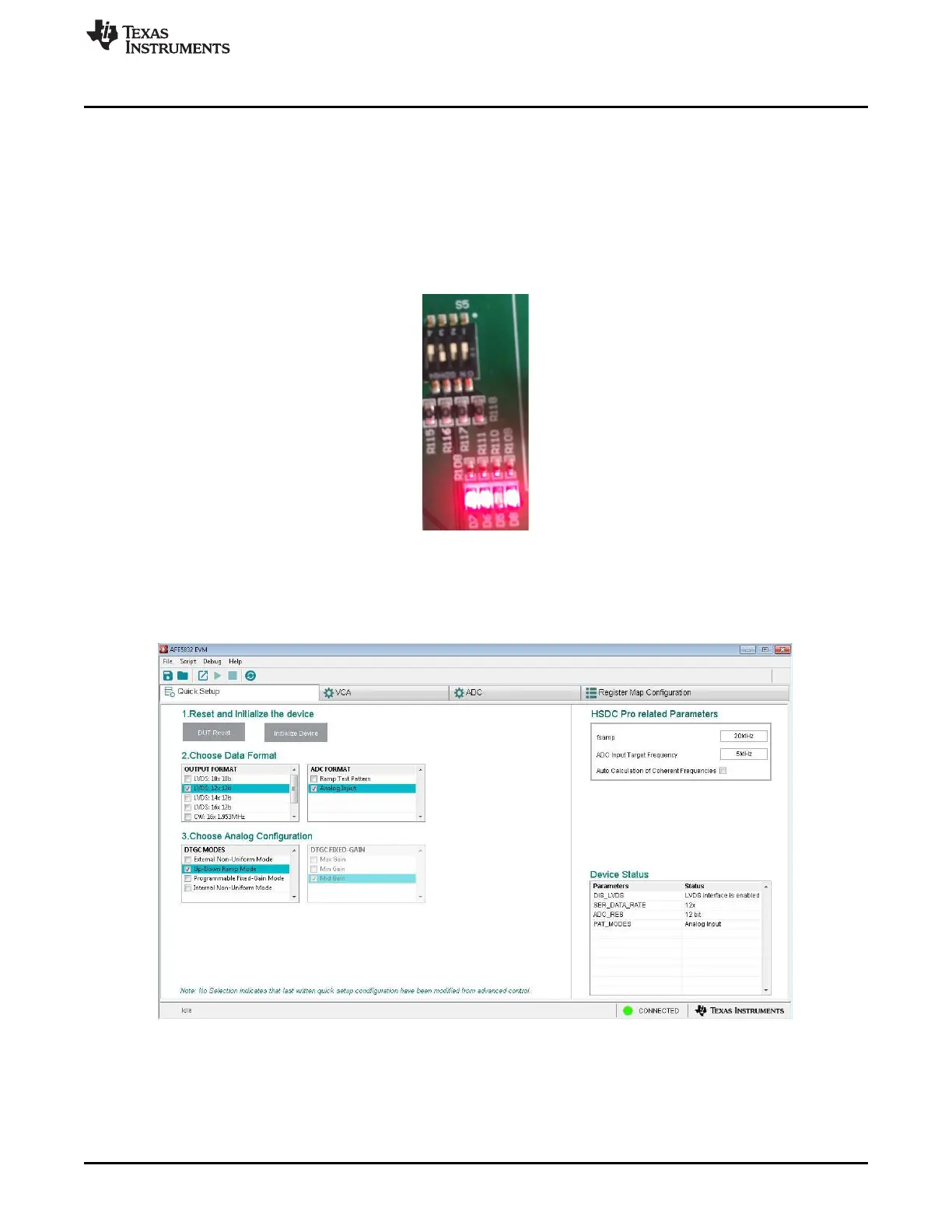
c. Set the switches of the AFE5832 EVM at S5 for 'Up-Down Ramp Mode' as Figure 15 illustrates. LEDs
D6-D8 should be lit and LED D5 should be off.
Figure 15. DTGC Mode Test: AFE5832 EVM Switches (S5)
d. Choose AFE5832.ini as firmware on HSDC Pro.
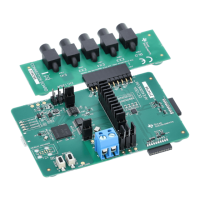
e. Change the DTGC Mode on the AFE5832 EVM GUI to ‘Up-Down Ramp Mode’ and configure the other
formats as shown in Figure 16:
Figure 16. DTGC Mode Test: Change GUI Configuration
f. In HSDC Pro, navigate to the Trigger Option menu. Choose “Trigger mode enable” and “ Arm on next
capture button press” as shown in Figure 17.







 To Next Page