www.ti.com
Register Map Configuration Tab
43
SLOU489–August 2017
Submit Documentation Feedback
Copyright © 2017, Texas Instruments Incorporated
Overview of the AFE5832 EVM GUI Features
B.4 Register Map Configuration Tab
The Register Map Configuration tab is a tool to write to and read from specific registers using SPI. The tab
contains multiple useful subsections and features that allow the user to interact with the register map,
select update modes, and manipulate register values.
B.4.1 Tab Subsections
The following key words are useful in navigating the map:
• Register Map: Displays all the details for each of the registers in the device as well as the fields and
bits contained within that register
• Field View: Displays all the Field Names and Field Values corresponding to those names
• Register Description: Describes each of the fields within the registers and what writing a certain
sequence of ‘0s’ and ‘1s’ indicates in that particular field
• Update Mode: Allows the user to choose an Immediate or Deferred method of updating the content of
the registers
• Export HSDC Parameters: Updates HSDC Pro GUI with the register-level changes made to the
AFE5832EVM.
B.4.2 Register Map Interaction
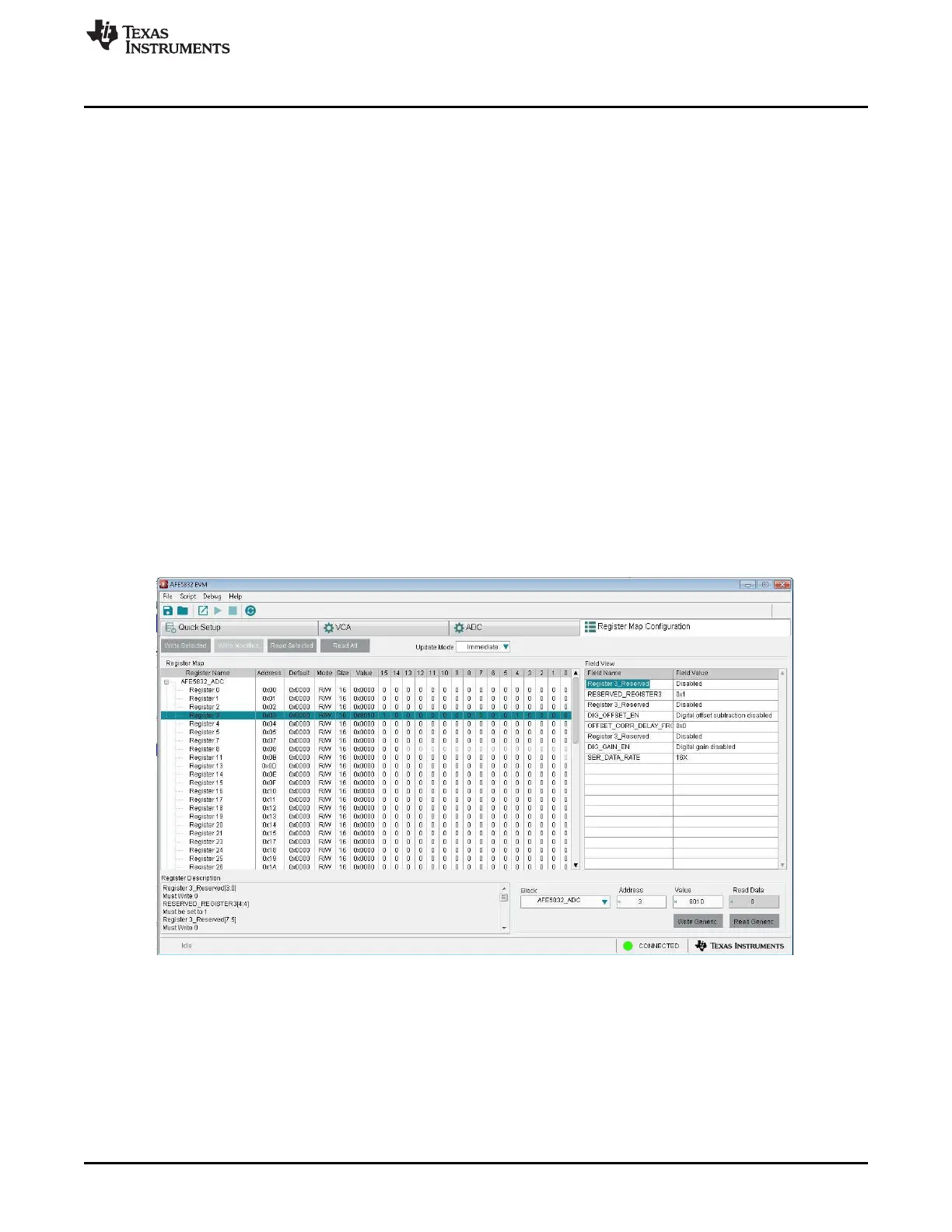
Clicking on a register name produces a list of the fields within that specific register. Clicking on a field
name highlights the bits within the register that correspond to that field. In Figure 54, Register 3 has been
clicked. All the fields within Register 3 come up on the right-hand side of the GUI. Clicking on any one of
these field names highlights the corresponding bits for this field in the Register Map.
Figure 54. Clicking on Register and Field Names







 To Next Page