AS 680/682
Description, Operation and Maintenance Maintenance and Repair
ADS−B
7−5Ed. 10.07
WARNING
Do not recharge, disassemble, heat above 100 °C or incinerate the lithium cell. Do not
short circuit, or solder directly on the cell. Disregard of the norms regarding the use of
lithium batteries may cause risk of fire, explosion or leaking out of toxic liquid and gas.
Run−down batteries are objects that can pollute the environment and must be disposed
of with proper precautions.
CAUTION
To avoid leakage discharge, never store the "Snaphat" housing on a conductive surface
(such as a dedicated anti−static foam pad used for ESD sensitive devices).
Replace the battery pack as follows (regard also manufacturers COTS documentation):
a) Connect the LCMS with the SBC serial port of GS via the LCMS serial cable (see Fig. 3−3).
b) Boot the LCMS and login as supervisor.
c) Start Minicom by clicking the following keys: right mouse key ? Misc. ? Minicom.
d) Switch the Ground Station OFF and ON again.
e) After you get a new message in the Minicom window press the ENTER"−key within 1 sec. The
COMMAND>" line is shown at the bottom.
f) Type: ENV ;S <Enter> to save the NVRAM contents into the system flash.
g) Switch OFF the Ground Station.
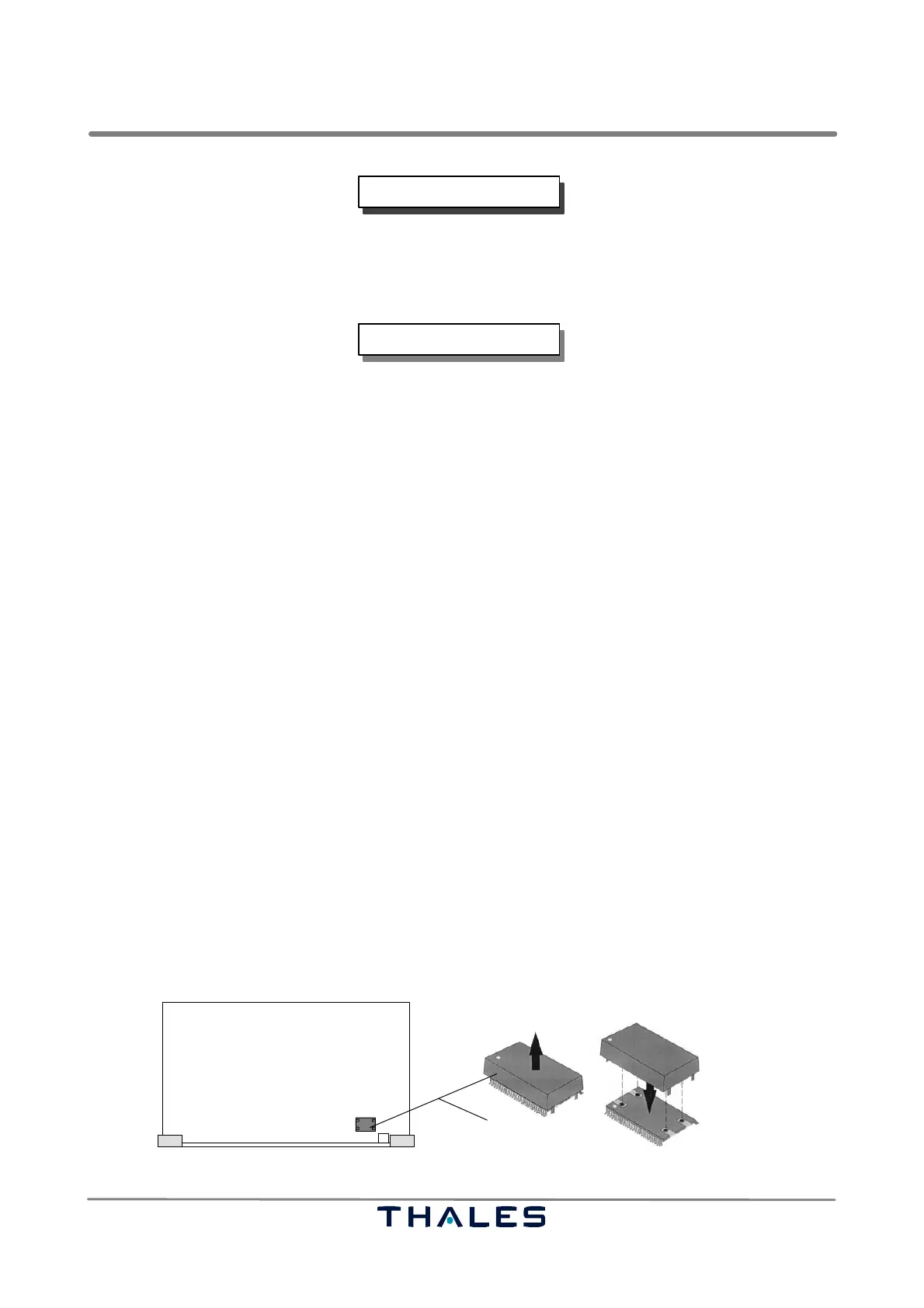
h) Remove the SBC using the unlocked handles left and right. The yellow Snaphat battery is located
near the front panel on the right hand side (see Fig. 7−3).
i) Carefully remove the Snaphat battery from its location. The Snaphat battery in mounted on the
M48T59 device.
j) Insert the new Snaphat battery carefully to its base. The battery is keyed to prevent reverse inser-
tion.
k) Insert the SBC to the SPU subrack and lock with handles.
l) Switch ON the Ground Station.
m)After you get a new message in the Minicom window press the ENTER"−key within 1 sec. The
COMMAND>" line is shown at the bottom.
n) Type: ENV ;C <Enter>
o) Enter new date and UTC time (it is necessary because the RTC contents becomes undefined if the
battery is removed). Type: DATE MM DD hh mm YYYY
<Enter>
p) Switch the Ground Station OFF and ON again.
q) Remove the LCMS from the SBC. Battery exchange is now finished.
Snaphat battery
SBC board
MT48T59 device
Fig. 7−3 Removing Snaphat battery pack from SBC



 To Next Page