4-34
User Manual PN 84469 Rev B
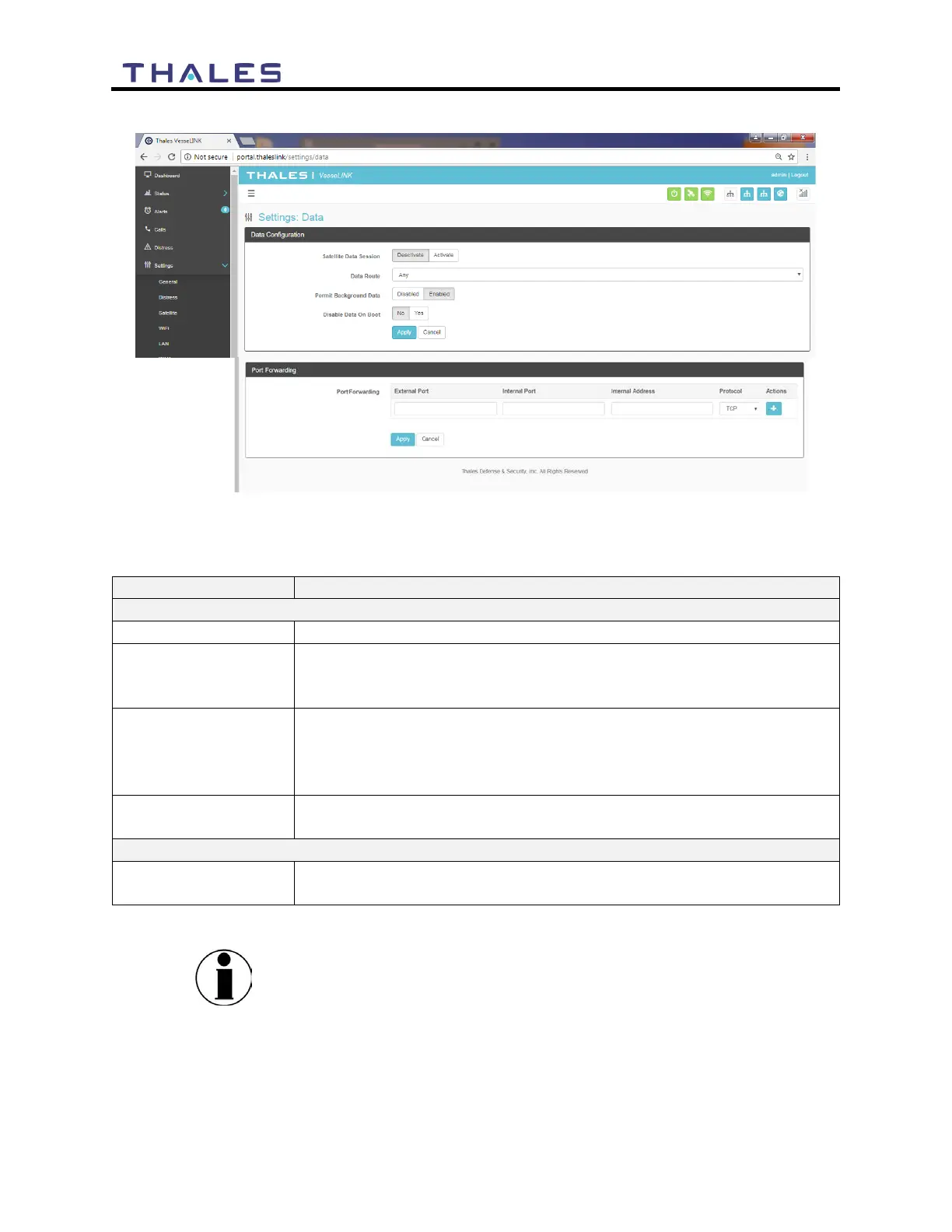
Figure 4-30 Settings
Data Screen
Table 4-11 Settings
Data
Deactivate / Activate (Activate is the default setting)
Select the desired data route (Any, Satellite, or WAN Port) (Any is
the default setting). The automatic data routing feature requires Any
Data
Disabled / Enabled (Enabled is the default setting). If Enabled, this
setting allows for GPS location information to be transmitted even
when data is disabled. This is valuable if location services are being
NO / YES (NO is the default setting). Determines the default data
operations state when the system is restarted.
Enter the External Port, Internal Port, Internal IP Address, and
Protocol.
NOTE
Since the system default for “Satellite Data Sessions” is OFF,
the “Disable Data on Boot” configuration has been added so that
when the system is turned off and on frequently, it comes up in a
known state each time for data. This allows the unit to start up
with data sessions turned on each time or to be off.


 To Next Page