5-1
User Manual PN 84469 Rev B
FIRMWARE UPGRADE
On occasion it may be necessary to update VesseLINK
™
software to add features or fix issues
found in the software. This section will step through the process of those updates. The firmware
file will contain updates for both the TU and the antenna if needed, so a single load automatically
updates both. It is important to make sure the system is connected, powered up, and operational
before attempting a firmware update. Do not remove power from the TU or remove the antenna
connection while an update is in process. This may cause a corruption to occur and force
reverting to the previous software version.
For SW reset or returning to factory defaults please refer to
Chapter 6 RESETS.
INSTALLING THE FIRMWARE ON VESSELINK
™
Via Computer or Mobile device.
1. With PC or Mobile Device connect to “ThalesLINK” on Wi-Fi or via Ethernet (RJ-45)
port.
2. Open a web browser and type: http://portal.thaleslink (do not type .com or any other
extension)
3. Once prompted enter Username and Password.
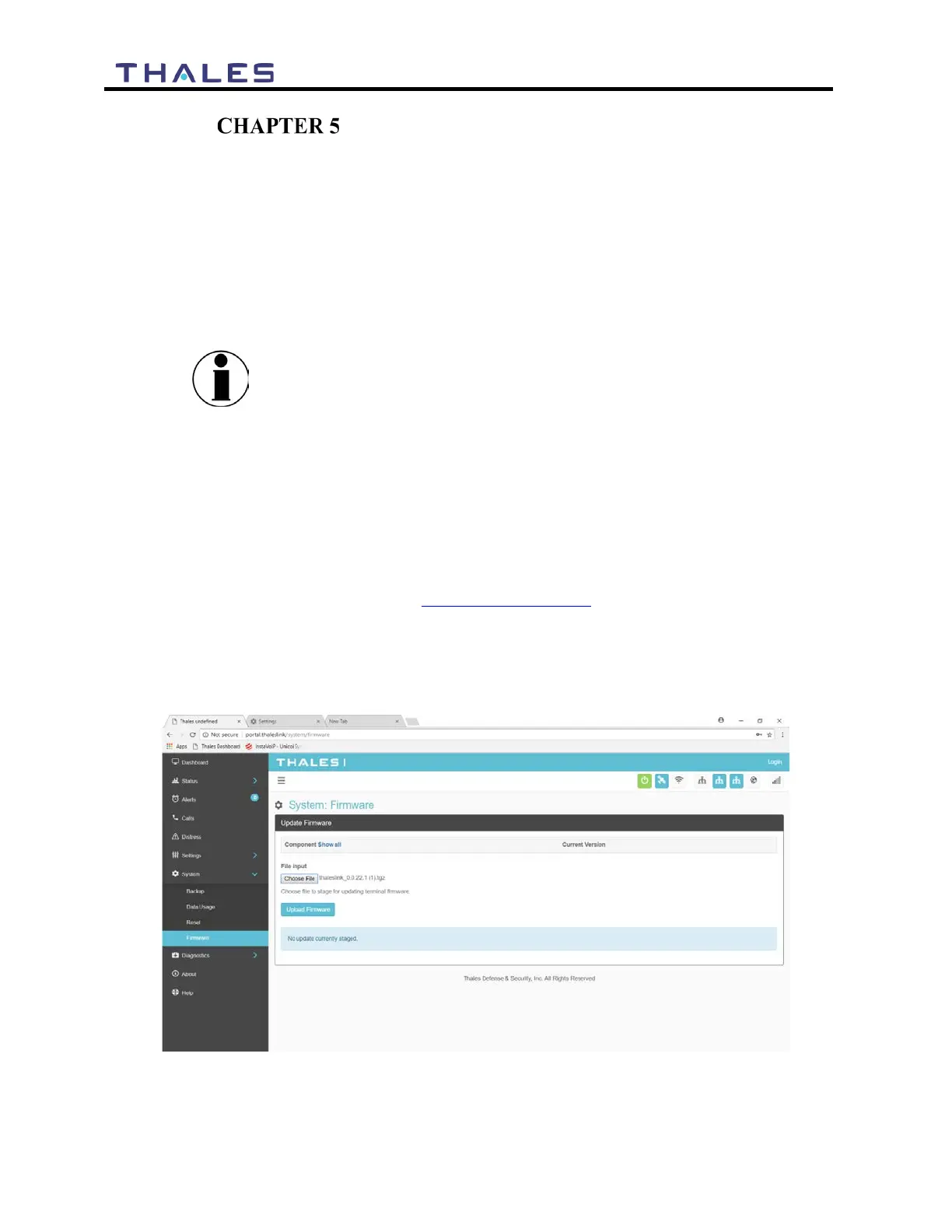
4. Navigate to the SYSTEM Firmware (Figure 5-1)
Figure 5-1 System
Firmware


 To Next Page