6-5
User Manual PN 84469 Rev B
SYSTEM RESETS
In a rare situation where the VesseLINK
™
system is not responding or operating properly, it may
be necessary to reset the system. There are varying levels of system resets that are explained
below:
Power Cycle
There are three (3) ways to power cycle the system:
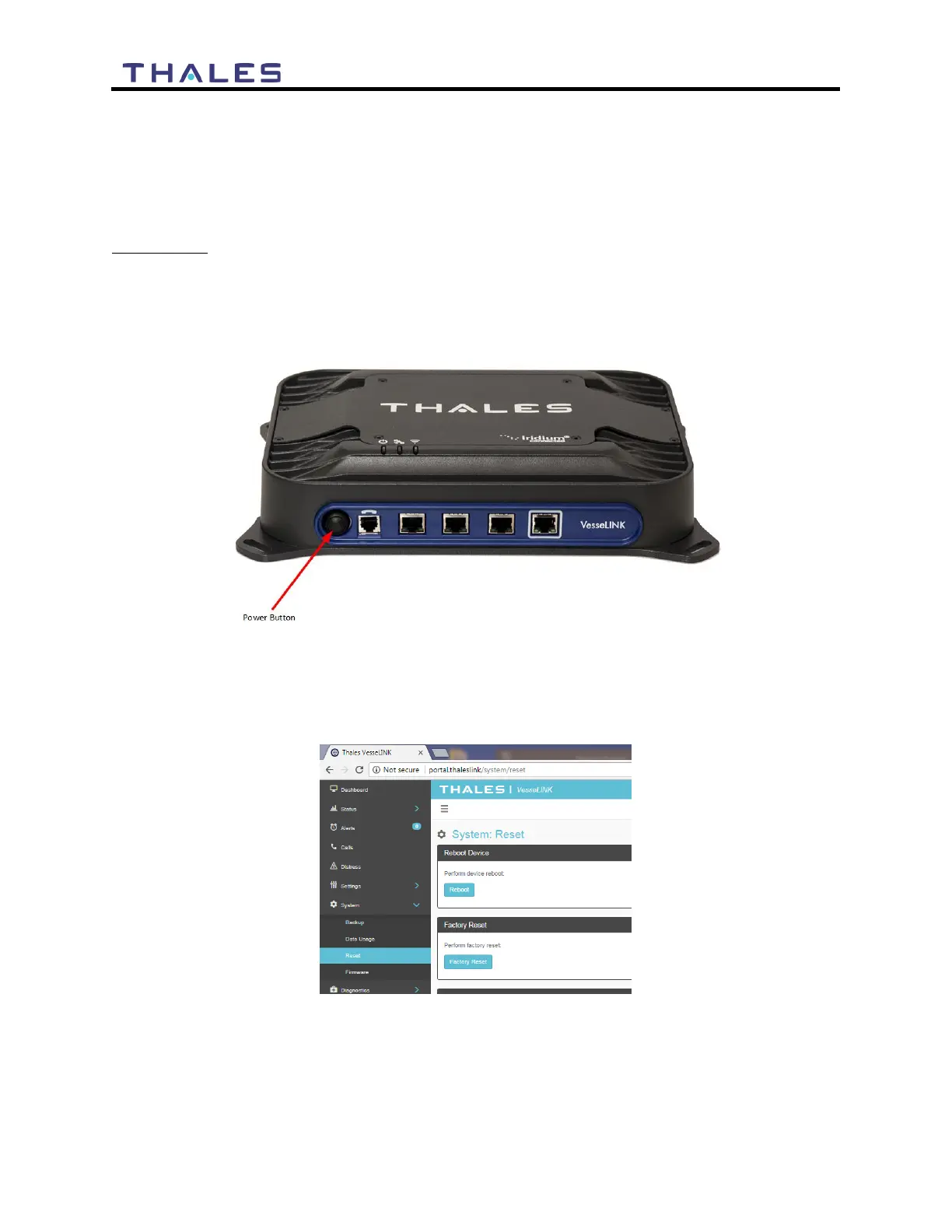
• If power is already on (LEDs are illuminated), press and release the Power Button on the
unit to power the unit off. Again, press and release the Power Button to power the unit
on. It will take a few minutes before the boot-up cycle completes.
Figure 6-1 Location of Power Button on BDU
• From the Management Portal, select SYSTEM RESET REBOOT DEVICE. Press
REBOOT. It will take a few minutes before the boot-up cycle completes.
Figure 6-2 Management Portal - SYSTEM
RESET
• If neither of these work, then unplugging the system from the power source may be
necessary. Note: Always wait at least 20 seconds for power inside the unit to dissipate
before reconnecting the input power.


 To Next Page