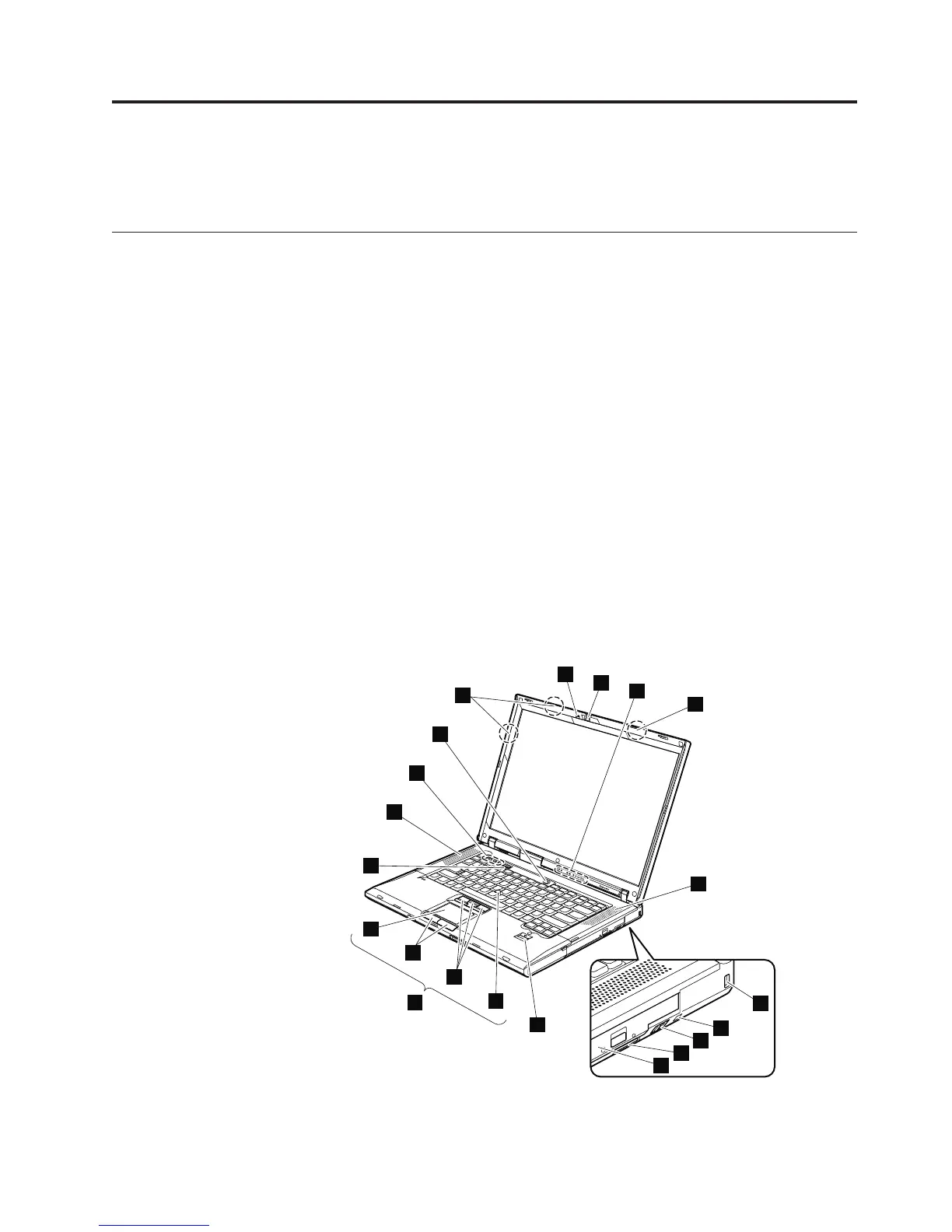
Locations
This chapter presents the location of ThinkPad R500 features and hardware.
Front view
1 ThinkLight
2 Integrated camera (for some models)
3 Status indicators Note: For the description of each indicator, see “Status
indicators” on page 71.
4 Wireless LAN antennas
5 Stereo speakers
6 Security key hole
7 Serial Ultrabay Enhanced status indicator
8 Serial Ultrabay Enhanced latch
9 Serial Ultrabay Enhanced device eject lever
10 Serial Ultrabay Enhanced
11 Fingerprint reader (for some models)
12 TrackPoint pointing stick
13 TrackPoint buttons
14 Touch pad buttons (for some models)
15 Touch pad (for some models)
16 UltraNav (for some models)
17 ThinkVantage button
18 Volume control buttons
19 Power switch
1
2
4
5
6
3
17
5
4
7
8
9
10
11
12
13
14
15
16
17
18
19
137
©CopyrightLenovo2008,2013



 To Next Page