Important notices for replacing the battery
Attention: Lenovo has no responsibility for the performance or safety of unauthorized batteries, and
provides no warranties for failures or damage arising out of their use.
Lenovo provides a diagnostic program to do an automatic battery diagnostic test, which can determine if the
removable battery is defective. A removable battery FRU should not be replaced unless this diagnostic test
shows that the battery is defective. The only exception to this is if the battery is physically damaged or a
customer is reporting a possible safety issue.
If no diagnostic program is installed on the computer, the customer should download and install the program
to diagnose the battery, before getting a non-physically damaged battery replaced. Note that the
replacement of a physically damaged battery is not covered by the warranty.
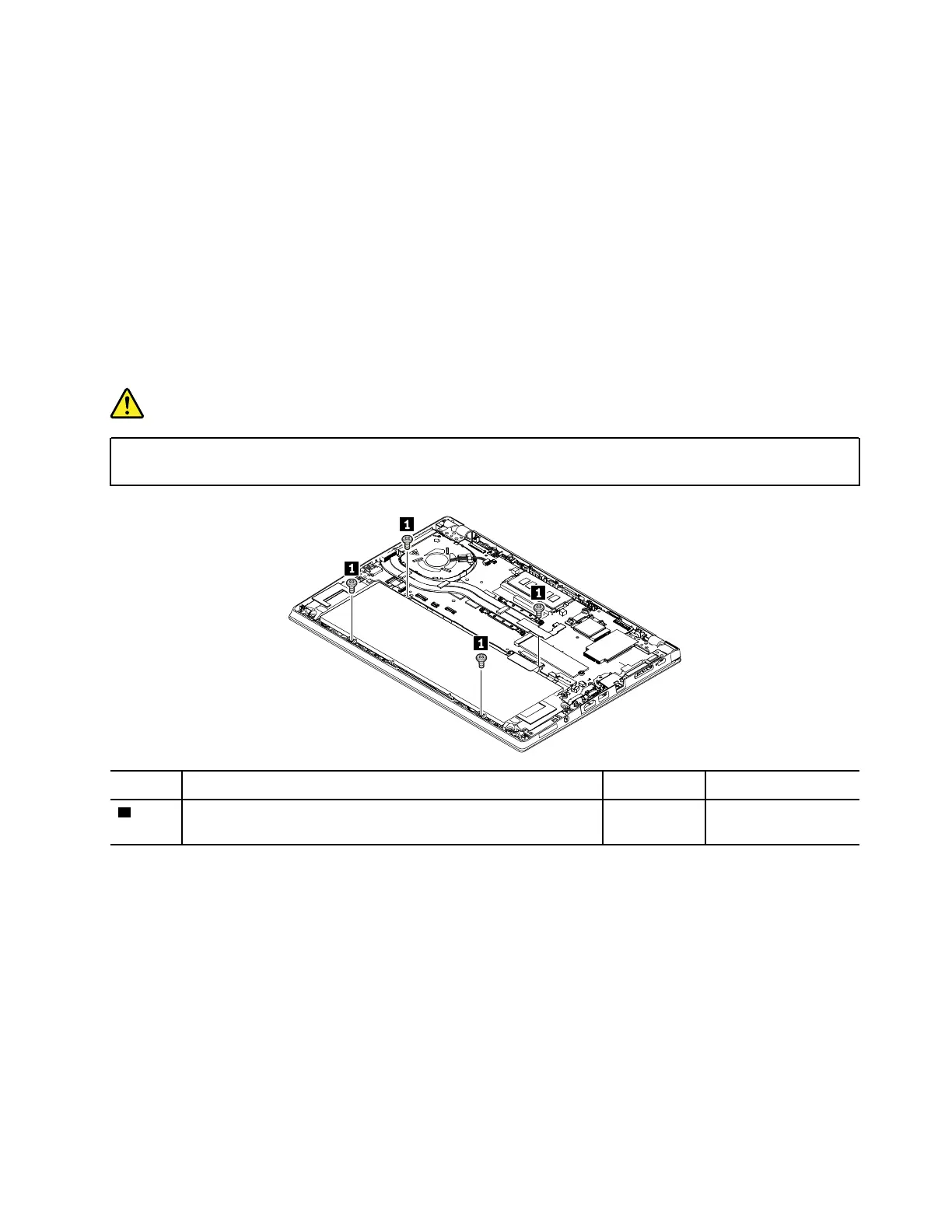
Removal steps of the built-in battery
DANGER
Use only the authorized battery specified for your computer. Any other battery could ignite or
explode.
Step Screw (quantity) Color Torque
1
M2 × 4 mm, flat-head, nylon-coated (4) Black 0.181 Nm
(1.85 kgf-cm)
Chapter 8. Removing or replacing a FRU 75



 To Next Page