1010 Keyboard
Note: You might be instructed to slide the keyboard frame forward or backward in some of the following
steps. In this case, ensure that you do not press or hold the keys while sliding the keyboard frame.
Otherwise, the keyboard frame cannot be moved.
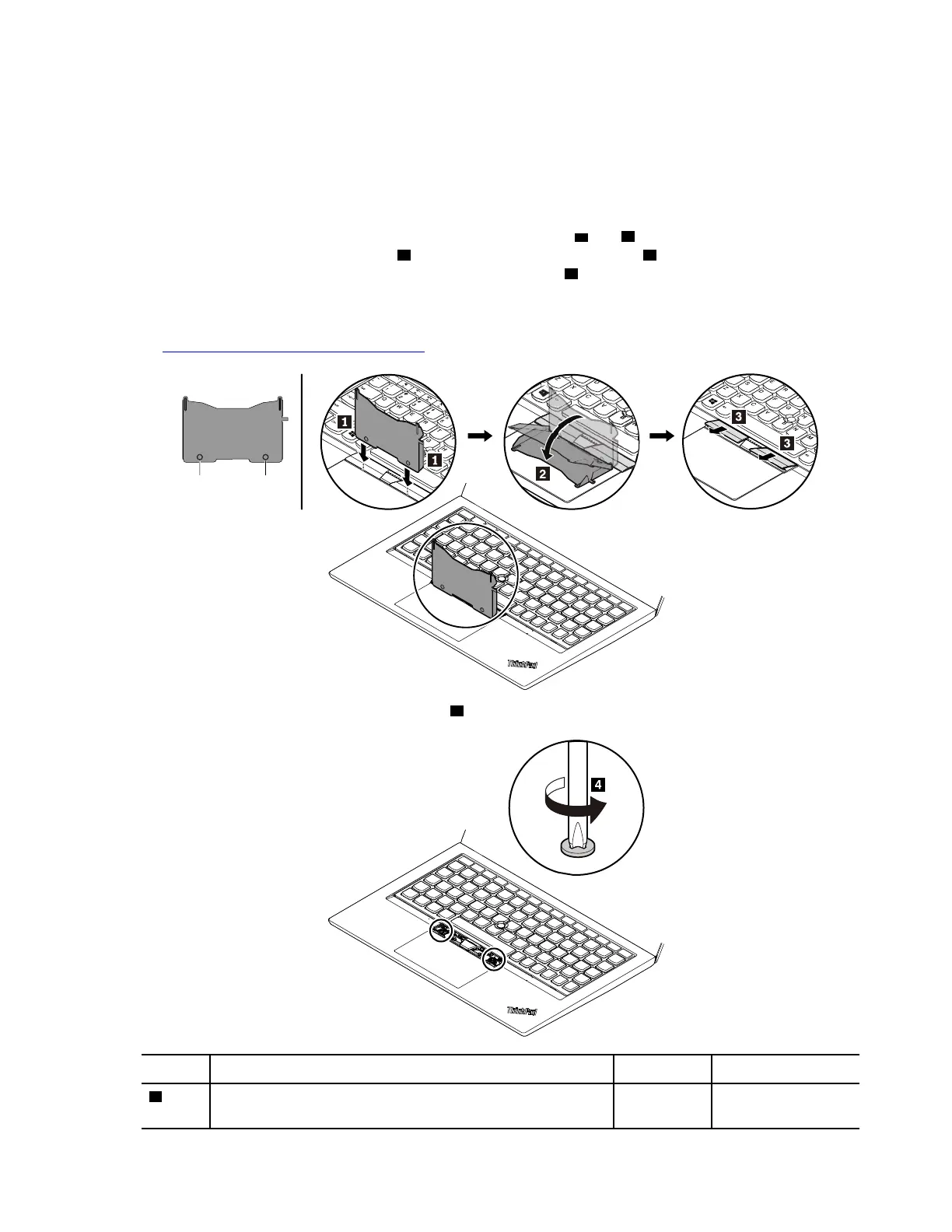
Removal steps of the keyboard
1. Take the tool out of the new keyboard package. Insert the tabs
a and b into the slot between the
TrackPoint buttons and the trackpad
1 . Slightly pivot the tool downward 2 to release the left and right
TrackPoint buttons. Then remove the two TrackPoint buttons
3 .
Note: If the keyboard must be removed to access other FRUs, you need the keyboard removal tool
(product part number: 01LX856) to remove the keyboard. You can purchase the tool as a separate FRU
at:
https://support.lenovo.com/partslookup.
2. Loosen the screws that secure the keyboard 4 .
Step Screw (quantity) Color Torque
4
M2 × 1.65 mm, flat-head, nylon-coated (2) Silver 0.143 Nm
(1.4 kgf-cm)
Chapter 8. Removing or replacing a FRU 63



 To Next Page