Using the mobile viewer
33
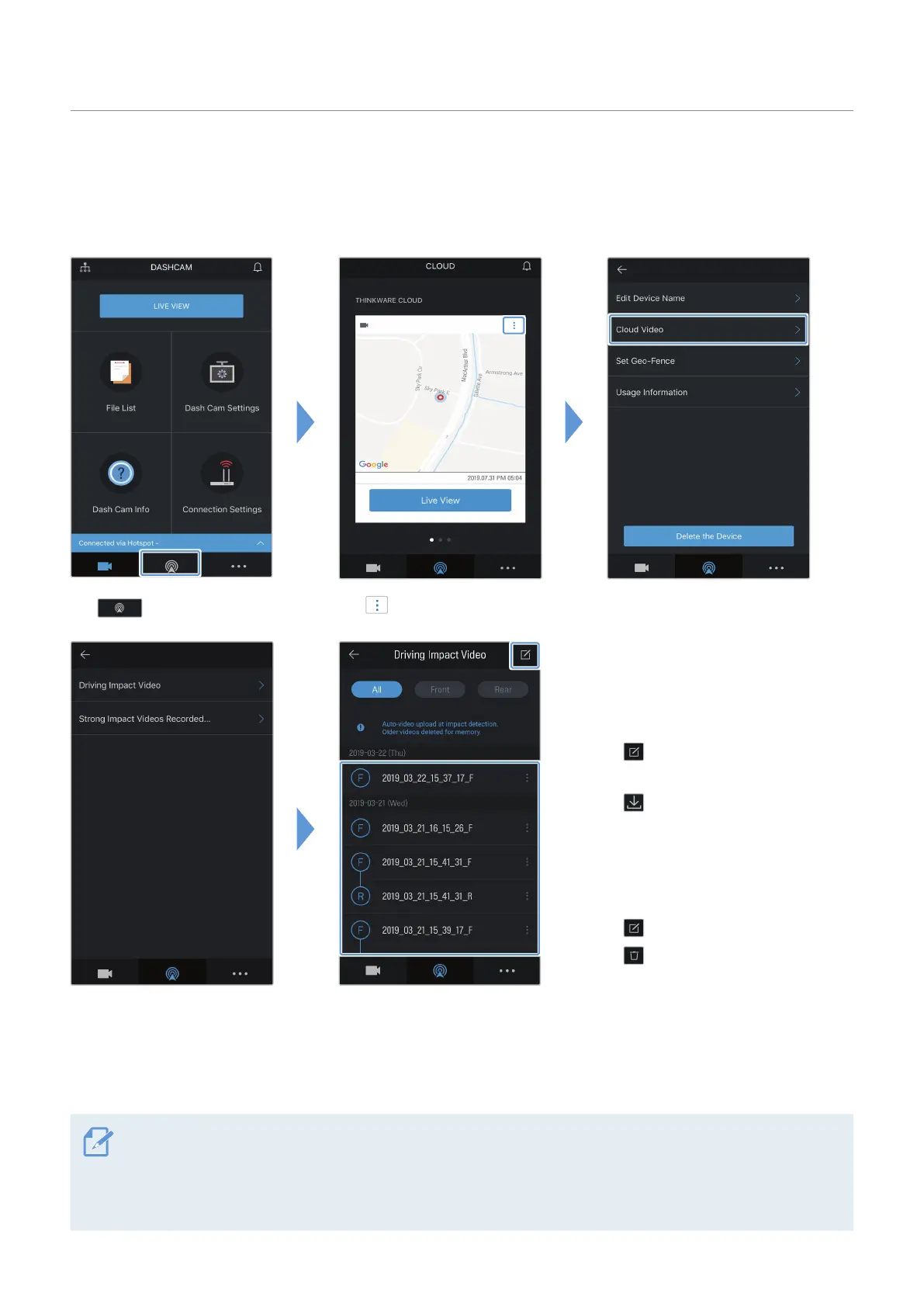
4.5.7 Viewing strong impact videos on the cloud service
You can view strong impact videos uploaded on the cloud service if an impact is detected while driving or
the vehicle is parked. Follow the instructions to view the impact videos.
DC-U1-FG
DC-U1-FG
DC-U1-FG
DC-U1-FG
Tap . Tap . Tap Cloud Video.
DC-U1-FG
Tap a driving strong impact videos you wish
to play.
• To download impact videos from the cloud
server,
➊
Tap and select a video to
download.
➋
Tap
>
Download. The downloaded
video will be available in the
File List menu.
• To delete impact videos from the cloud
server,
➊
Tap and select a video to delete.
➋
Tap
>
Yes/Delete. The selected
video will be deleted from the cloud
server.
Select Driving Impact Video
or Strong Impact Videos
Recorded While Parked.
• You must turn on the network function to use the cloud service. To enable or disable this feature, refer to
"6.6.3 Setting driving impact video upload" on page 52.
• The speed of upload and cloud service operation may vary depending on the status of your mobile network
and the cloud server.













 To Next Page