Using the PC viewer
37
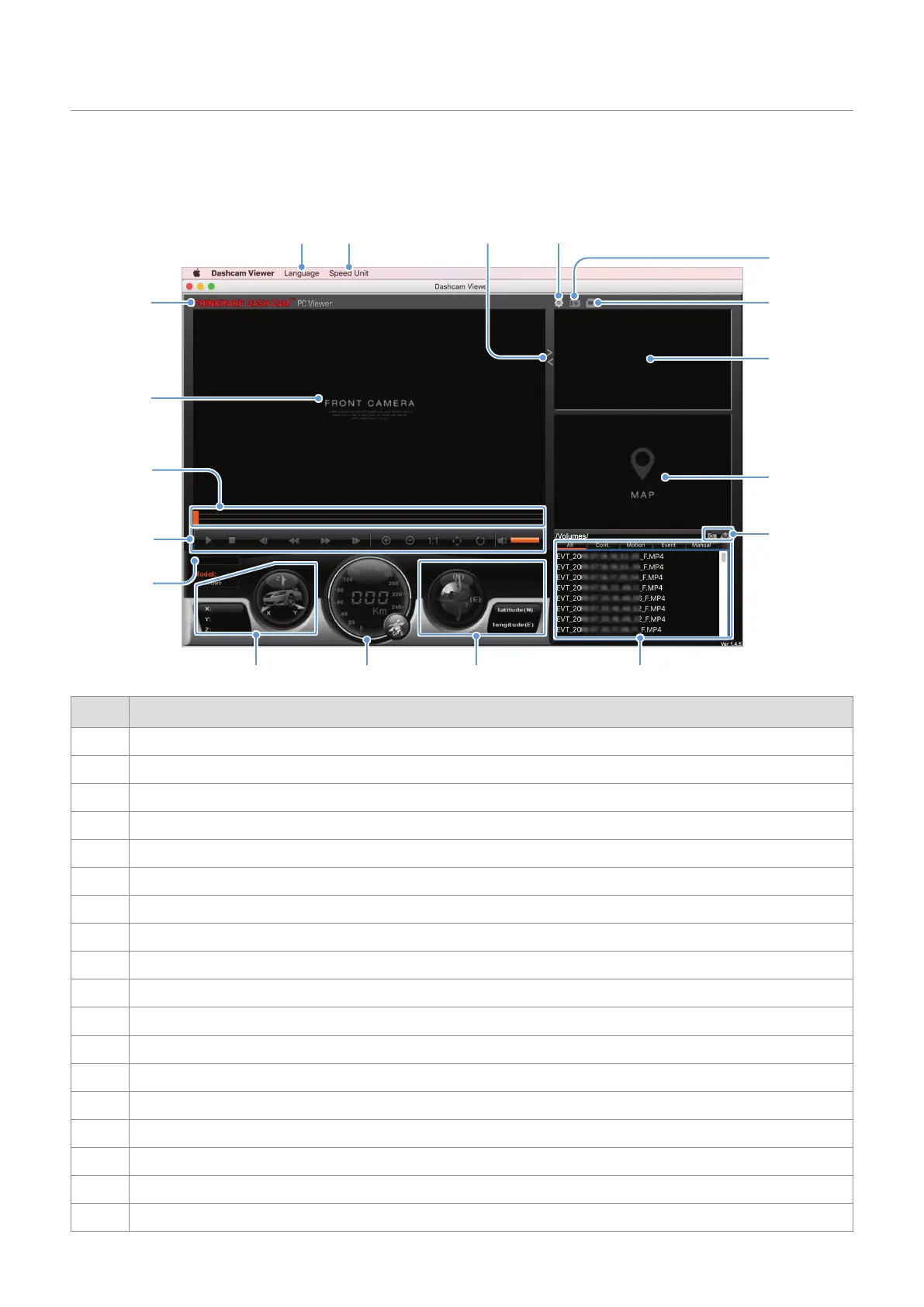
5.2.4 PC viewer screen layout (for Mac)
The following provides brief information about the PC viewer’s screen layout.
DC-U1-FG
➋ ➌
➍
➊
➎
➑
➒
➏
➓
➐
Number Description
➊
Visit the THINKWARE website.
➋
Set the language for the PC viewer.
➌
Set the speed unit.
➍
Switch between the front and rear videos.
➎
View or configure the dashcam settings.
➏
Save the current scene.
➐
Print the current scene.
➑
Displays the recorded rear camera video.
➒
Displays the map screen.
➓
Open a file, or save a video with a different name.
Displays the playlist.
Displays the GPS information at the time of recording.
Indicates the vehicle’s driving speed at the time of recording.
Indicates the G sensor value at the time of recording.
Displays the current and total running time of the current video.
Play or control a video.
Displays the progress of video playback.
Displays the recorded front camera video. Right-click this pane to display the current video in full screen.













 To Next Page