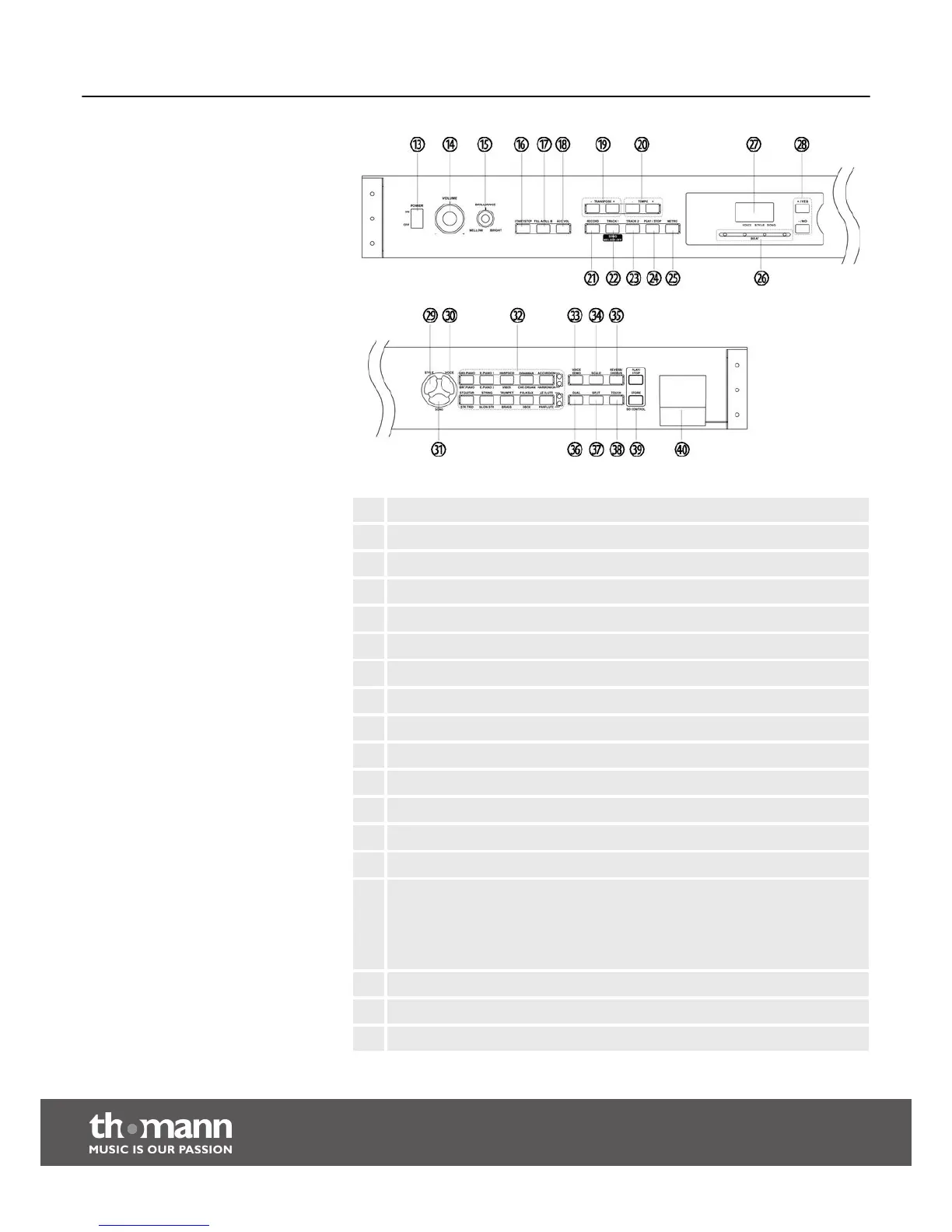
13 [POWER]
14 Rotary control [VOLUME] to adjust the volume.
15 Rotary control [BRILLIANCE] to adjust the brilliance of the sound.
16 [START/STOP] button to start or stop styles.
17 [FILL A/FILL B] button to insert fill bars into styles.
18 [ACC VOL] button to adjust the accompaniment volume.
19 [TRANSPOSE +/–] buttons to transpose note values.
20 [TEMPO +/–] buttons to increase or decrease the tempo.
21 [RECORD] button to call the recording function.
22 [TRACK 1/SONG MELODY OFF] button to select and mute track #1.
23 [TRACK 2 ] button to select track #2.
24 [PLAY/STOP] button to play or stop rehearsal songs.
25 [METRO] button to call the metronome function.
26 LED ‘BEAT’ indicators.
27 LED display
n ‘VOICE’
n ‘STYLE’
n ‘SONG’
28 [+/YES] and [–/NO] buttons to select values and parameters.
29 [STYLE] button to call styles.
30 [VOICE] button to select voices.
Operating elements and connections
digital piano
14



 To Next Page