8.6
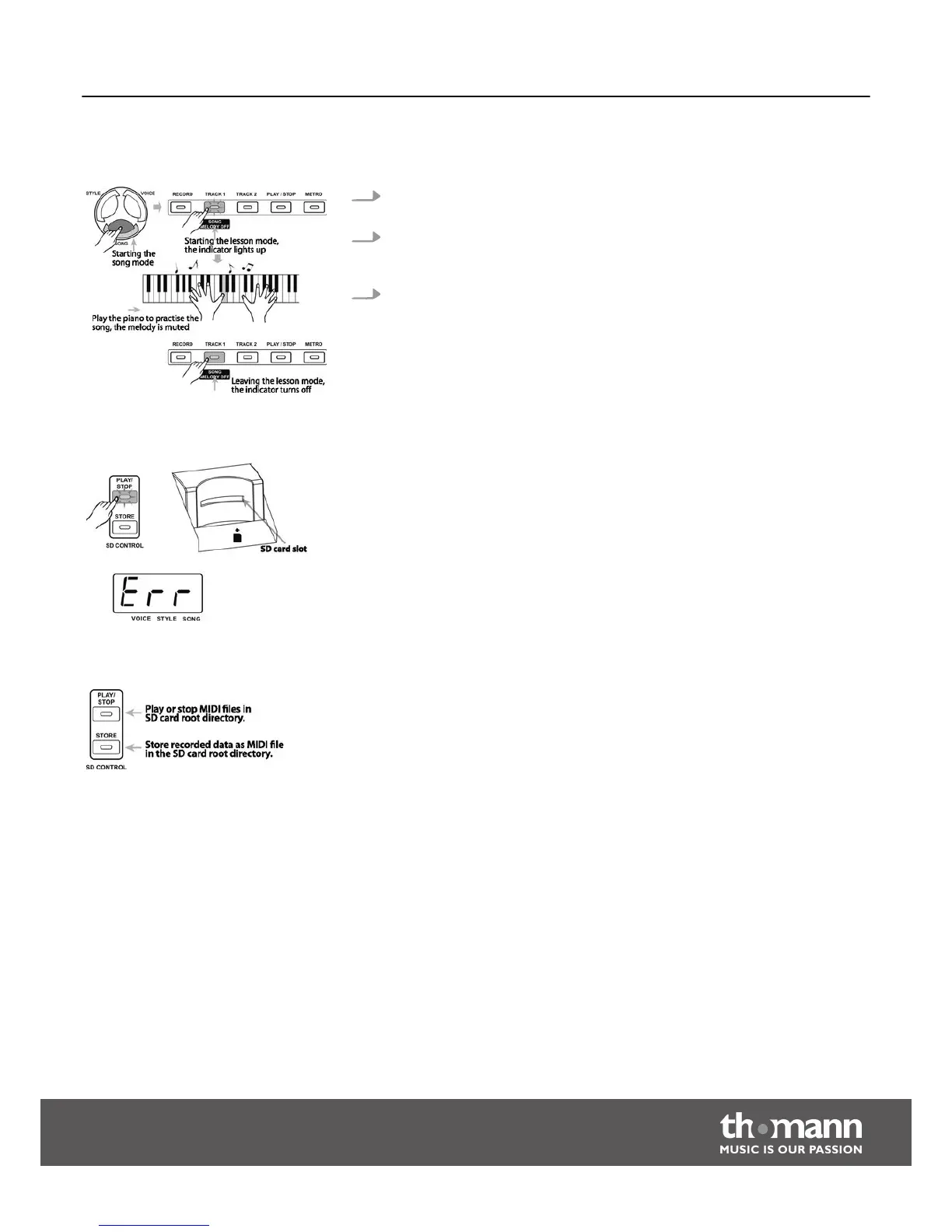
Lesson mode
1. Press the [TRACK 1/SONG MELODY OFF] button in SONG mode to call the
Lesson mode.
2. If you press the button [TRACK 1/SONG MELODY OFF] the indicator of the
button [TRACK 1/SONG MELODY OFF] lights up and the melody of the song is
muted. Now you can play the melody yourself and thus practise the song.
3. Press the button [TRACK 1/SONG MELODY OFF] again to unmute the melody.
The indicator for the [TRACK 1/SONG MELODY OFF] button turns off.
8.7
SD memory card
The digital piano offers a card slot for SD memory cards with a capacity of 16 MB to
2 GB that are formatted for the FAT 16/32 file system.
Press one of the two buttons [PLAY/STOP] or [STORE] in the ‘SD CONTROL’ area to call
the respective function mode (Playback/Stop or Storing). If no card is inserted, ‘ERR’
appears in the display for about two seconds.
8.7.1
Functions
n Press the [PLAY/STOP] button to play MIDI files located in the root directory of the
SD card. Formats 0 and 1 are supported.
n Press the [STORE] button to save recorded data as MIDI file in the root directory,
that can be played by a MIDI player.
In SD mode, the digital piano responds to the buttons [VOICE], [STYLE] and [SONG]
only.
Functions
DP-50
29



 To Next Page