6
Connection options
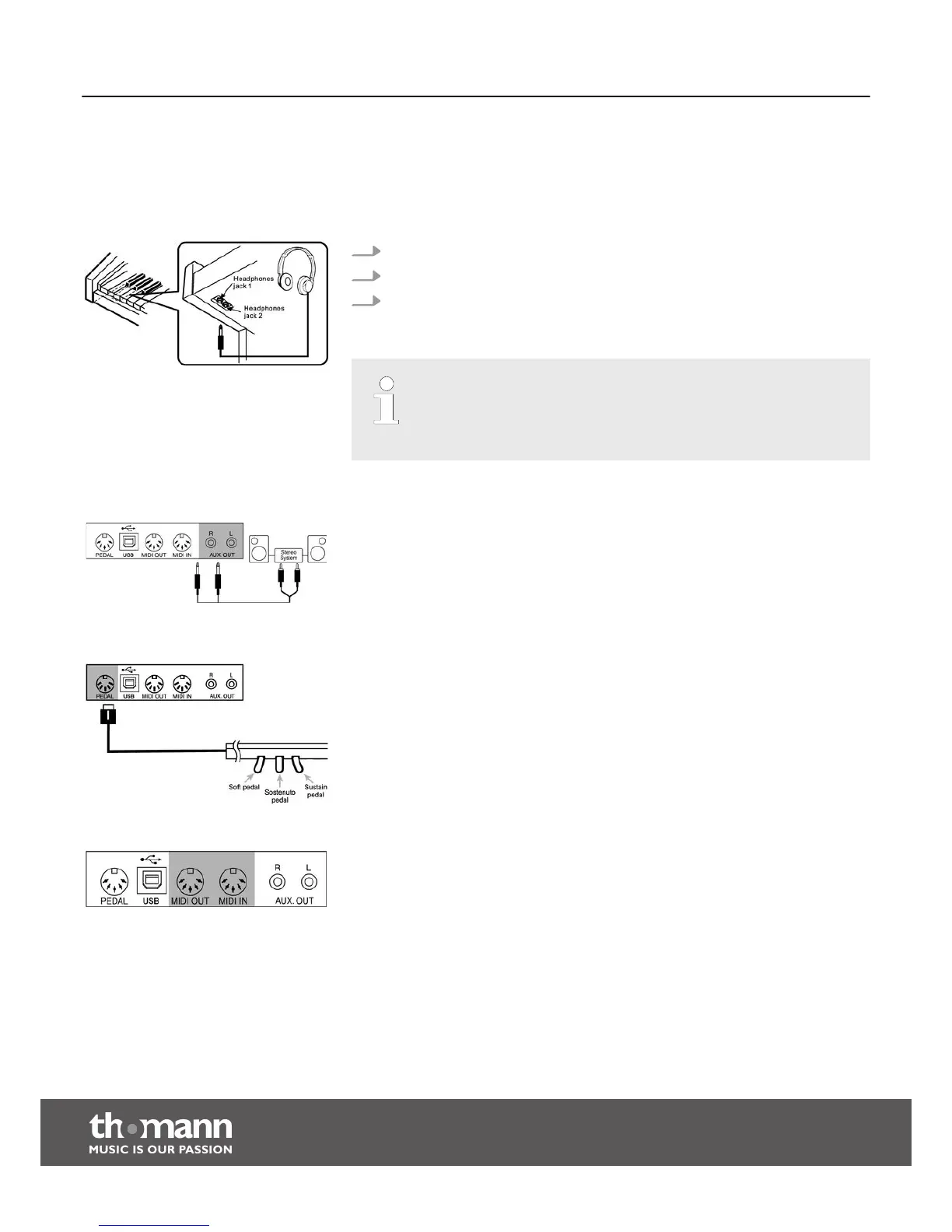
To the left beneath the keyboard you find the headphones outlets 1 and 2.
1. Connecting headphones (not supplied) to outlet 2 mutes the speakers.
2. Using outlet 1 maintains the sound output through the speakers.
3. You can connect 2 headphones, for example, in order to rehearse with your
teacher without disturbing anyone.
– Never operate headphones at high volume as this can permanently
damage your hearing.
– Before connecting the mains voltage or other devices to the piano turn
the volume to minimum to avoid damage to the speakers.
Use the AUX/OUT sockets to connect the digital piano to an amplifier, stereo device,
mixing console or recording device. For stereo operation, connect these external
audio devices to the AUX OUT L – R sockets. For mono operation, connect only one of
the sockets. Connect the AUX/OUT sockets on the rear panel of the digital piano to
the input of the respective audio device.
Connect the plug of the pedal cable to the corresponding socket on the rear panel of
the unit. Then you can use the soft, sostenuto and sustain pedal.
MIDI stands for ‘Musical Instrument Digital Interface’ and represents a world wide
standard for the communication of numerous electronic instruments and sound
modules.
n MIDI IN: the device receives MIDI data from other devices through this port.
n MIDI OUT: MIDI data from the digital piano are sent to other MIDI devices
through this port.
Headphones
AUX output
Pedals
MIDI interface
Connection options
digital piano
16



 To Next Page