8
Functions
8.1
Rehearsal songs
8.1.1
Selecting, playing and quitting rehearsal songs
The digital piano offers 60 rehearsal songs for practising in total (see
Ä
Chapter 12
‘Rehearsal song list’ on page 35).
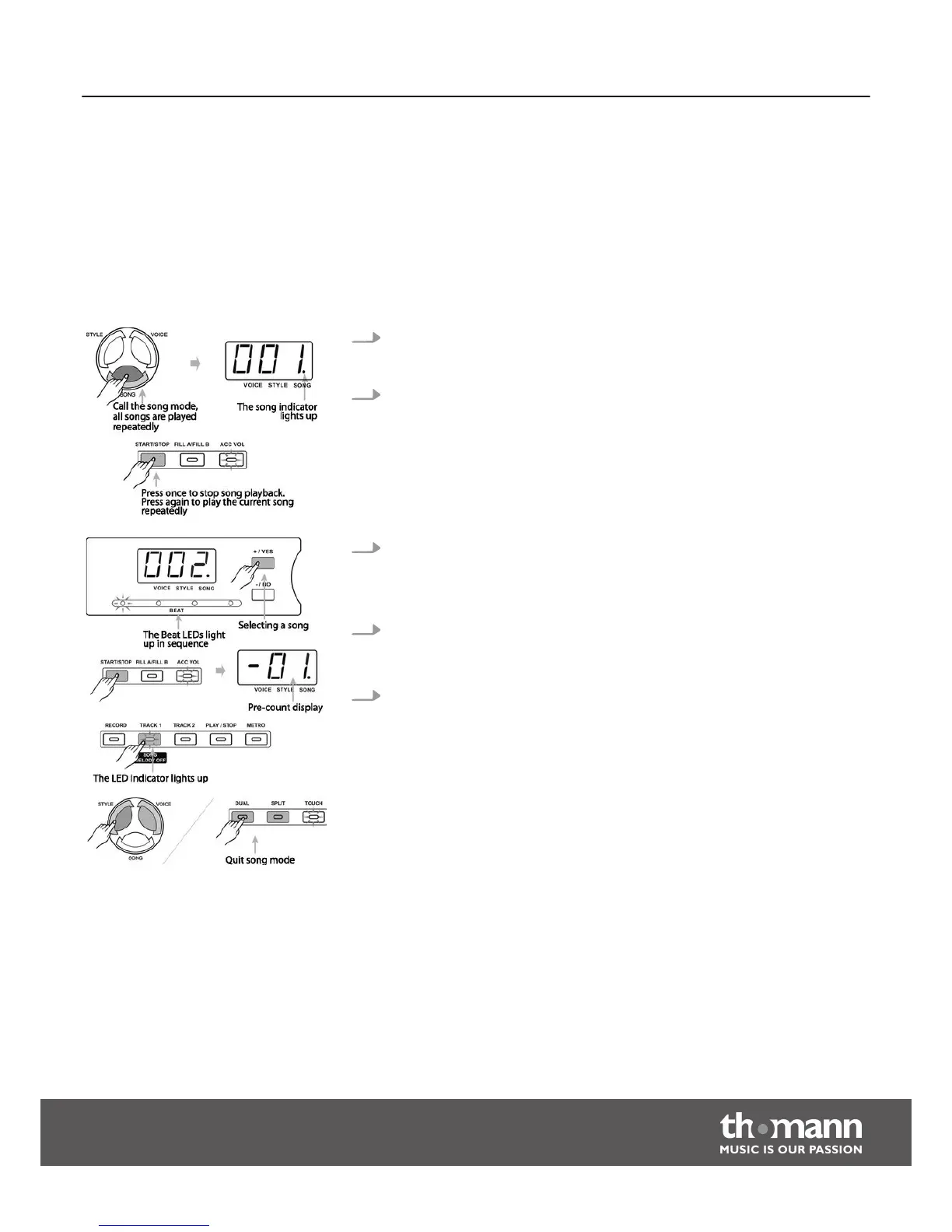
1. Press the button [SONG] to enter the playback mode for rehearsal songs. The
‘SONG’ indicator appears in the display and all rehearsal songs are played in an
endless loop.
2. Press the button [START/STOP] to finish the currently played rehearsal song.
This will not quit the mode for rehearsal song playback. If you press the
[START/STOP ] button again, this song will be repeated in an endless loop until
you press the [START/STOP] button again.
3. Selecting rehearsal songs
Use the [+/YES] or [–/NO] buttons to select the desired rehearsal song. If you
select a new rehearsal song, the display will show its number first, then the
‘BEAT’ LED indicators light up in sequence.
4. Pre-count
After pressing the [START/STOP] button the display will pre-count one bar. The
bar indicator starts with a negative value. The playback starts on ‘1’.
5. Press the button [TRACK1/SONG MELODY OFF] to start the self-learn function
and to turn track 1 of the song on or off.
Functions
DP-50
19



 To Next Page