8.7.2
Buttons in the SD CONTROL area
The digital piano stores and plays MIDI files in the root directory.
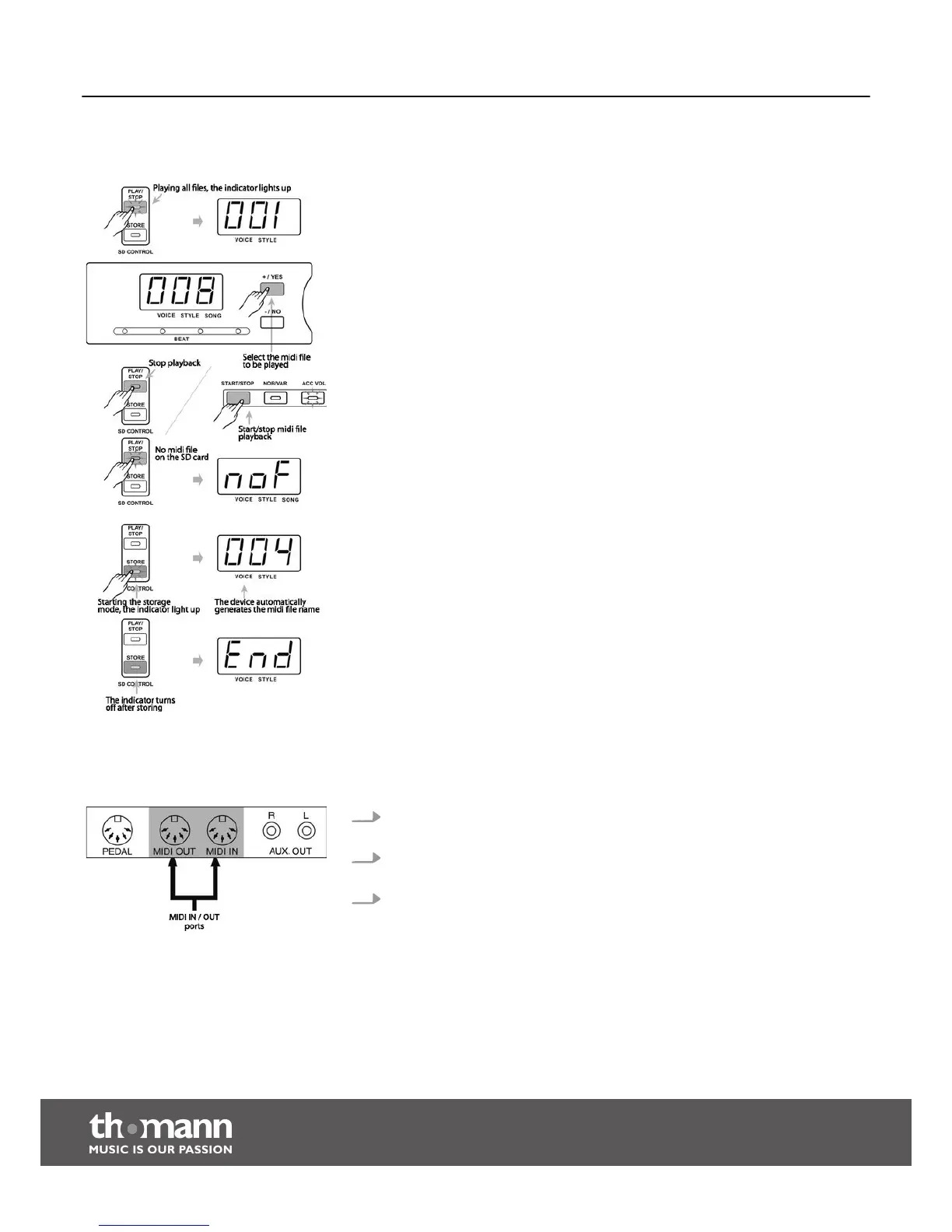
n [PLAY/STOP]
When the digital piano is switched on, press the [PLAY/STOP] button to play all
files in the root directory of the SD card. The indicator of the button [PLAY/STOP]
lights up.
In SD mode, you can select the MIDI files using the [+/YES] or [–/No] buttons. By
default, ‘001’ is the number of the first file.
Press the [PLAY/STOP] or [START/STOP] button to stop the MIDI file playback.
Press the [START/STOP] button again to play the file repeatedly.
If there is no MIDI file on the SD card and you press the button [PLAY/STOP], ‘noF’
appears for two seconds in the LED display. Then, the digital piano returns to the
previous mode.
n [STORE]
When the digital piano is switched on, press the [STORE] button to activate the
storage mode. The indicator of the button [STORE] lights up.
The recorded data can be saved as a MIDI file in the root directory of the SD card.
The MIDI file name is generated by the system to prevent double naming.
If the SD card is full, the storing is cancelled automatically and the LED display
shows ‘FUL’. The storage mode is exited and the digital piano returns to the pre‐
vious mode.
After saving, the indicator of the [STORE] button goes off. The LED display briefly
shows ‘End’ and thus indicates the successful completion of the saving.
8.8
MIDI functions
1. MIDI stands for 'Musical Instrument Digital Interface' and is the standard inter‐
face for connecting musical instruments and computers.
2. The digital piano is equipped with a standard MIDI interface providing a MIDI
IN and OUT.
3. You can connect the digital piano to a computer or other MIDI devices via this
interface.
What is MIDI?
Functions
digital piano
30



 To Next Page