8.5.1
Recording
1. Recording standby
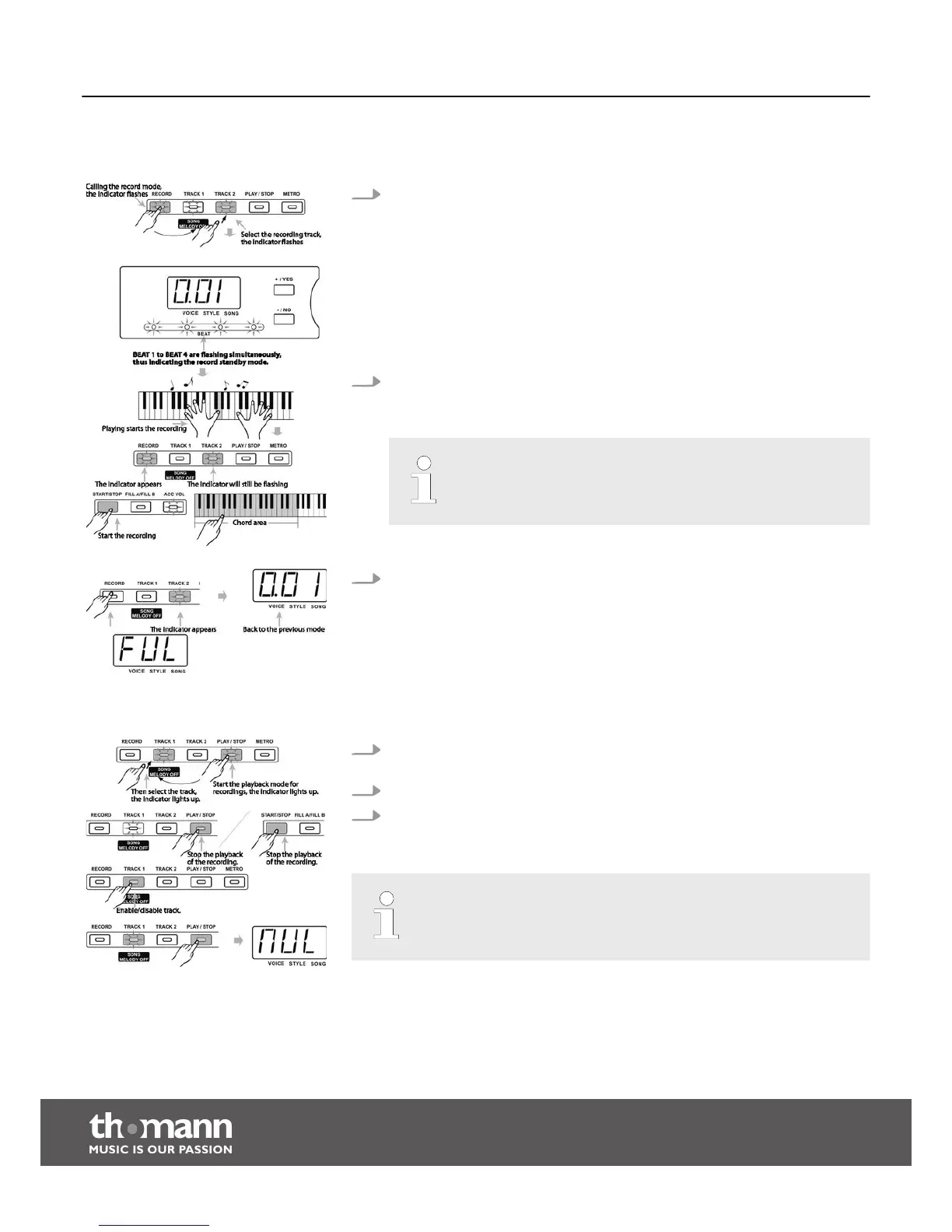
Press the button [RECORD] to enable the recording mode. The indicator of the
button [REC] lights up. ‘BEAT 1’ to ‘BEAT 4’ start flashing synchronously, thus
indicating the recording standby mode. At the same time an empty track is
automatically selected for recording and the corresponding track indicator of
the button [TRACK 1] or [TRACK 2] is flashing.
The selection order is [TRACK 1], [TRACK 2]. If no unused track is available,
[TRACK 1] is selected and the previous recording will be overwritten. You can
also press the button [TRACK 1] or [TRACK 2] and select the track to be recorded
to directly.
2. Start recording
When ‘BEAT 1’ to ‘BEAT 4’ are flashing in the display, press the [START/STOP]
button or one of the piano keys to start the recording.
If you start recording, any existing data on the selected track will be
deleted.
3. Stop recording
Press the [RECORD] button again to stop the recording. The recording stops
automatically when the memory is full. In this case ‘FUL’ appears in the display.
8.5.1.1
Playing the recording
1. First, press the [PLAY/STOP] to play recorded data. Choose one or both tracks
for playback, the indicator lights accordingly.
2. Press the button [PLAY/STOP] again or press [START/STOP] to stop the playback.
3. During playback, you can press the buttons [TRACK 1/SONG MELODY OFF] or
[TRACK 2] to turn the related track on or off.
If no record exists and you press the [PLAY/STOP] button, the display briefly
shows ‘NUL’.
Functions
digital piano
28



 To Next Page