14
ThurayaIP Satellite Modem User Guide
H
OME
S
CREEN
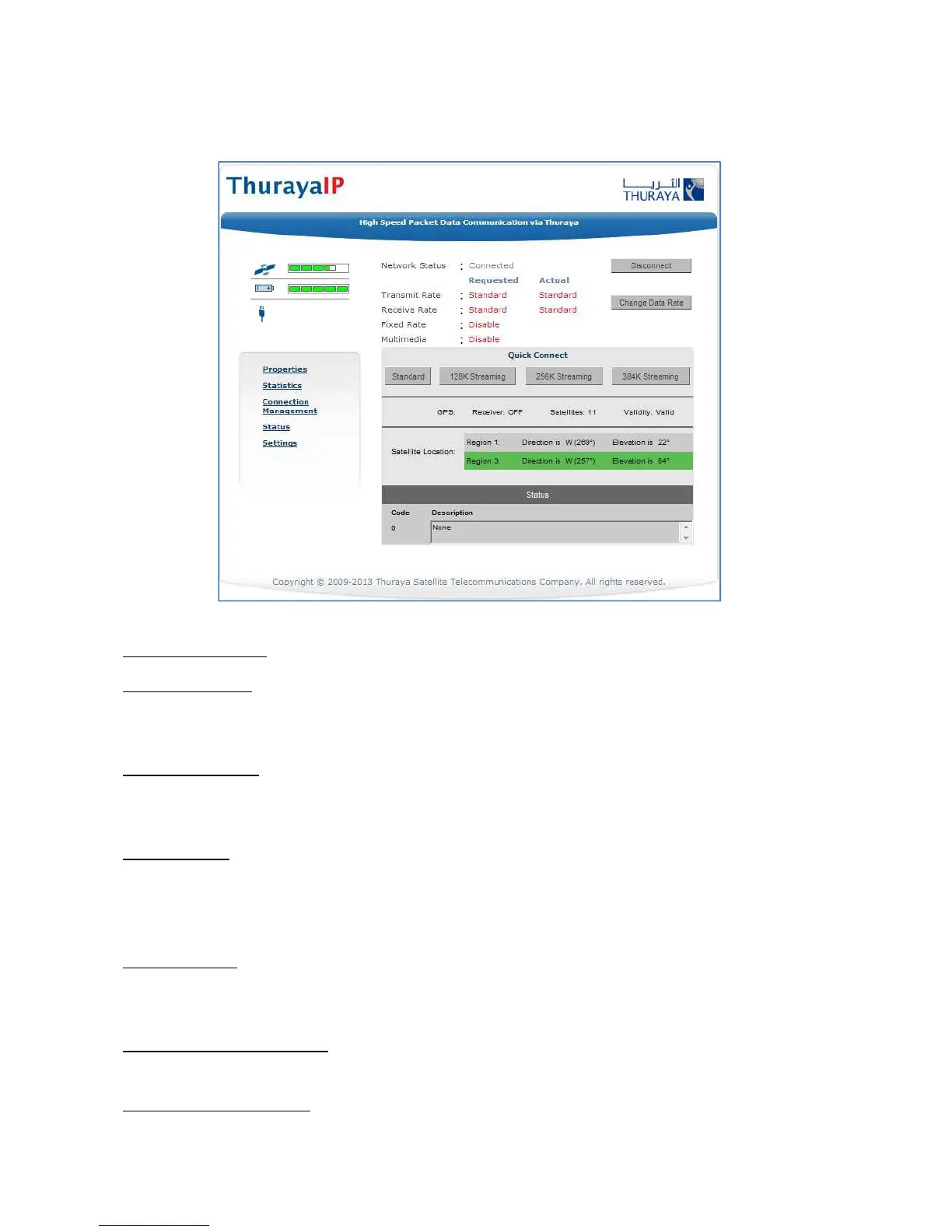
The Home screen provides you with key summary status information
about ThurayaIP and is also a gateway into ThurayaIP management.
Home Screen
Network Status: Provides the status of the network connection.
Transmit Rate: Provides the requested and actual transmit channel
data rate. The actual allocated data rate may vary from the one
requested due to subscription or system capacity restrictions.
Receive Rate: Provides the requested and actual receive channel data
rate. The actual allocated data rate may vary from the one requested
due to subscription or system capacity restrictions.
Fixed Rate: Provides the status of the Fixed Rate control. Enable Fixed
Rate when using a streaming connection that must match the
requested data rate. If the rate is unavailable, the connection will not
be made.
Multimedia: Provides the status of the Multimedia control. Enable
Multimedia when using streaming applications like Voice over Internet
Protocol (VoIP) or live video playback.
Connect/Disconnect: This button toggles the network connection state
on or off. When Disconnected no data can be sent or received.
Change Data Rate: This button allows you to change the connection
parameters for the current session.



 To Next Page