24
ThurayaIP Satellite Modem User Guide
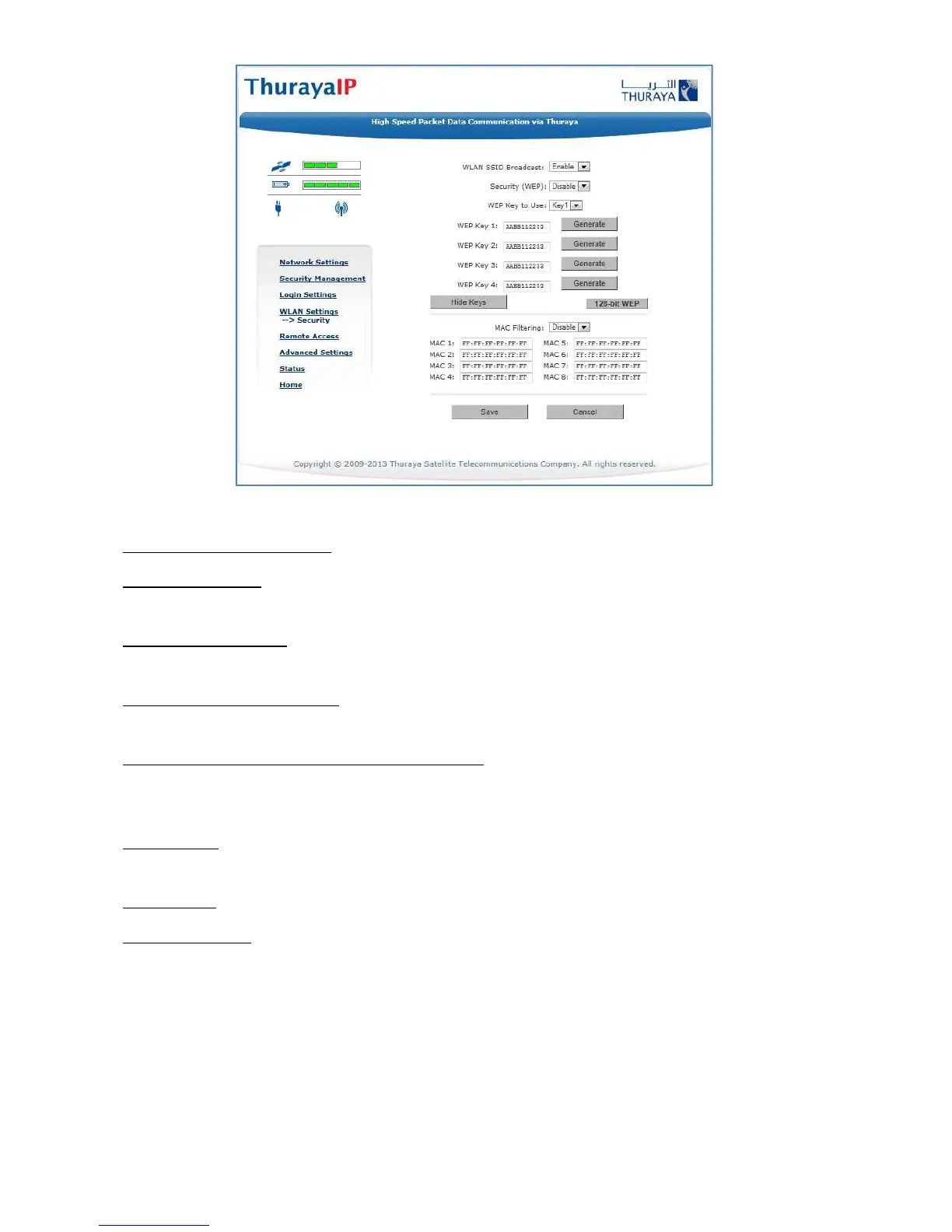
WLAN Security Screen
WLAN SSID Broadcast: Enable or Disable SSID broadcast.
Security (WEP): Enable or Disable security for Wired Equivalent Privacy
(WEP), a security protocol for the wireless local area network.
WLAN Key to Use: Select the active key--Key1 through Key4--from a pull
down menu. Note that in 128-bit key mode only Key1 is available.
64-bit WEP/128bit-WEP: Use this button to toggle between 64-bit and
128-bit WEP mode.
WLAN Key Fields, Key 1 through Key 4: In 64-bit WEP mode, enter a 10
character (0-9, A-F) key value in each of four text boxes. In 128-bit WEP
mode, enter a 26 character (0-9, A-F) key value in the Key1 text box.
Generate: Instead of manually entering a key value, you may press the
Generate button to automatically generate a key value.
Hide Keys: Click this button to hide the keys from this display.
MAC Filtering: Enable or disable MAC filtering. If filtering is enabled, you
can enter up to eight MAC addresses. Only these addresses will be
permitted to access the terminal.



 To Next Page