23
Tobii Glasses Eye Tracker
Sessions
A session is a container for all recording data of a single recording and a
single personal calibration. It can also only include only a recording or a
calibration by itself. A new empty session is created automatically when
starting the Recording Assistant or when pressing the New key on the
Recording Assistant. When starting the Recording Assistant you will start
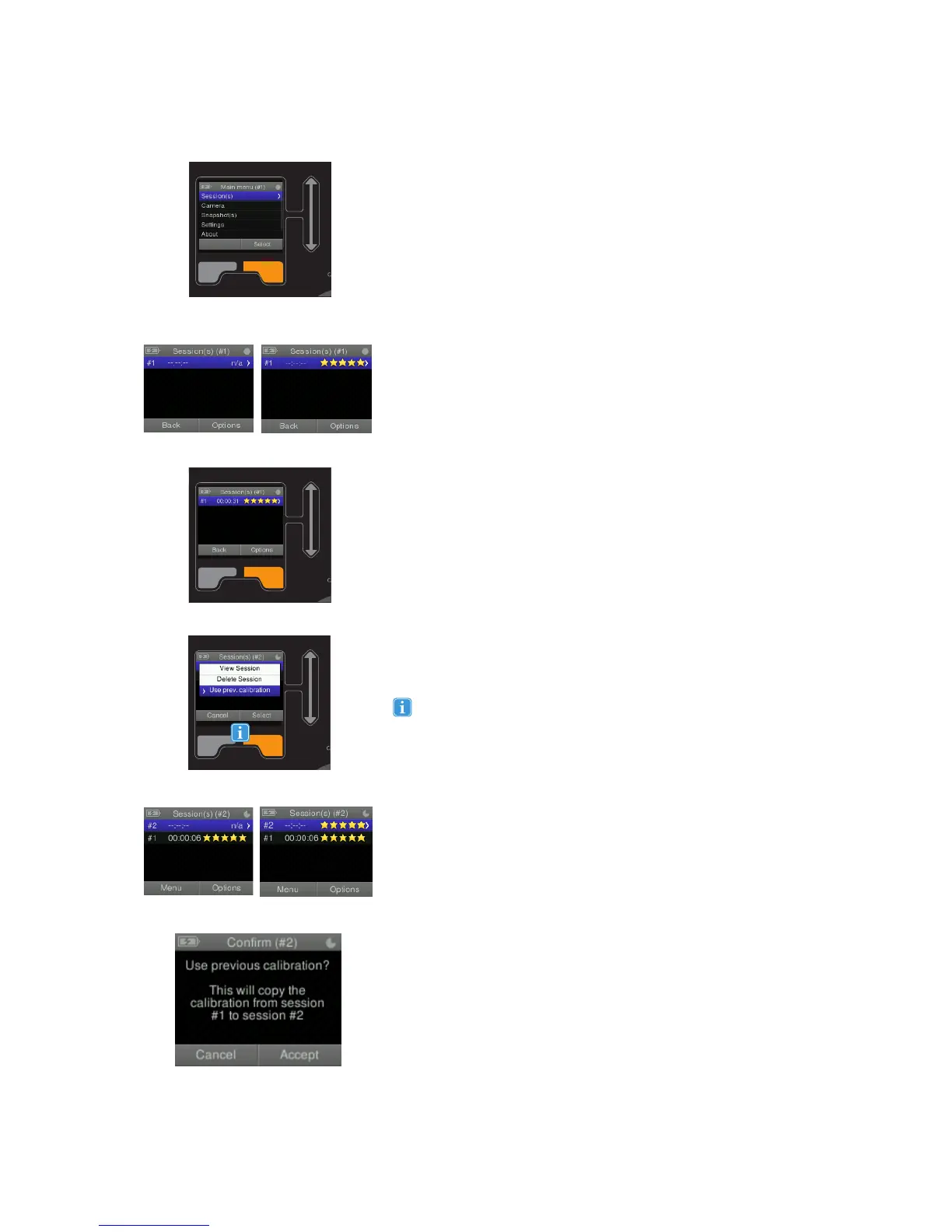
in the Session(s) menu. The currently selected session number is always
indicated in the same top menu bar. For example, if the currently selected
session is number 9 and you are viewing the Session screen, the top
menu bar would say: Session(s) (#9)
A calibration of a session can be done before or after making a
recording, Stars (1-5) will indicate that a calibration has been completed
and indicate calibration quality, fewer stars means some data samples
were lost during calibration; one star will be subtracted for each instance
of data loss. Read more about Calibration on page 25.
You can also select the Session(s) menu from the main menu. This menu
will show an overview of all sessions that are created.
Creating a new Session
An empty session with no recording or calibration will be created on the
Recording Assistant when pressing the New button, an empty session is
displayed.
Using a single calibration for multiple sessions
When multiple sessions are created for a single participant, consecutively
without calibrating in between (only the initial calibration), it is possible to
copy the initial calibration for that participant to his/her other sessions.
Ensure that the participant has not moved the glasses in between
sessions, in which case a new calibration should always be done. You
can only copy the calibration from the previous Session to the next,
hence start by selecting the next session on the list after the one that is
calibrated. Highlight/select a session and select Options to view more
options. From the options list select the “Use prev. calibration” option.
Choose Accept in the following screen to allow the copying of the
calibration from the previous session to the currently selected one.
When both a recording and a calibration have been completed the
Session(s) menu will show the recording time and the calibration quality
for each session. Select Options to view more options.
Selecting View Session from the Options will show detailed information
about the selected session including the creation date and time and
whether they are calibrated or not. Selecting Delete Session will delete
the selected session.
Use the scroll bar in the Session menu to select a different
session. The session number is always indicated in the center of
the menu bar, marked by a #-sign.
Using Sessions


 To Next Page