32
User
Manual
32
User
Manual
Importing Recordings
Step 5
Step 6
Step 7
To import one or more recordings:
1. Connect the Memory card reader to the computer. (If your
computer has an integrated Memory card reader use that instead.)
2. Turn the Recording Assistant off, remove the memory card and
insert it in the memory card reader.
3. Close any AutoPlay dialog boxes that appear and Start Tobii
Studio.
4. In the Tobii Studio Project Library dialog box create a new Project
and Test. This will open Tobii Studio to the Design and Record
view.
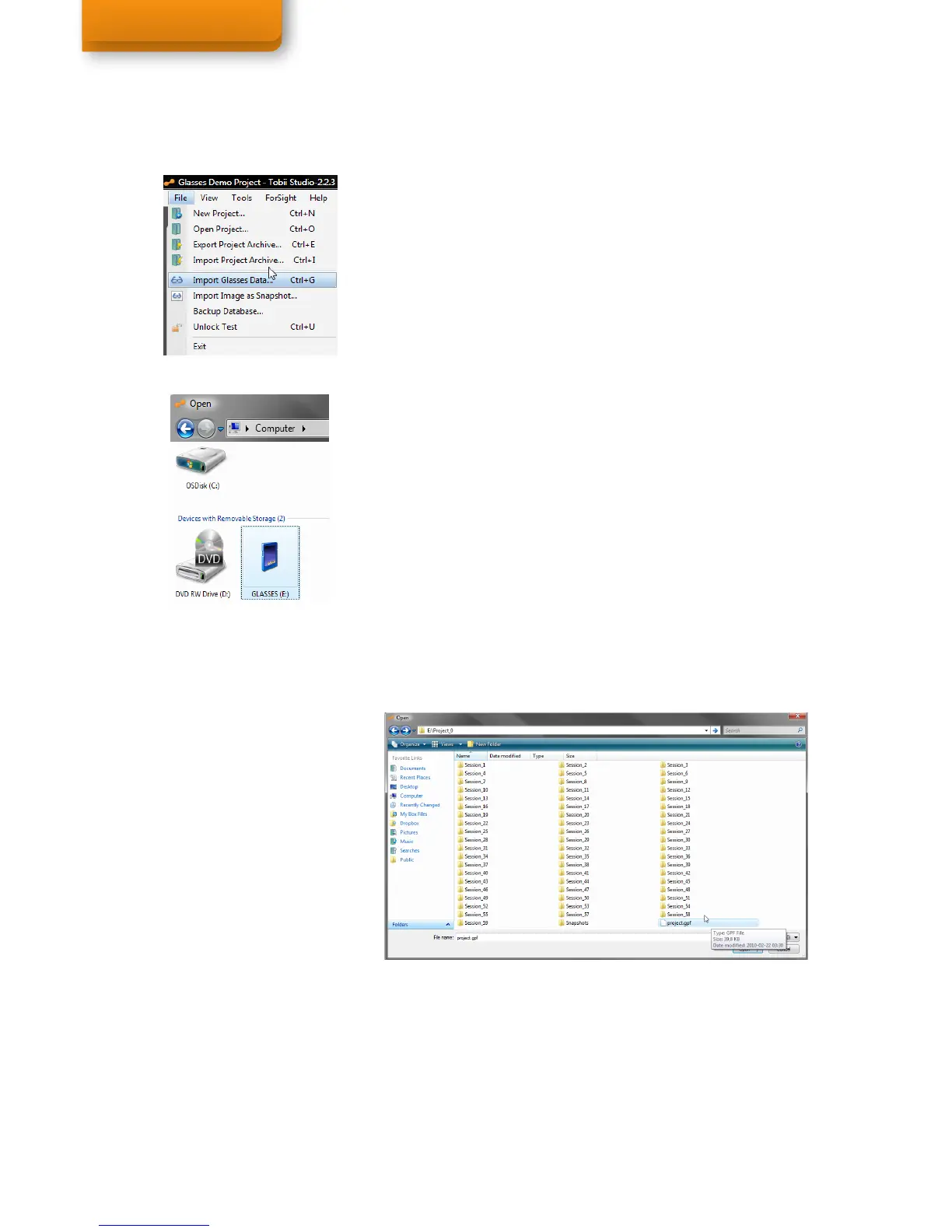
5. From Tobii Studio’s menu bar, click File and select Import Glasses
Data.
6. A dialog box will open, now select the Computer folder, and then
double click on the Removable Disk icon labeled GLASSES
(corresponds to the memory card) to open the memory card and
view its contents. When opening the Import Dialog again, Tobii
Studio will open the last selected folder.
7. Double-click on the Project folder (Project_0) to open it.
Then press the Open button to open the Tobii Glasses project
(project.gpf). This opens the Import dialog box. Full path:
Computer>G30>Project 0>project.gpf
Importing recordings into Tobii Studio


 To Next Page