25
Tobii Glasses Eye Tracker
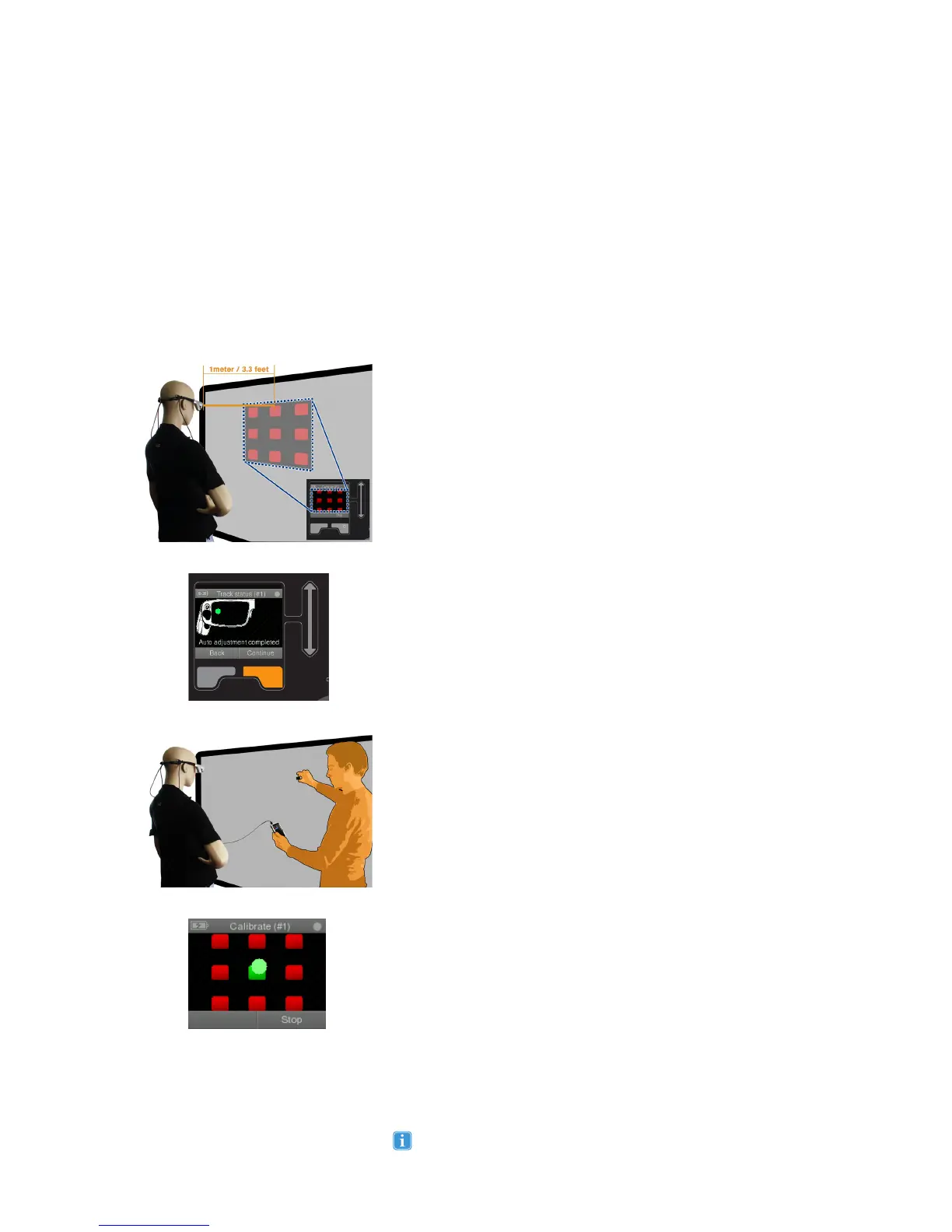
To calibrate the Tobii Glasses for a participant:
1. Find a flat surface. For best results choose a neutral contrast,
single colored surface (e.g. not very bright/reflective or very dark).
2. The participant should stand so the front of the glasses are
exactly 1 meter or 3.3 feet* from the flat surface for best results.
3. Ask the participant to look straight ahead and hold his/her head
as still as possible, the temple arms should be level so the glasses
are in a right angle to the calibration surface.
4. Select the session you wish to calibrate from the session menu,
check that you are using the same session you will create or have
created the recording in for the participant in question. Press the
Calibrate button on the Recording Assistant. The Track Status will
be displayed. Select Continue once the pupil is found correctly,
indicated by a green dot placed within the image of the glasses
frame on the display of the Recording Assistant. The calibration
will now start.
5. Hold an IR Marker against the flat surface, with the front facing
the participant. Ask the participant to keep looking at the IR
Marker (anywhere is OK, although just 5-10 mm below the LED
is the true reference point) while keeping his/her head still during
the entire process.
6. The LED indicator on the IR Marker should stay solid green,
indicating that it is in Calibration Mode.
7. On the Recording Assistant screen, the IR Marker should now
show up on the calibration grid as a blinking green/red dot. Green
indicates the pupil is found, red means lost eye tracking samples.
It is possible to complete a calibration session with 8 calibration points,
as opposed to having to collect data for all 9 calibration points. The
center point must always be included in the calibration. Note that the
eye tracking accuracy and precision performance may be reduced in
the area where the calibration point data was not collected. The general
accuracy and precision performance for the other areas will remain the
same.
A red dot may indicate a blink or bad trackability, due to the glasses
placement or general problems such as eye lashes, mascara, droopy eye
lids etc. When this occurs the glasses may require further adjustment or
asking the participant to minimize the problem, for example by taking off
any mascara. Ask the participant to open their eyes wider, this allows the
eye to be found more easily, only use this as a last option to complete a
difficult (or post) calibration, always try to adjust the glasses first. Using
this method may result in reduced trackability as the participant will not
keep their eyes wider open in the same way during the actual recording.
A calibration is needed for each Session to be able to use the gaze
data in Tobii Studio. The calibration can be done either before or after
a recording. A calibration is used to correctly map the obtained eye
tracking data to the scene video and has to be done for each individual
participant and every specific eye tracker placement on a participant´s
head (e.g. after moving the Glasses a recalibration is required). During the
calibration, a Virtual Calibration Plane (invisible) is positioned at 1 meter
(3.3 feet) from the glasses. A representation of a 9 point calibration grid
that is used for calibration is displayed on the Recording Assistant during
the calibration procedure.
Calibrating
You can always stop a calibration and recalibrate by pressing Stop
(Right selection key) and Recalibrate (Left selection key).
Step 1, 2, 3


 To Next Page