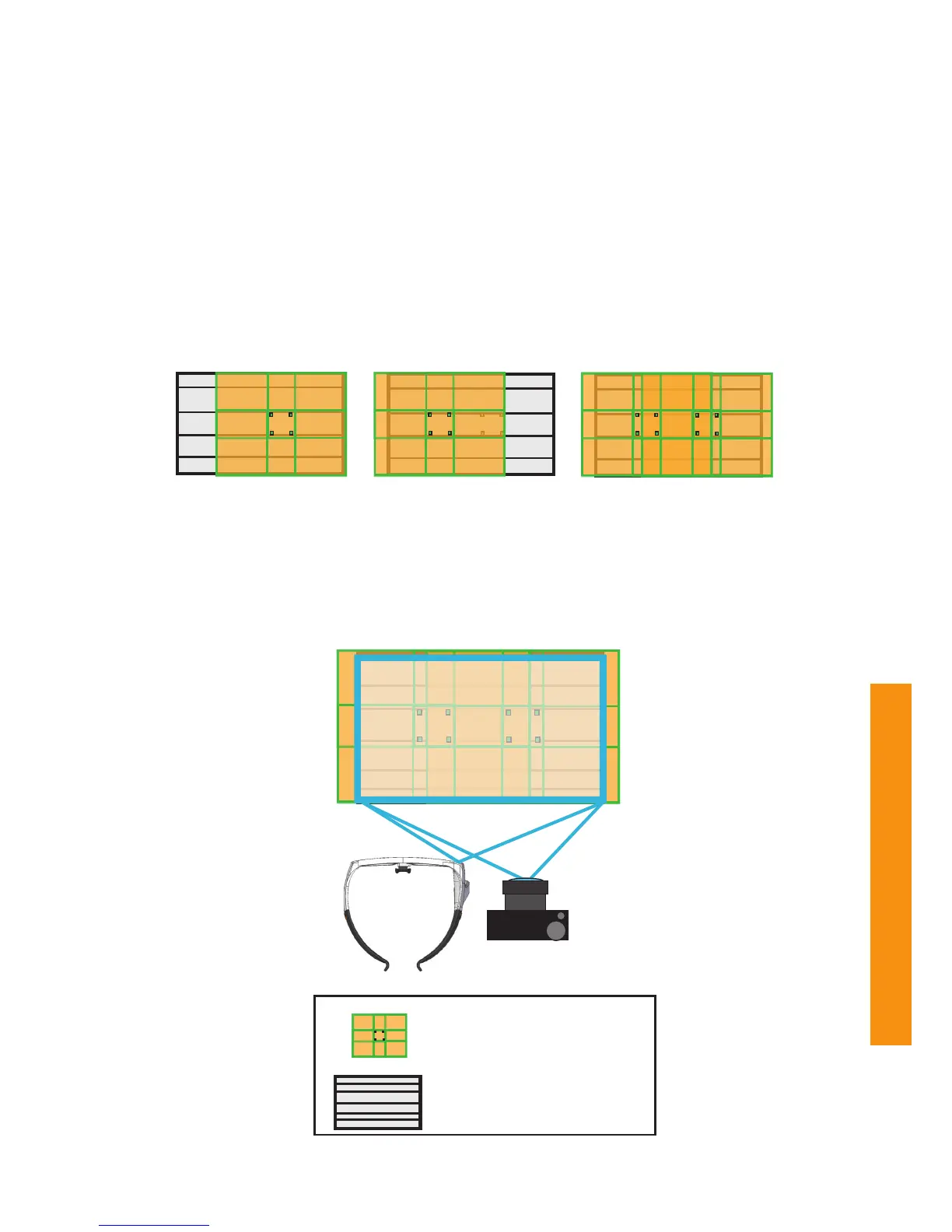
IR Marker coverage
with 4 IR Markers
Coverage of 4
additional IR Markers
Combined coverage
using 8 IR Markers
Snapshot of an AOA
with the combined coverage of 8 IR Markers
Shopping shelves/research object
Maximum AOA (IR Marker coverage)
How to extend the total IR Marker coverage
The illustrations below show how additional IR Markers can be used to extend the total IR Marker coverage of an
AOA. By adding more IR Markers you can extend IR Marker coverage and therefore the maximum AOA size, where
4 IR Markers are still within the field of view of the glasses camera. The Tobii Glasses only require 4 IR Markers to
define an AOA but may use any amount or combination of at least 4 markers, therefore all IR Markers used on a
shelf should be included within a single Snapshot. To fit more IR Markers on a snapshot a panorama photo stitching
software such as the freely available Microsoft Reseach Image Composite Editor (ICE) software can be used to
create a snapshot that includes all IR Markers. This type of Snapshot will always have to be manually imported and
marked in Tobii Studio using the Import Image as Snapshot feature which will open the Snapshot Tool for manually
defining IR Marker positions in any picture.


 To Next Page